


Inspiring
December 10, 2018
Answered

Nikon z6 and DNG converter

  • December 10, 2018
  • 2 replies
  • 3925 views

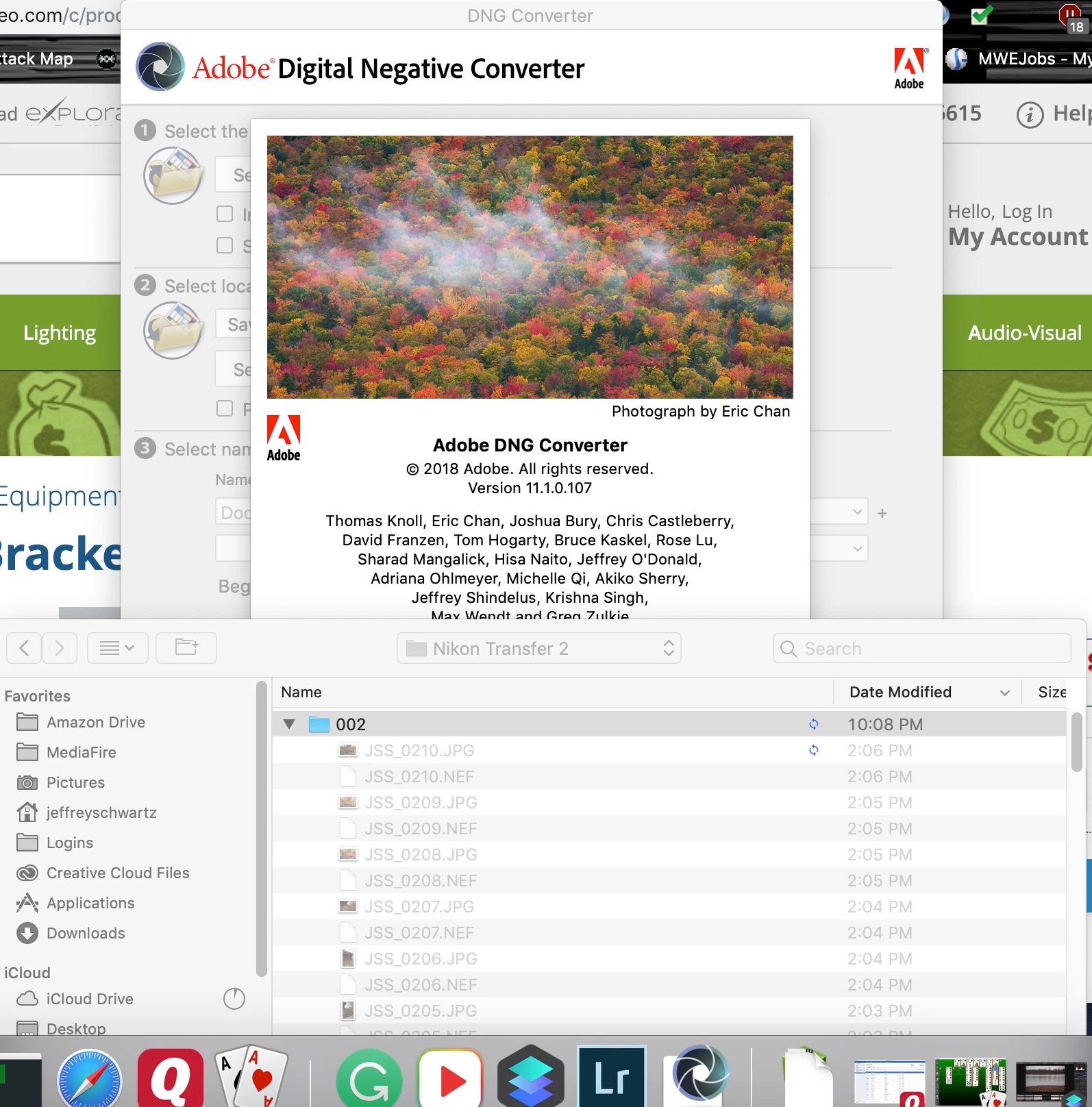
While I'm waiting for adobe to add support for the Nikon z6 I was instructed to install the DNG converter beta and uswe that. Well it doesn't work. I copy the files from the camera ising transfer 2 to a folder on the drive and when I open the converter it see the files but they are all grayed out and unselectable. Now if I open LR CC classic if sees the files and I'm able to view them but not import them.

Now I'm able to open and edit the same files in ON1 Photo 10 from 2017 and Luminal 2018.
This topic has been closed for replies.
Correct answer Per Berntsen

First of all, don't use Nikon Transfer, older versions can corrupt the files and make them unreadable for Adobe software.

So if you still have the images on the camera card, copy them to your computer using the OS (Finder).

I'm not familiar with Macs, but it looks as though you are trying to select individual files, which will not work.

You have to select the folder containing the images, and the converter will then convert all raw files in that folder.

2 replies

JP Hess
Inspiring
December 10, 2018

The DNG converter works at the folder level. You choose the folder that contains NEF files, but you don't open the folder. If you open the folder and then you will get the message that there are no raw files to convert.

Mohit Goyal
Community Manager
Community Manager
December 12, 2018

Hi All,

We're happy to announce the release of Lightroom CC 2.1 & Lightroom Classic CC 8.1.

This update includes the support for Nikon Z6 camera.

Here's the list of what's new in this release:

Lightroom CC 2.1: New features summary for the October 2018 release of Lightroom CC

Lightroom Classic CC 8.1: New features summary for the October 2018 release of Lightroom Classic CC

Let us know if the update resolves the problem for those affected and share your feedback with us.

Regards,

Mohit

Participant
October 28, 2019

How can I see if I have this update? I have updated everything and LightroomCC is still not importing my files. I have also tried to use the DNG converter and it is not finding my camera files at all. 

Per Berntsen
Community Expert
Per BerntsenCommunity ExpertCorrect answer
Community Expert
December 10, 2018

First of all, don't use Nikon Transfer, older versions can corrupt the files and make them unreadable for Adobe software.

So if you still have the images on the camera card, copy them to your computer using the OS (Finder).

I'm not familiar with Macs, but it looks as though you are trying to select individual files, which will not work.

You have to select the folder containing the images, and the converter will then convert all raw files in that folder.