Exit
  • Global community
    • Language:
      • Deutsch
      • English
      • Español
      • Français
      • Português
  • 日本語コミュニティ
  • 한국 커뮤니티
0

Sony RX100 V Lens Profile Correction - which lens profile?

Contributor ,
Mar 16, 2017 Mar 16, 2017

Just got a Sony RX100 V, and I'm trying to set up the Lens Profile.  The Default set up did not work; adding in the make (Sony), changes the Model and Profile to Sony 100mm F2.8 Macro.  The RX100 V is a 24-70.  A Custom attempt to create a profile shows 2 Sony 24-70 lens entries, the 24-70 ZA SSM and 24-70 ZA SSM II.

Perhaps the problem is that the RX100 V is a fixed lens, and not interchangeable?  What is the right Lens Profile Correction for the RX100 V?  The answer could be simple, and I'm just overlooking it.  Are there any other RX100 V owners who worked out this problem with the Lightroom CC Lens Profile? 

Thanks for any help the Lightroom Community can give.
8.7K
Translate
Report
Community guidelines
Be kind and respectful, give credit to the original source of content, and search for duplicates before posting. Learn more
community guidelines

correct answers 1 Correct answer

Guide , Mar 16, 2017 Mar 16, 2017

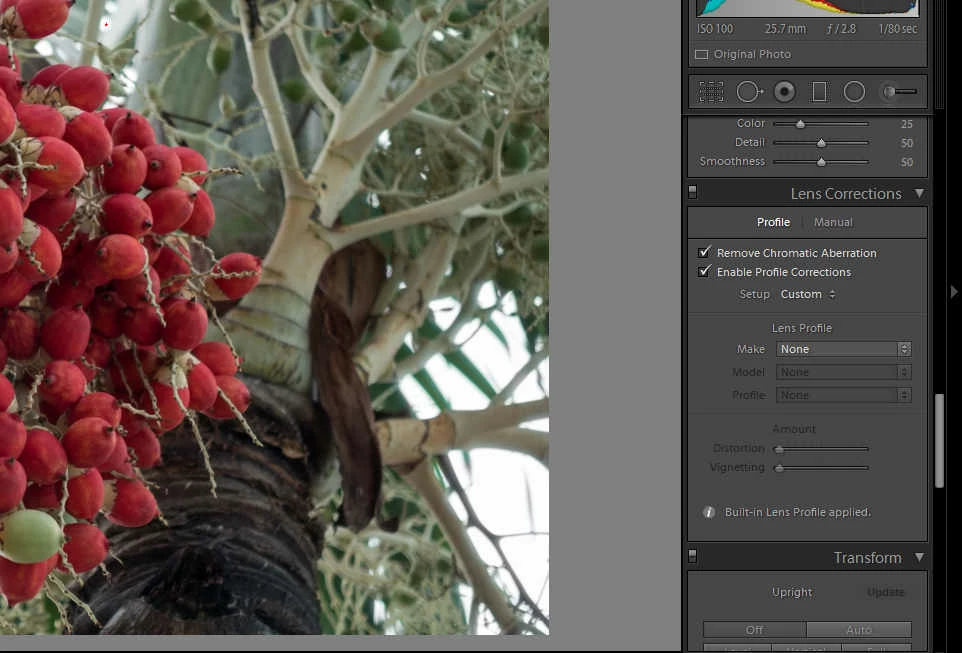
Just select Custom as the profile and the built-in lens profile will be applied ... click on the "i" next to the message on the bottom of the Lens Correction panel to see what profile has been applied:

Custom.jpg

Translate
Guide ,
Mar 16, 2017 Mar 16, 2017

Just select Custom as the profile and the built-in lens profile will be applied ... click on the "i" next to the message on the bottom of the Lens Correction panel to see what profile has been applied:

Custom.jpg

Translate
Report
Community guidelines
Be kind and respectful, give credit to the original source of content, and search for duplicates before posting. Learn more
community guidelines
Adobe Employee ,
Mar 16, 2017 Mar 16, 2017
Translate
Report
Community guidelines
Be kind and respectful, give credit to the original source of content, and search for duplicates before posting. Learn more
community guidelines
Contributor ,
Mar 17, 2017 Mar 17, 2017

Thanks for the assistance - both replies were on the mark.

Translate
Report
Community guidelines
Be kind and respectful, give credit to the original source of content, and search for duplicates before posting. Learn more
community guidelines
New Here ,
Sep 28, 2019 Sep 28, 2019
LATEST

Please note that the lens correction in Lightroom for RX100V and RX100Va is not dealing with chromatic aberration. For this you need to use Sonys Imaging Edit software. I'm hoping Adobe will make an update to fix this issue in the future. 

Translate
Report
Community guidelines
Be kind and respectful, give credit to the original source of content, and search for duplicates before posting. Learn more
community guidelines