Participant
March 23, 2019
Answered

How to change the Worspace Background color?

  • March 23, 2019
  • 3 replies
  • 2845 views

Hello all App setup experts,

I just started with PSE 15 and I want to change it's skin appearance. From Photoshop I'm used a dark background and I want to setup PSE somehow similar.

  • Is it possible?
  • How to do it?

Thanks a lot for any helpful hint!

Regards

Chris

This topic has been closed for replies.
Correct answer Greg_S.

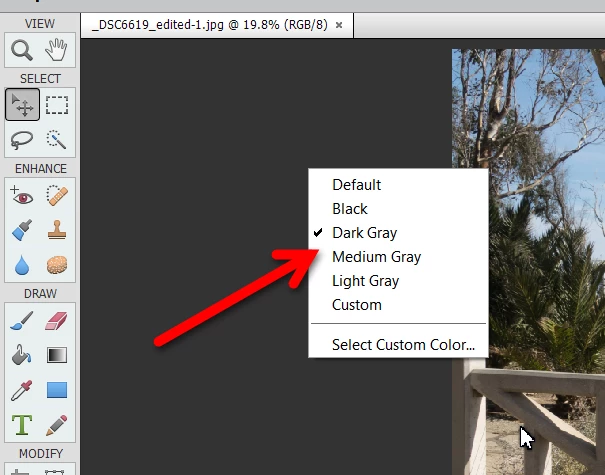
I think the only part of the UI that can be changed is the canvas area.  Right-click anywhere on it to bring up the color choice dialog.

3 replies

Participant
March 6, 2021

You can change Photoshop 2021 to dark or lighter mode by using: SHIFT + F1

Greg_S.
Community Expert
Community Expert
March 6, 2021

@Abbey5E54, see my response to your other post here.

chrimapAuthor
Participant
March 23, 2019

Thank you Greg_S.,

as far as the frames aren't customizeable in colors, this is the best helpful answer.

kind regards

Chris

Greg_S.
Community Expert
Greg_S.Community ExpertCorrect answer
Community Expert
March 23, 2019

I think the only part of the UI that can be changed is the canvas area.  Right-click anywhere on it to bring up the color choice dialog.