Brandevin
Participant
July 28, 2019
Answered

Problème avec la fonction "Ouvrir les yeux fermés"

  • July 28, 2019
  • 2 replies
  • 1425 views

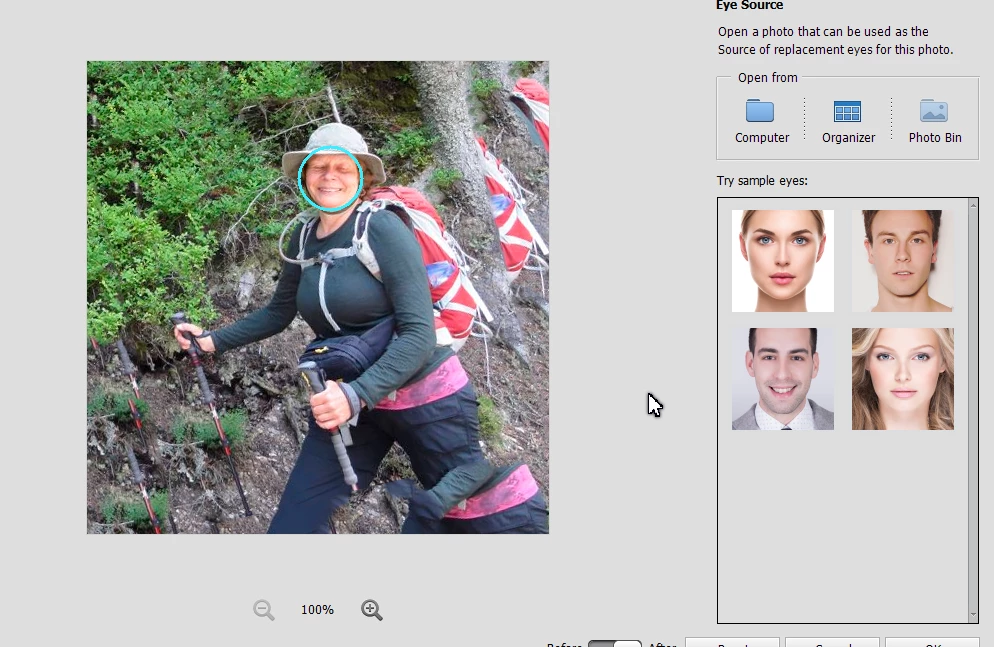
J'ai Photoshop Elements 2019.  Pour une de mes photos, la fonction "Ouvrir les yeux fermés" ne fonctionne pas.  Voir photo ci-jointe.

    This topic has been closed for replies.
    Correct answer Greg_S.

    Here's a little trick you can try.  Rotate the image so the face is more level.  The face will then be found!!
    2 replies

    Brandevin
    BrandevinAuthor
    Participant
    July 29, 2019

    Mais oui, c'est bien ça le problème : pourquoi le visage n'est pas reconnu ?  peut-on y remédier ?  Autrement, je sais bien comment ne servir de cette fonction...

    Brandevin
    BrandevinAuthor
    Participant
    July 29, 2019

    Wow.  Je l'ai enregistré en format PSD et le logiciel maintenant voit un visage...  sur le poteau !  (voir photo ci-jointe).  Vous êtes certain qu'il n'y pas une erreur dans le logiciel ?

    Greg_S.
    Community Expert
    Greg_S.Community ExpertCorrect answer
    Community Expert
    July 29, 2019

    Here's a little trick you can try.  Rotate the image so the face is more level.  The face will then be found!!

    MichelBParis
    Legend
    July 28, 2019

    L'option consiste à utiliser les yeux ouverts d'une autre photo. Le message montre que dans ce cas précis l'éditeur n'arrive pas à reconnaître un visage.