Raissa1570
Participant
March 25, 2017
Answered

I can not write by arabic language in photoshop. The letters are not connected to each other.

  • March 25, 2017
  • 3 replies
  • 16461 views

Hi,

First, I am a student and I am using mac book air.

Second, I am from United Arab Emirates and our first language is Arabic.

When I try to write in photoshop using arabic:

1. It types the word at the wrong direction (left to right). It should type it from the right side to the left.

2. The letters are not connected to each other. It types the letters as individual letters which is not the case at arabic language.

I have download many arabic fonts and tried them all but they all give me the same problem.

Since me and many students are suffering from this issue your help will be most appreciated.

Thank you so much.
    Correct answer quirky_Glow157F
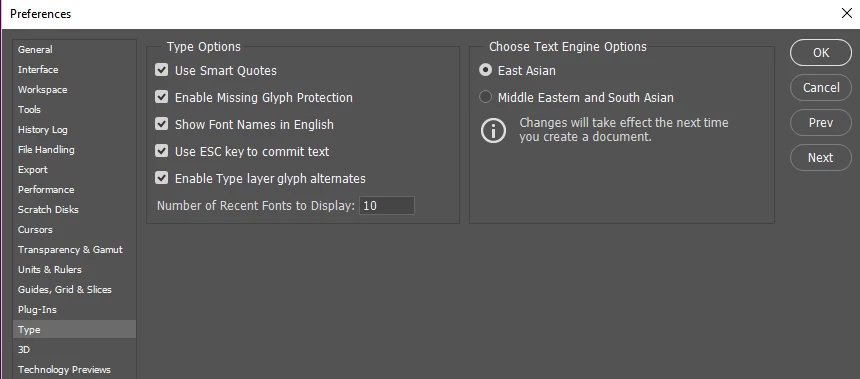
    1. Edit > Preferences > Type (Windows) or Photoshop > Preferences > Type (Mac OS) > Middle Eastern and South Asian
    2. Click OK, and Restart Photoshop.

    3. Type > Language Options > Middle Eastern Features.

    4. Paragraph > Right-to-Left Character Direction button should now be visible.

    More details on Kashidas and Ligatures are here: Arabic and Hebrew type in Photoshop

    Best Regards,

    3 replies

    Participant
    November 21, 2017

    i choose middle eastern ans south asian and i click ok.then i go to typr- language- middle eastern option is idle i cannot choose this option kindly tell me how to enable

    Zaid Al Hilali
    Community Expert
    Community Expert
    March 25, 2017

    Marhaba Raissa,

    Please follow above steps as detailed by servitor​ and Photoshop will behave well with Arabic text

    My post here in fact is to ask about your school/university, can I know which one is it? And how come teachers couldn't help you out with this basic, yet important step?

    basmam470931
    Participant
    February 9, 2018

    Hello Zaid,

    I've done all the steps and now I am able to type in Arabic on a new document.

    However, I purchased a design, and when I try to change the text from English to Arabic

    after following all the steps you mentioned, the Arabic is still jumbled and not connected.

    I am even unable to change the type to middle easters from photoshop's menu because it

    is no highlighted, even though the type from preferences is checked on Middle Eastern.

    pls help.

    Zaid Al Hilali
    Community Expert
    Community Expert
    February 11, 2018

    Marhaba Basma,

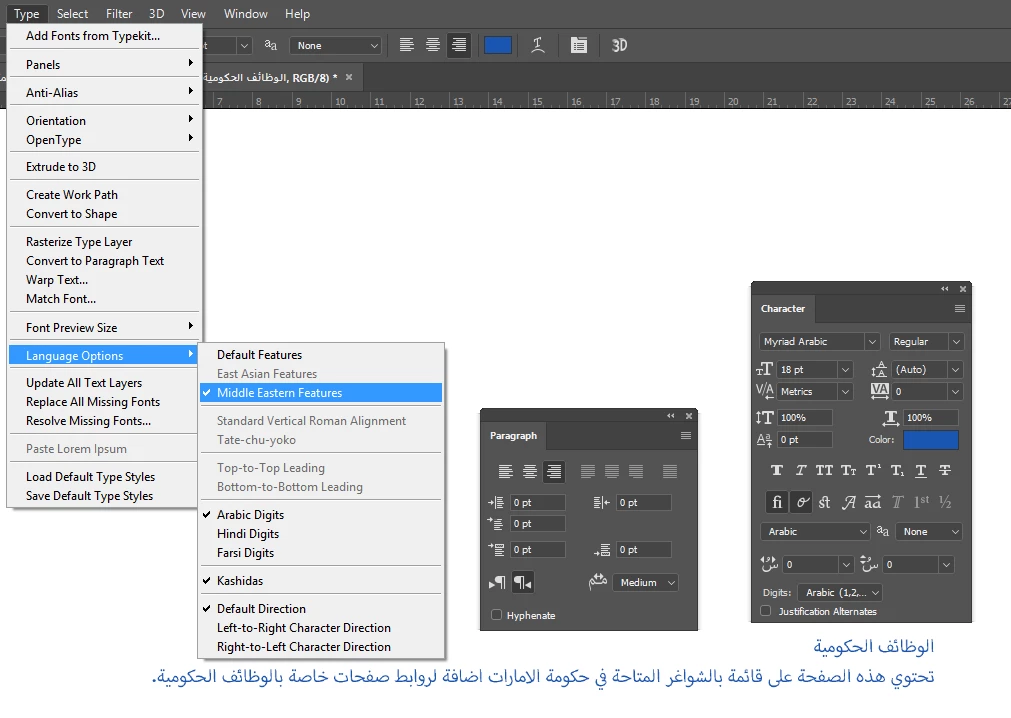
    Make sure you change settings in both Character and Paragraph Panels in order to insert Arabic script correctly as shown below

    quirky_Glow157FCorrect answer
    Participating Frequently
    March 25, 2017
    1. Edit > Preferences > Type (Windows) or Photoshop > Preferences > Type (Mac OS) > Middle Eastern and South Asian
    2. Click OK, and Restart Photoshop.

    3. Type > Language Options > Middle Eastern Features.

    4. Paragraph > Right-to-Left Character Direction button should now be visible.

    More details on Kashidas and Ligatures are here: Arabic and Hebrew type in Photoshop

    Best Regards,