

Is there any jsx to execute the auto tone of camera raw ?
I write some code to execute the auto tone of camera raw , but the image has no effects. I konw the Action Manager can't record the auto tone of camera raw,so i add the follow code :
desc1.putBoolean(charIDToTypeID('Auto'), true);
and the auto function is still not work.Any help will be appreciated!
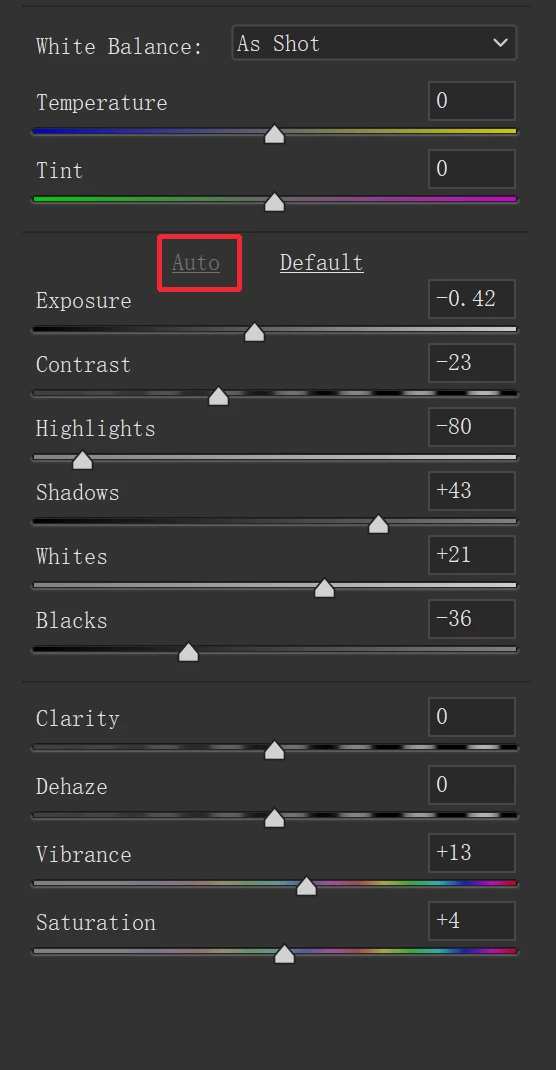
All code is as follows:
(function () {
// Camera Raw Filter
var desc1 = new ActionDescriptor();
desc1.putString(charIDToTypeID('CMod'), "Filter");
desc1.putEnumerated(charIDToTypeID('Sett'), charIDToTypeID('Sett'), charIDToTypeID('Cst '));
desc1.putEnumerated(charIDToTypeID('WBal'), charIDToTypeID('WBal'), charIDToTypeID('AsSh'));
desc1.putBoolean(charIDToTypeID('Auto'), true);
desc1.putInteger(charIDToTypeID('Temp'), 0);
desc1.putInteger(charIDToTypeID('Tint'), 0);
desc1.putBoolean(charIDToTypeID('CtoG'), false);
desc1.putInteger(charIDToTypeID('Strt'), 0);
desc1.putInteger(charIDToTypeID('Shrp'), 0);
desc1.putInteger(charIDToTypeID('LNR '), 0);
desc1.putInteger(charIDToTypeID('CNR '), 0);
desc1.putInteger(charIDToTypeID('VigA'), 0);
desc1.putInteger(charIDToTypeID('BlkB'), 0);
desc1.putInteger(charIDToTypeID('RHue'), 0);
desc1.putInteger(charIDToTypeID('RSat'), 0);
desc1.putInteger(charIDToTypeID('GHue'), 0);
desc1.putInteger(charIDToTypeID('GSat'), 0);
desc1.putInteger(charIDToTypeID('BHue'), 0);
desc1.putInteger(charIDToTypeID('BSat'), 0);
desc1.putInteger(charIDToTypeID('Vibr'), 0);
desc1.putInteger(charIDToTypeID('HA_R'), 0);
desc1.putInteger(charIDToTypeID('HA_O'), 0);
desc1.putInteger(charIDToTypeID('HA_Y'), 0);
desc1.putInteger(charIDToTypeID('HA_G'), 0);
desc1.putInteger(charIDToTypeID('HA_A'), 0);
desc1.putInteger(charIDToTypeID('HA_B'), 0);
desc1.putInteger(charIDToTypeID('HA_P'), 0);
desc1.putInteger(charIDToTypeID('HA_M'), 0);
desc1.putInteger(charIDToTypeID('SA_R'), 0);
desc1.putInteger(charIDToTypeID('SA_O'), 0);
desc1.putInteger(charIDToTypeID('SA_Y'), 0);
desc1.putInteger(charIDToTypeID('SA_G'), 0);
desc1.putInteger(charIDToTypeID('SA_A'), 0);
desc1.putInteger(charIDToTypeID('SA_B'), 0);
desc1.putInteger(charIDToTypeID('SA_P'), 0);
desc1.putInteger(charIDToTypeID('SA_M'), 0);
desc1.putInteger(charIDToTypeID('LA_R'), 0);
desc1.putInteger(charIDToTypeID('LA_O'), 0);
desc1.putInteger(charIDToTypeID('LA_Y'), 0);
desc1.putInteger(charIDToTypeID('LA_G'), 0);
desc1.putInteger(charIDToTypeID('LA_A'), 0);
desc1.putInteger(charIDToTypeID('LA_B'), 0);
desc1.putInteger(charIDToTypeID('LA_P'), 0);
desc1.putInteger(charIDToTypeID('LA_M'), 0);
desc1.putInteger(charIDToTypeID('STSH'), 0);
desc1.putInteger(charIDToTypeID('STSS'), 0);
desc1.putInteger(charIDToTypeID('STHH'), 0);
desc1.putInteger(charIDToTypeID('STHS'), 0);
desc1.putInteger(charIDToTypeID('STB '), 0);
desc1.putInteger(charIDToTypeID('PC_S'), 0);
desc1.putInteger(charIDToTypeID('PC_D'), 0);
desc1.putInteger(charIDToTypeID('PC_L'), 0);
desc1.putInteger(charIDToTypeID('PC_H'), 0);
desc1.putInteger(charIDToTypeID('PC_1'), 25);
desc1.putInteger(charIDToTypeID('PC_2'), 50);
desc1.putInteger(charIDToTypeID('PC_3'), 75);
desc1.putDouble(charIDToTypeID('ShpR'), 1);
desc1.putInteger(charIDToTypeID('ShpD'), 25);
desc1.putInteger(charIDToTypeID('ShpM'), 0);
desc1.putInteger(charIDToTypeID('PCVA'), 0);
desc1.putInteger(charIDToTypeID('GRNA'), 0);
desc1.putInteger(charIDToTypeID('LPEn'), 0);
desc1.putInteger(charIDToTypeID('MDis'), 0);
desc1.putInteger(charIDToTypeID('PerV'), 0);
desc1.putInteger(charIDToTypeID('PerH'), 0);
desc1.putDouble(charIDToTypeID('PerR'), 0);
desc1.putInteger(charIDToTypeID('PerS'), 100);
desc1.putInteger(charIDToTypeID('PerA'), 0);
desc1.putInteger(charIDToTypeID('PerU'), 0);
desc1.putDouble(charIDToTypeID('PerX'), 0);
desc1.putDouble(charIDToTypeID('PerY'), 0);
desc1.putInteger(charIDToTypeID('AuCA'), 0);
desc1.putDouble(charIDToTypeID('Ex12'), 0);
desc1.putInteger(charIDToTypeID('Cr12'), 0);
desc1.putInteger(charIDToTypeID('Hi12'), 0);
desc1.putInteger(charIDToTypeID('Sh12'), 0);
desc1.putInteger(charIDToTypeID('Wh12'), 0);
desc1.putInteger(charIDToTypeID('Bk12'), 0);
desc1.putInteger(charIDToTypeID('Cl12'), 0);
desc1.putInteger(charIDToTypeID('DfPA'), 0);
desc1.putInteger(charIDToTypeID('DPHL'), 30);
desc1.putInteger(charIDToTypeID('DPHH'), 70);
desc1.putInteger(charIDToTypeID('DfGA'), 0);
desc1.putInteger(charIDToTypeID('DPGL'), 40);
desc1.putInteger(charIDToTypeID('DPGH'), 60);
desc1.putInteger(charIDToTypeID('Dhze'), 0);
desc1.putInteger(charIDToTypeID('TMMs'), 0);
var list1 = new ActionList();
list1.putInteger(0);
list1.putInteger(0);
list1.putInteger(255);
list1.putInteger(255);
desc1.putList(charIDToTypeID('Crv '), list1);
var list2 = new ActionList();
list2.putInteger(0);
list2.putInteger(0);
list2.putInteger(255);
list2.putInteger(255);
desc1.putList(charIDToTypeID('CrvR'), list2);
var list3 = new ActionList();
list3.putInteger(0);
list3.putInteger(0);
list3.putInteger(255);
list3.putInteger(255);
desc1.putList(charIDToTypeID('CrvG'), list3);
var list4 = new ActionList();
list4.putInteger(0);
list4.putInteger(0);
list4.putInteger(255);
list4.putInteger(255);
desc1.putList(charIDToTypeID('CrvB'), list4);
desc1.putString(charIDToTypeID('CamP'), "Embedded");
desc1.putString(charIDToTypeID('CP_D'), "54650A341B5B5CCAE8442D0B43A92BCE");
desc1.putInteger(charIDToTypeID('PrVe'), 167772160);
desc1.putString(charIDToTypeID('Rtch'), "");
desc1.putString(charIDToTypeID('REye'), "");
desc1.putString(charIDToTypeID('LCs '), "");
desc1.putString(charIDToTypeID('Upri'), "<x:xmpmeta xmlns:x=\"adobe:ns:meta/\" x:xmptk=\"Adobe XMP Core 5.6-c140 79.160451, 2017/05/06-01:08:21 \">\n <rdf:RDF xmlns:rdf=\"http://www.w3.org/1999/02/22-rdf-syntax-ns#\">\n <rdf:Description rdf:about=\"\"\n xmlns:crs=\"http://ns.adobe.com/camera-raw-settings/1.0/\"\n crs:UprightVersion=\"151388160\"\n crs:UprightCenterMode=\"0\"\n crs:UprightCenterNormX=\"0.5\"\n crs:UprightCenterNormY=\"0.5\"\n crs:UprightFocalMode=\"0\"\n crs:UprightFocalLength35mm=\"35\"\n crs:UprightPreview=\"False\"\n crs:UprightTransformCount=\"6\"/>\n </rdf:RDF>\n</x:xmpmeta>\n");
desc1.putString(charIDToTypeID('GuUr'), "<x:xmpmeta xmlns:x=\"adobe:ns:meta/\" x:xmptk=\"Adobe XMP Core 5.6-c140 79.160451, 2017/05/06-01:08:21 \">\n <rdf:RDF xmlns:rdf=\"http://www.w3.org/1999/02/22-rdf-syntax-ns#\">\n <rdf:Description rdf:about=\"\"\n xmlns:crs=\"http://ns.adobe.com/camera-raw-settings/1.0/\"\n crs:UprightFourSegmentsCount=\"0\"/>\n </rdf:RDF>\n</x:xmpmeta>\n");
desc1.putString(charIDToTypeID('Look'), "");
desc1.putString(charIDToTypeID('Pset'), "");
executeAction(stringIDToTypeID('Adobe Camera Raw Filter'), desc1, DialogModes.NO);
})();


 AdChoices