Participant
December 1, 2015
Answered

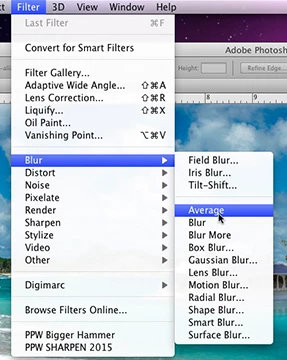
My Adope Photoshop CS6 Doesn't have Average Blur

  • December 1, 2015
  • 4 replies
  • 12928 views

Hello forum, AddiTech here. My question my sound a little crazy,

but I do not have the Average option when I pull up my Blur Column.

Does anyone have any idea why this is?

    This topic has been closed for replies.
    Correct answer Norman Sanders

    If it is not here:

    ... then logical next step would be to reset your Preferences.

    To reset Preferences:

    If Photoshop is already open on your screen, close it (Quit). Then hold down Shift+Ctrl+Alt (Win) / Shift+Command+Option (Mac) on your keyboard and start Photoshop.

    A dialog box will pop up asking if you want to delete the existing Preferences file (the "Settings"). Click Yes in the dialog box. The existing Preferences file will be scrapped and a new one will be created.

    4 replies

    October 26, 2020

    No funciona el reset.

    June 21, 2016

    Hi I'm having the exact same problem as I want to make a LowPoly picture but can't please help (Shift+Ctrl+Alt  did nothing aswell)

    Norman Sanders
    Norman SandersCorrect answer
    Legend
    December 1, 2015

    If it is not here:

    ... then logical next step would be to reset your Preferences.

    To reset Preferences:

    If Photoshop is already open on your screen, close it (Quit). Then hold down Shift+Ctrl+Alt (Win) / Shift+Command+Option (Mac) on your keyboard and start Photoshop.

    A dialog box will pop up asking if you want to delete the existing Preferences file (the "Settings"). Click Yes in the dialog box. The existing Preferences file will be scrapped and a new one will be created.

    Inspiring
    December 1, 2015

    Hi additech,

    Could you please close Photoshop , and reopen it, Also what is the file format that you are working on ?

    Regards,

    Tanuj

    AddiTechAuthor
    Participant
    December 1, 2015

    Thanks for the quick reply Tanuj, i'm working on an .jpg image

    and closing out and reopening did not solve the problem.

    Inspiring
    December 1, 2015

    Please try resetting the preferences of Photoshop .

    How to reset the preferences of Photoshop : FAQ: How do I reset my preferences?