seasand
Participant
Nov 19, 2016 6:50 PM UTC
Answered

Photoshop CC 2017 right to left text direction support.

Hello everyone.

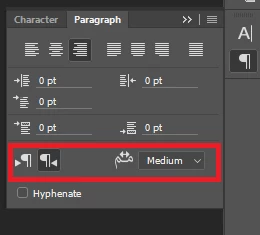
I installed Photoshop CC 2017 trial lately, and it seems it's missing the options highlighted in the attached image(from CC 2015)!

Is there a way to get them back?

PS: I already checked "Middle Eastern and South Asian" option in the preferences.
    This topic is closed to new replies. Start a new post to keep the conversation going.
    Semaphoric
    SemaphoricCorrect answer
    Community Expert
    Nov 20, 2016 1:10 PM UTC

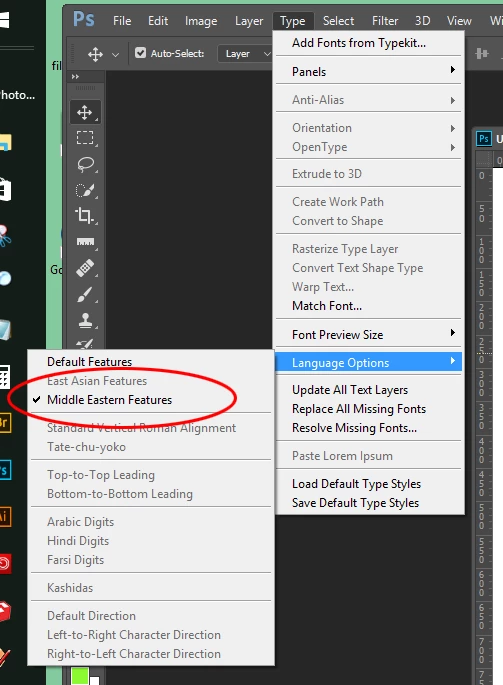
    Not just in the Preferences - in the Type menu.


    11 replies

    Participant
    Dec 3, 2016 10:28 AM UTC

    Does this option in Illustrator too??
    there's no (Language Options) in Illustrator's Type Menu

    Translate
    M_ries_Lab
    Inspiring
    Dec 7, 2016 6:48 PM UTC

    or in InDesign, where are these options?

    Translate
    seasand
    seasandAuthor
    Participant
    Nov 20, 2016 4:09 PM UTC

    It worked!

    Thank you both very much for taking the time to answer.

    Translate
    Semaphoric
    Community Expert
    Community Expert
    Nov 19, 2016 7:13 PM UTC

    Under Type > Language Options, make sure "Middle Eastern Features" is checked.

    Translate
    seasand
    seasandAuthor
    Participant
    Nov 20, 2016 12:05 PM UTC

    As I mentioned earlier, I already did that and it didn't fix it.

    Translate
    davescm
    Community Expert
    Community Expert
    Nov 20, 2016 12:30 PM UTC

    Have you set the direction in the Type menu ?

    Dave

    Translate