
rjbphoto1
Participant
April 13, 2017
Answered

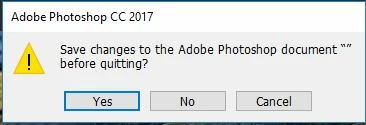
Save changes to the adobe photoshop document "" before quitting

  • April 13, 2017
  • 2 replies
  • 10742 views

I updated Photoshop CC yesterday and since then every time I come to close Photoshop I get the following message - Save changes to the adobe photoshop document "" before quitting

There are no documents open, if I say no Photoshop closes but if I say yes it hangs for ages with nothing happening.
Any ideas how to stop this happening?

    This topic has been closed for replies.
    Correct answer twinbrush

    I'd agree with Mylenium​ and to further than point, when you next open Photoshop go to Edit > Preferences (or Photoshop > preferences on a mac, I think?) and check your performance and scratch disks settings to see if something looks amiss to you. I've had a few issues with a temp file being created on an external hard drive I was using as a secondary scratch disk.

    Failing that I'd go to the extreme and unistall Photoshop, run something like Ccleaner, restart your machine and re-install Photoshop again...I know that's a pain in the trunks, but sometimes looking for a 'quick-fix' tends to take longer than just starting fresh again.

    Hopefully you get it sorted

    2 replies

    twinbrush
    twinbrushCorrect answer
    Inspiring
    April 13, 2017

    I'd agree with Mylenium​ and to further than point, when you next open Photoshop go to Edit > Preferences (or Photoshop > preferences on a mac, I think?) and check your performance and scratch disks settings to see if something looks amiss to you. I've had a few issues with a temp file being created on an external hard drive I was using as a secondary scratch disk.

    Failing that I'd go to the extreme and unistall Photoshop, run something like Ccleaner, restart your machine and re-install Photoshop again...I know that's a pain in the trunks, but sometimes looking for a 'quick-fix' tends to take longer than just starting fresh again.

    Hopefully you get it sorted

    rjbphoto1
    rjbphoto1Author
    Participant
    April 16, 2017

    Thank you for the reply. In the end I uninstalled and reinstalled and that did the trick.

    Mylenium
    Legend
    April 13, 2017

    Clean out your system's temp folders and delete any leftover PS restore and page files. Also check your document templates and presets folders. Sometimes crashes produce fluke file remnants and PS gets strung up on them trying to restore something that isn't there.

    Mylenium