


Participant
May 19, 2011
Answered

Can't get PPro to accept video file.

  • May 19, 2011
  • 2 replies
  • 42646 views

I tried getting this to work in PPro 7.0 but it wouldn't accept an HD video file. I've downloaded a trial of PPro CS5.5 ( I purchased it as well but will have to wait for the disc to arrive) and now the file is imported but it shows up as an audio with no video. The video does play just fine in Windows Media Player. The following is the GSpot report on the file:
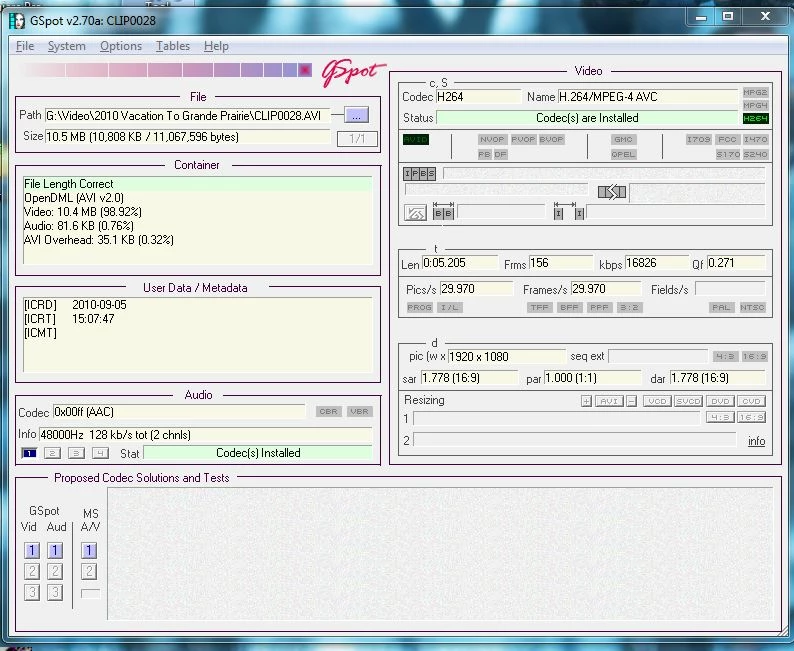
Can anyone tell me any reason I can't import this file?

Thank you,

.....Gord

    This topic has been closed for replies.
    Correct answer Colin Brougham

    It doesn't really matter if you have QT installed for this file; it's not going to help either way. Premiere Pro does not support H.264 in an AVI container. We can fix this.

    1. Download the latest 32-bit static build of FFmpeg from here: Zeranoe FFmpeg - Builds
    2. Open the archive; you'll probably need 7-Zip since the archive is a .7z file. Extract the ffmpeg.exe file in the archive (it's in the "bin" folder) to the folder containing your AVIs.
    3. Create a text document (Notepad is fine) called "avi2mp4.bat" (no quotes) in the same folder as the AVIs, making sure to change the default TXT extension to BAT.
    4. Paste the following into the BAT file:

      @ECHO OFF
      for %%a in (*.avi) do ffmpeg -i "%%a" -vcodec copy -acodec copy -f mp4 -y "%%~na".mp4

    5. Once you save the BAT file, double-click it; your AVIs will be rewrapped to MP4s without any conversion. The MP4s will correctly import into Premiere Pro.

    2 replies

    John T Smith
    Community Expert
    Community Expert
    May 20, 2011

    A quick Google found some information

    http://reviews.cnet.com/digital-camcorders/insignia-ns-dv111080f/4507-6500_7-34092992.html?tag=mncolBtm;rnav

    HD camera at 720p or 1080p using H.264 in either an AVI or MOV container... since I have seen other messages about 1080p problems, stick with 720p

    Since AVI doesn't work and MOV does... use MOV (part of the Google results was that the "custom" AVI produced by the camera would not edit in any software other than what came with the camera... another reason to use MOV if that works for you)

    Once you have the MOV file on your hard drive, See the 2nd post for NEW ITEM pointer http://forums.adobe.com/thread/770072?tstart=0 to be sure your sequence matches your file

    There is also a camera discussion forum

    http://community.insigniaproducts.com/t5/tag/NS-DV111080F/tg-p/tag-id/1465/category-id/discussions-cat-en

    Participant
    November 11, 2019

    The callange that I'm facing if I inporin clips the audio will authentic unlike itself

    I'm using adobe premiere CS6

    the_wine_snob
    Inspiring
    May 19, 2011

    Gord,

    Do you have Apple's QT Player installed, or another H.264 CODEC?

    Good luck,

    Hunt

    GordRocksAuthor
    Participant
    May 19, 2011

    Yes, I do have Quick Time installed. I don't understand; is that a good thing or a bad thing?

    Colin Brougham
    Colin BroughamCorrect answer
    Participating Frequently
    May 19, 2011

    It doesn't really matter if you have QT installed for this file; it's not going to help either way. Premiere Pro does not support H.264 in an AVI container. We can fix this.

    1. Download the latest 32-bit static build of FFmpeg from here: Zeranoe FFmpeg - Builds
    2. Open the archive; you'll probably need 7-Zip since the archive is a .7z file. Extract the ffmpeg.exe file in the archive (it's in the "bin" folder) to the folder containing your AVIs.
    3. Create a text document (Notepad is fine) called "avi2mp4.bat" (no quotes) in the same folder as the AVIs, making sure to change the default TXT extension to BAT.
    4. Paste the following into the BAT file:

      @ECHO OFF
      for %%a in (*.avi) do ffmpeg -i "%%a" -vcodec copy -acodec copy -f mp4 -y "%%~na".mp4

    5. Once you save the BAT file, double-click it; your AVIs will be rewrapped to MP4s without any conversion. The MP4s will correctly import into Premiere Pro.