
yaaraagnon
Participant
November 18, 2018
Answered

Can't import .mov file to premiere pro CC

  • November 18, 2018
  • 1 reply
  • 1919 views

The file is a short movie I edited on Avid and exported it 'match to source' for high quality.

Now I'd like to make some changes on Premiere but i can't import the file.

it says 'Codec missing or unavailable'

I've tried changing the file name to m4v and it only imported the audio, like the video does't exist in the clip.

I prefer not to use and converters because I don't want to lose the quality of the movie

thanks

here's the info of the clip if it matters (I use macbook pro)
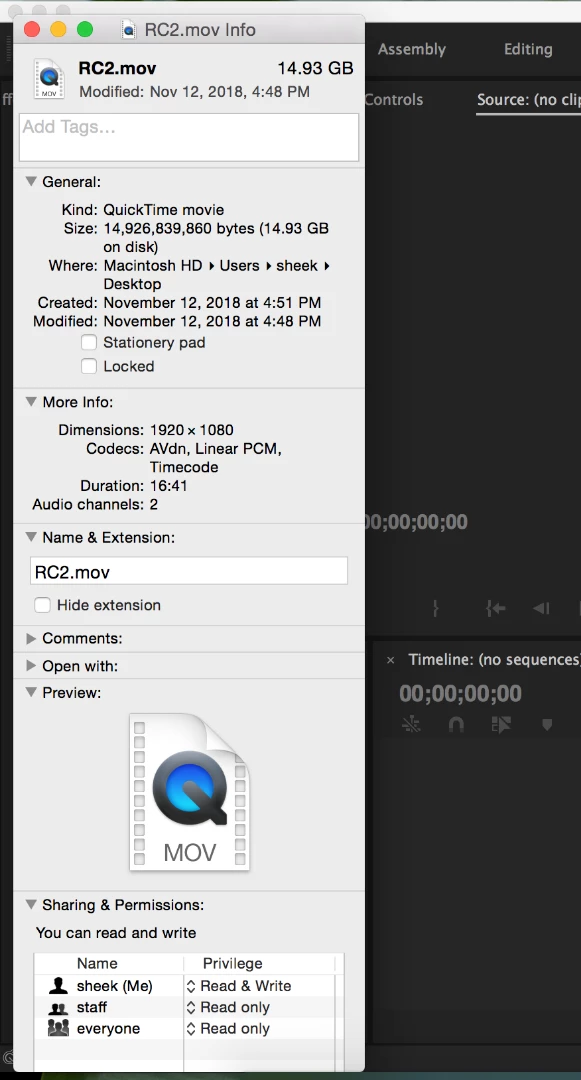
This topic has been closed for replies.
Correct answer Averdahl

I would have started with downloading the Avid DNxHD codec. Close Premiere Pro/After Effects/Media Encoder before installing it: Avid QuickTime Codecs LE 

Though it is a native codec in Premiere Pro i am pretty sure it don´t support .mov, only. mxf.

1 reply

Averdahl
Community Expert
AverdahlCommunity ExpertCorrect answer
Community Expert
November 18, 2018

I would have started with downloading the Avid DNxHD codec. Close Premiere Pro/After Effects/Media Encoder before installing it: Avid QuickTime Codecs LE 

Though it is a native codec in Premiere Pro i am pretty sure it don´t support .mov, only. mxf.

sleepy7474
Participant
August 15, 2021

I had the same issue but used Media Encoder to convert my .mov to DNxHD and that worked fine as well.