
Participant
May 3, 2017
Question

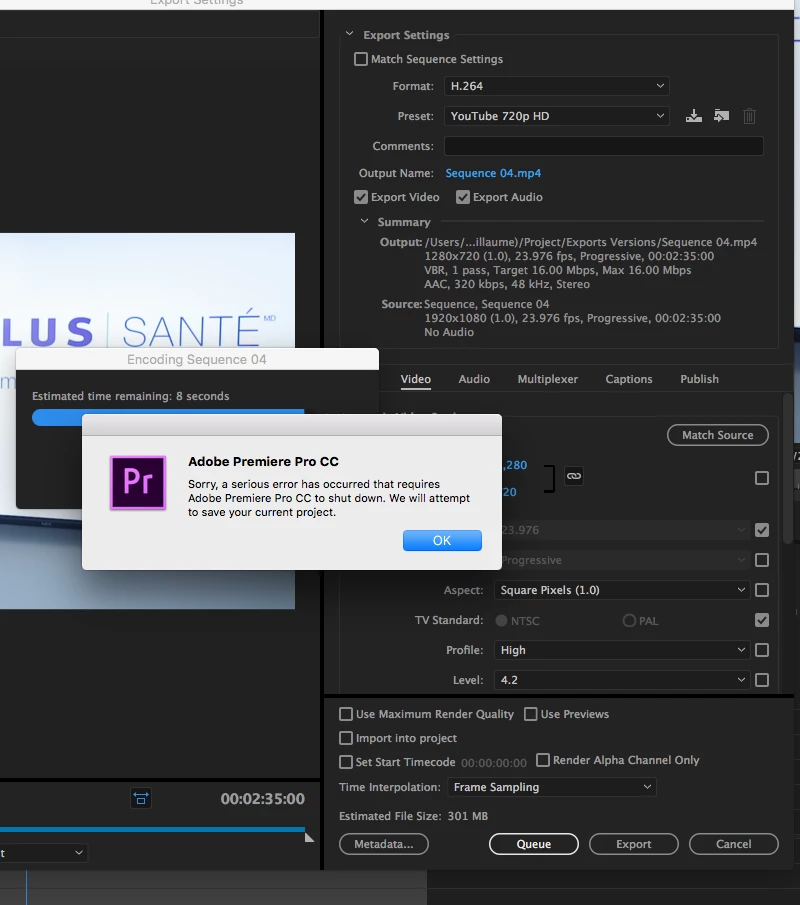
Crash when exporting in premiere pro cc 2017.1
  • May 3, 2017
  • 2 replies
  • 3817 views

Premiere keeps crashing when trying to export. The program shuts down completely and when I reopen the project, it asks me to open it from a new recovery copy file. I tried multiple solutions but nothing worked. I tried sending the export to media encoder, removing the adjustment layers, remove the audio both on the timeline and or the export page. I tried copying the edit to a new sequence, removing effects thinking that it maybe had to do with key frames.

What I find weird is that I exported the footage in 3 parts, the intro the main section and the outro and all 3 parts exported fine but when I export it in a whole, it crashes. it would also be good to mention that I'm on the latest Adobe update.

Anyone know what could be the reason or a solution?

This topic has been closed for replies.

2 replies

jamesa29219022
Participating Frequently
June 18, 2018

I tried breaking it up into several exports, no luck.  Tried reboot, reload, and export only as video . . . no luck.  I changed the output to mpeg2-DVD and it exported.

Vinay Dwivedi
Adobe Employee
Adobe Employee
June 18, 2018

Hi James,

Try this:

Export your main sequence(s) into a new Adobe Premiere Pro project from File>Export>Selection as Premiere Pro Project.

Once done open it in Premiere Pro and then try to export.

//Vinay

kulpreet singh
Inspiring
May 3, 2017

Hi Julzs,

I am sorry that you are not able to export your sequence.

I appreciate that you have already tried a couple of troubleshooting steps, but have you tried exporting your sequence in a different format/or to a different location?

What is the source of your footage? Is there any 3rd party effect used in this sequence?

Please help me with your system specs and OS details.

Thanks,

Kulpreet Singh

jamesa29219022
Participating Frequently
June 18, 2018

I can't believe this hasn't been answered by Adobe . . .  I've tried most of what has been suggested and am going nuts.  Naturally there's a deadline.  I'm using Adobe 2017 because I'm always afraid to try new releases for reasons just such as these.  What I'm not sure, because I've not done it before, is if I export in sections how to the "get back together".  Oh well, I'll give it a try.

jamesa29219022
Participating Frequently
June 18, 2018

I tried breaking it up into several exports, no luck.  Tried reboot, reload, and export only as video . . . no luck.  I changed the output to mpeg2-DVD and it exported.