Inspiring
March 27, 2018
Answered

Handbrake

  • March 27, 2018
  • 3 replies
  • 1592 views

How effective is Handbrake in reducing file size and maintaining quality?

    This topic has been closed for replies.
    Correct answer Ann Bens

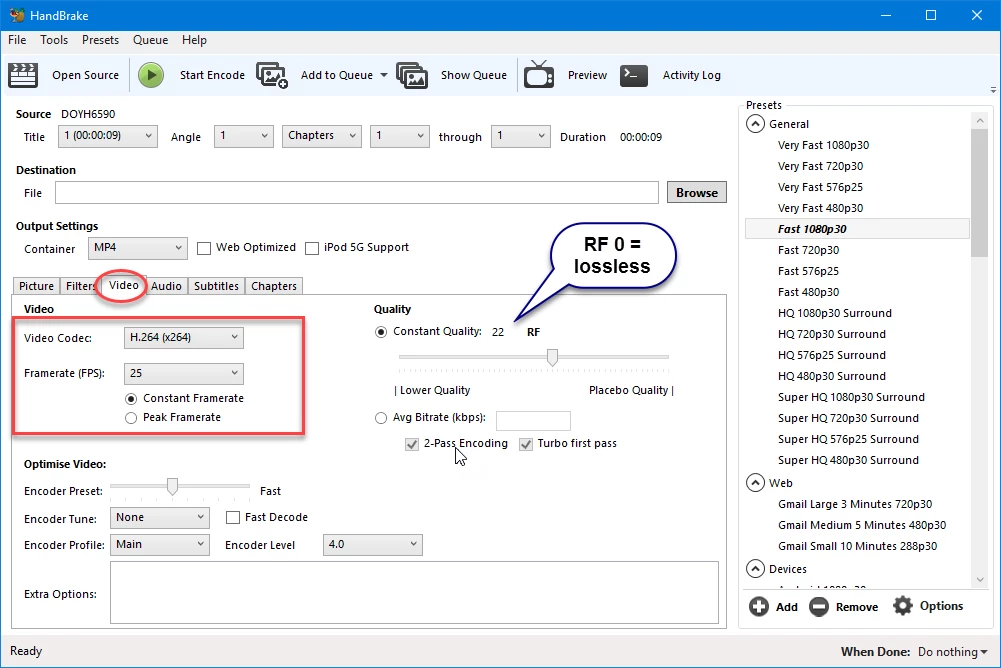
    22 is default. Want a lossless file set it to 0 but file will be huge.

    3 replies

    Community Expert
    March 27, 2018

    Hi Michael

    Why you are trying to use Handbrake if you have got Adobe Media Encoder where you have total control of what are you exporting?

    Media Encoder tutorials | Learn how to use Adobe Media Encoder CC

    Perhaps now you need some time to learn how to use it, but to the future it will be faster. Worth it.

    Regards!

    Byron.
    Inspiring
    March 27, 2018

    The videos had a problem in Premiere when I tried to stabilize.  They jumped from one clip to the next.  It was very apparent when the videos played.  I created an XML file in Premiere and exported it to Davinci Resolve 14.  The jumping disappeared.  The video file created in Resolve was over the limit for upload to Vimeo.  Also, I have been using Premiere since 1991.

    Ann Bens
    Community Expert
    Ann BensCommunity ExpertCorrect answer
    Community Expert
    March 27, 2018

    22 is default. Want a lossless file set it to 0 but file will be huge.

    Community Expert
    March 27, 2018

    It is free!  Try it and see what you think of the output.

    Legend
    March 27, 2018

    For what purpose?

    Inspiring
    March 27, 2018

    I have a 10GB video file to upload to Vimeo.  My Vimeo plan only allows 5GB.

    Legend
    March 27, 2018

    Got it.

    You can give it a try, but I think your best option is to upgrade your plan or use a video streaming service without file size limits.  I say this because they all convert whatever you upload, so formats like Cineform and DNx are much better upload options.  But those better options are really big.