
Participant
May 21, 2016
Answered

How do I burn a DVD using Creative Cloud? I don't have Encore and can't find it anywhere.

  • May 21, 2016
  • 4 replies
  • 31388 views

I need to burn a DVD, but everything I read says to use Encore. I don't have Encore and can't find it to download anywhere. It really should be part of Premiere Pro or at least be part of the Creative Cloud. I don't understand why Adobe is making this so difficult. Burning a DVD should be a very simple thing to do.

Thank you to Anyone who can help me.

Swade
    This topic has been closed for replies.
    Correct answer Ann Bens

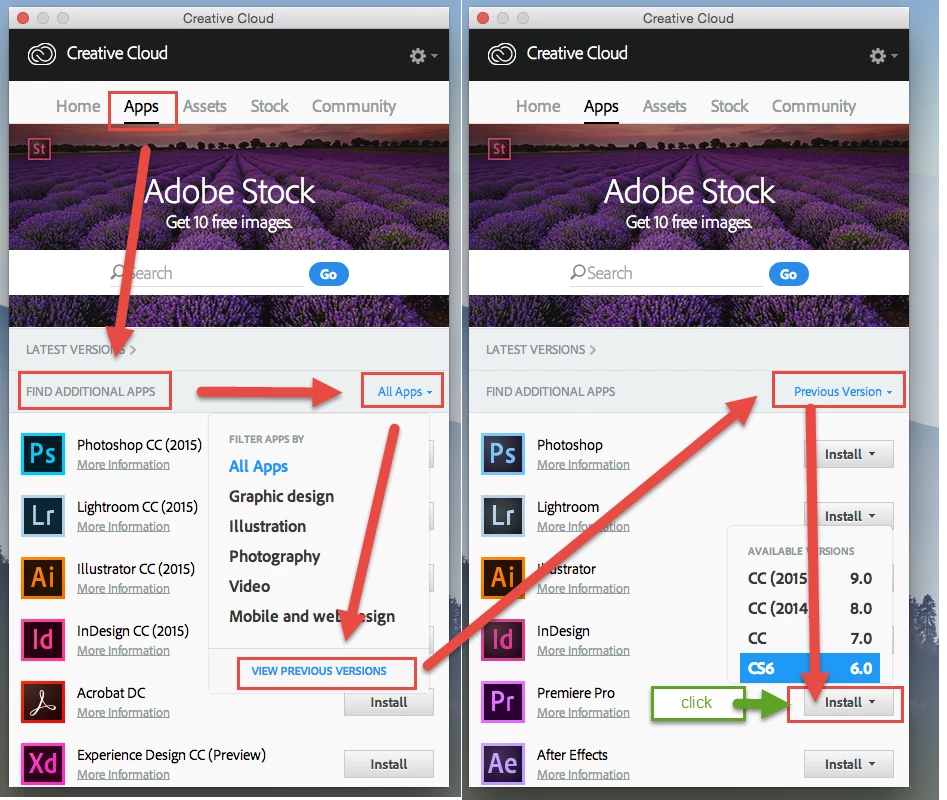
    Here is how to get Encore which is a part of Premiere CS6.

    4 replies

    r1001
    Participant
    February 12, 2022

    It's 2022. I have the same question but these solutions don't work in this day and age. Can someone help? I want to burn a DVD. 

    chrisw44157881
    Inspiring
    February 12, 2022

    I've used dvdstyler and it creates menus very fast and easy and supports native dvd compatible mpeg2 files so there's no re-compression. it works for both pc and mac. it's really great, and did i mention its free? just encode files from media encoder as dvd compatible muxed, then import into dvdstyler.

    Participant
    July 25, 2016

    My Creative Cloud Window does not have the option to choose previous versions.  It has a tab for that, but only shows three already installed programs other than Premiere.  So this is a road block for me.

    Why wouldn't they offer an alternative program instead of just making Encore useless and unavailable?????

    Ann Bens
    Community Expert
    Community Expert
    July 25, 2016

    Download Premiere CS6 and install, at the same time it installs Encore.

    Participant
    January 30, 2017

    I did all the above still not working.  I have Windows 10 so assume Encore is not supported.

    John T Smith
    Community Expert
    Community Expert
    May 21, 2016

    Getting Encore instructions, Cloud or serial number version https://forums.adobe.com/thread/1992717

    -has notes about different Cloud versions and step by step on those differences

    -must click on both "All Apps" and the button below, "VIEW PREVIOUS VERSIONS."

    -also includes information on the separate library download that is needed

    -ask actual Encore questions in https://forums.adobe.com/community/encore/content

    Ann Bens
    Community Expert
    Ann BensCommunity ExpertCorrect answer
    Community Expert
    May 21, 2016

    Here is how to get Encore which is a part of Premiere CS6.

    Swade1Author
    Participant
    May 21, 2016

    Thank you Both so much, I now have Encore! However I am having difficulty importing from the newest version of Pr to En. Learning new software is always challenging for me.

    Thanks!

    Swade

    Legend
    May 21, 2016

    Swade,

    Dynamic Link will not work at all between different versions of the Adobe Creative Cloud or Creative Suite software. You must export an assembled video file using an MPEG-2 DVD preset from Premiere to hard disk. Then, import the resulting .m2v and .wav files that you just created into Encore.

    Thanks for the inquiry,

    Randall