
googleinternet5
Known Participant
June 12, 2019
Answered

How do I extend a clip in the middle of the timeline in Premiere Pro without doing a ripple extend?

  • June 12, 2019
  • 1 reply
  • 16166 views

You can use "extend previous edit to playhead", but it does a ripple extend.

I wouldn't even mind the workaround that occurs to me:

1. select all clips to the right of the playhead

2. nudge all those clips

3. "extend previous edit to playhead" the previous clip

But the thing is, there's no keyboard shortcut for "select all to the right of the playhead". Yes there's a shortcut for the select all to the right of the playhead cursor tool but then you still have to click with the mouse.

I feel like I must be doing something wrong or missing something.

Thank you so much for your help.
    This topic has been closed for replies.
    Correct answer Warren Heaton

    I feel like I must be doing something wrong if there is no way to do this. What is the point of learning keyboard shortcuts to do trim and ripple trim if you can't also do extend but can only do ripple extend? Why are only 3 out of the 4 of these functionalities available with keyboard shortcuts? Do all the keyboard shortcut power-users just not ever extend clips? Obviously I feel like I am missing something here.


    Oh... got it.

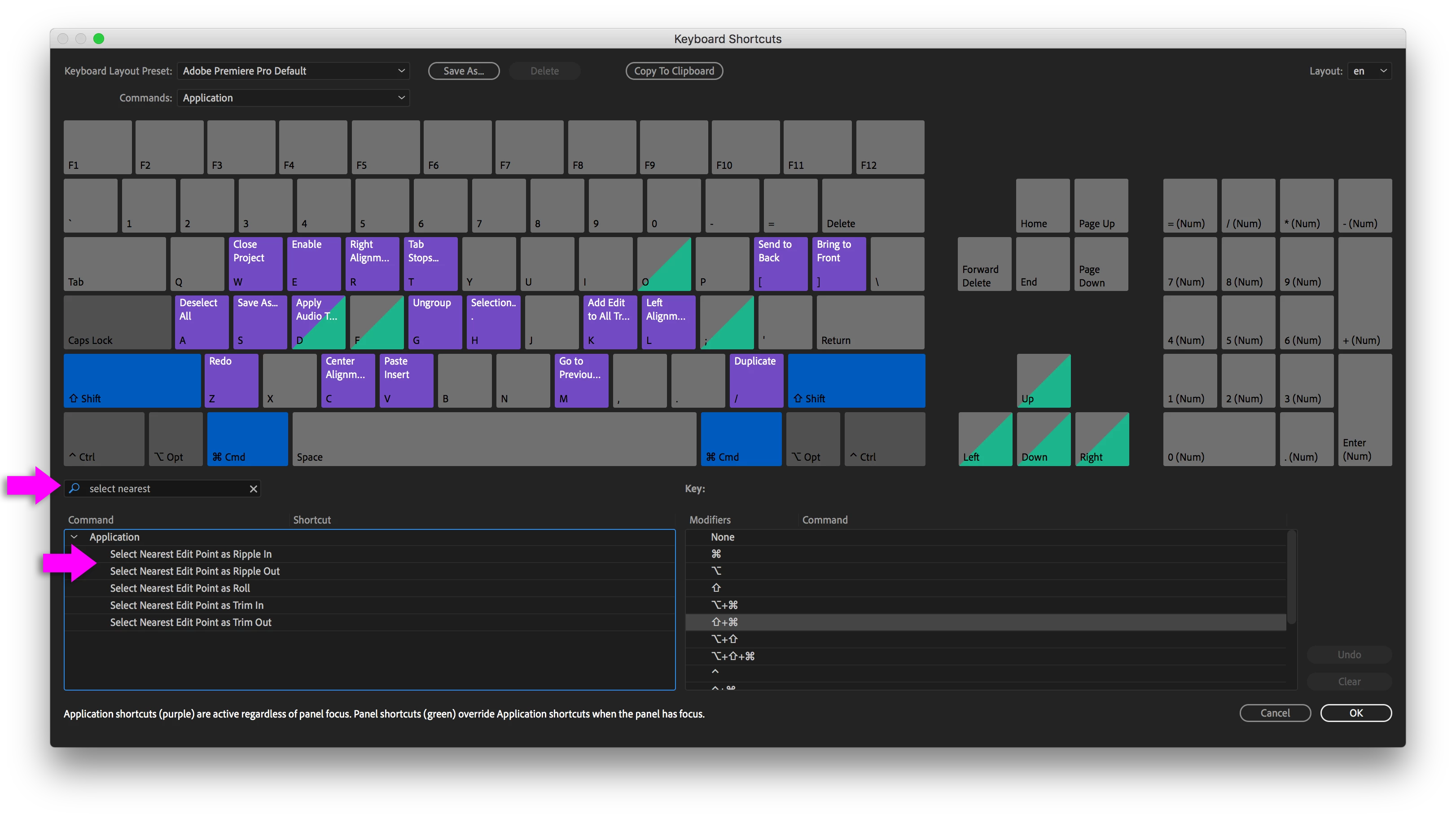
    You want "Select Nearest Edit as Ripple Out".

    You have to set that shortcut yourself in the Keyboard Shortcuts dialog box.

    Once set, you can then do this:

    Select Nearest Edit Point as Ripple in/out - Premiere Pro CC Keyboard shortcut - YouTube

    Then you'd follow up with a nudge left or right (hold option or alt while using the left or right arrow).  You can also press Enter on Mac or the Numeric Keypad Return on Windows to highlight the current time and enter a numeric value instead.

    -Warren

    1 reply

    Warren Heaton
    Community Expert
    Community Expert
    June 13, 2019

    Have you tried the Track Select Forward Tool?

    googleinternet5
    Known Participant
    June 13, 2019

    "Yes there's a shortcut for the select all to the right of the playhead cursor tool but then you still have to click with the mouse."

    googleinternet5
    Known Participant
    June 13, 2019

    I feel like I must be doing something wrong if there is no way to do this. What is the point of learning keyboard shortcuts to do trim and ripple trim if you can't also do extend but can only do ripple extend? Why are only 3 out of the 4 of these functionalities available with keyboard shortcuts? Do all the keyboard shortcut power-users just not ever extend clips? Obviously I feel like I am missing something here.