Participant
August 11, 2017
Answered

How to import footage into timeline without audio track appearing?

  • August 11, 2017
  • 2 replies
  • 6155 views

Hi there, I'm working on a large project in which I am not using any audio that was recorded while filming. Every time I drag new footage into the timeline, I have to lock the video track and manually delete the accompanying audio track. I'm wondering if there is a way to have Premiere only bring the video into the timeline by default, so I don't have to manually delete the audio for every clip.

Thanks.
This topic has been closed for replies.
Correct answer Meg The Dog

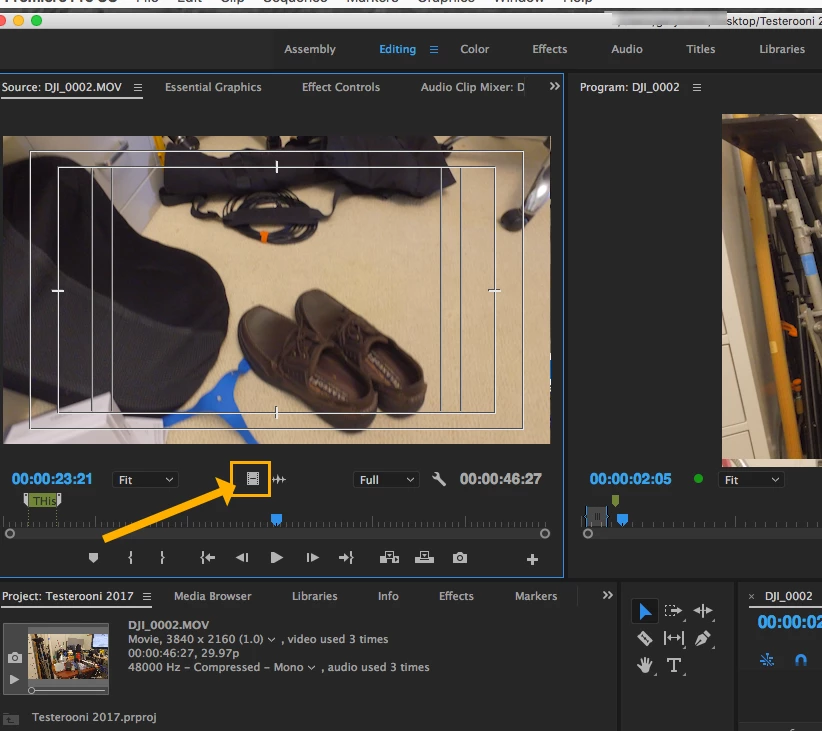
Either drag it from the source monitor to the timeline using this icon, which will drag video only:

\\

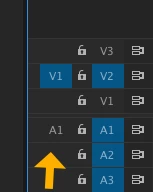
Or turn of the audio source routing on the timeline, so that only video is active:

MtD

2 replies

Ann Bens
Community Expert
Community Expert
August 11, 2017

Are you sure you dont want the audio.

If you do you will have an awfully job restoring.

Put it on a lower track and lock.

Zephyr13Author
Participant
August 11, 2017

Yes, most of the footage is from After Effects compositions that were exported without audio. They were just dragging in blank audio tracks that were sometimes overlapping the music and fx tracks I already had in the project and generally being annoying.

Ann Bens
Community Expert
Community Expert
August 11, 2017

In AE you can turn off audio for export.

Meg The DogCorrect answer
Inspiring
August 11, 2017

Either drag it from the source monitor to the timeline using this icon, which will drag video only:

\\

Or turn of the audio source routing on the timeline, so that only video is active:

MtD