
Participant
April 1, 2017
Answered

Made video in shadowplay, only getting audio in Premiere Pro CC 2017

  • April 1, 2017
  • 2 replies
  • 1590 views

I am using ShadowPlay to record videos and Adobe Premiere Pro CC 2017. When I import the mp4 that ShadowPlay produces I am only able to get the audio of the file. When I right click it and open it in Source Monitor I do see the video but not if I drag the file to a track, only the audio part will be put in the track.

I used GSpot to get some codec info but I am still clueless:
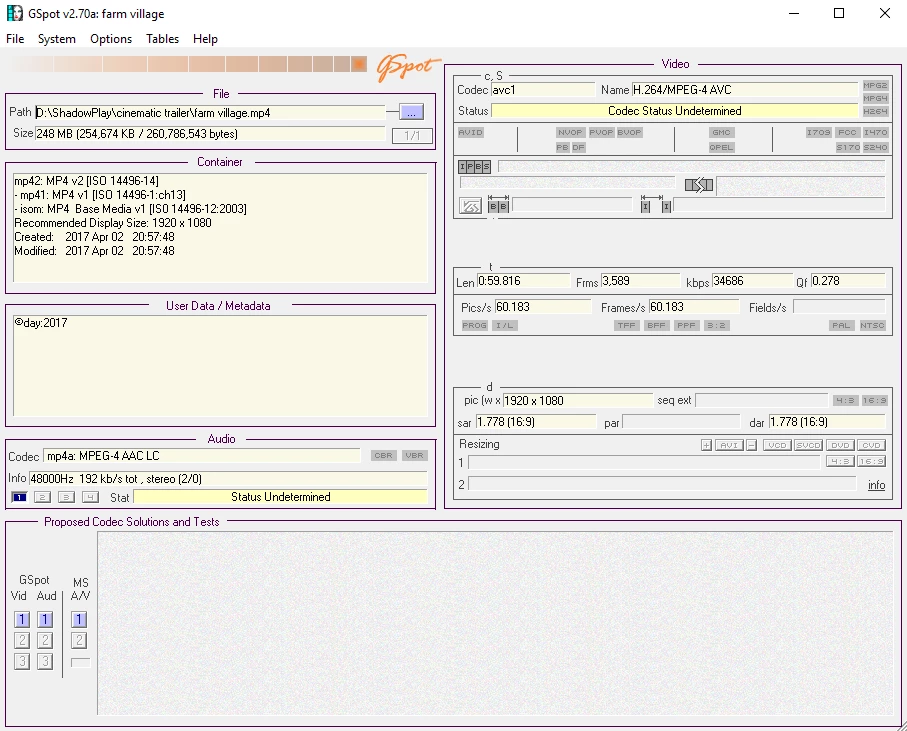
I have tried things people mentioned such as renaming it to a .mov but nothing has helped me.
    This topic has been closed for replies.
    Correct answer Ann Bens

    First of all you need to convert the file with Handbrake to constant framerate (gpot shows variable framerate which Pr does not like)

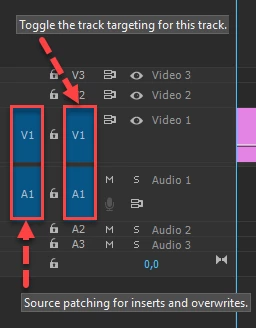
    Then you need to be sure your tracks are source patched. (hence no video in timeline)

    2 replies

    Ann Bens
    Community Expert
    Ann BensCommunity ExpertCorrect answer
    Community Expert
    April 1, 2017

    First of all you need to convert the file with Handbrake to constant framerate (gpot shows variable framerate which Pr does not like)

    Then you need to be sure your tracks are source patched. (hence no video in timeline)

    R Neil Haugen
    Legend
    April 1, 2017

    Not familiar with ShadowPlay, but that sounds like an issue with VFR ... variable frame-rate ... media. PrPro doesn't work too well with VFR, it prefers a constant frame rate.

    Download MediaInfo, open it, drag/drop a clip onto it, go into Tree view, make a screen grab of the video section like this, and post that in your reply ...

    Neil

    Everyone's mileage always varies ...
    jsoft_555Author
    Participant
    April 1, 2017

    Hi, thanks for quick answer. ShadowPlay is something that comes with the Nvidia Gforce Experience and has these settings:

    The MediaInfo data looks like this:

    R Neil Haugen
    Legend
    April 1, 2017

    As Ann noted, go down to the "frame rate mode" line ... variable.

    Yup, convert the video section to CFR via Handbrake before importing.

    Neil

    Everyone's mileage always varies ...