
Participating Frequently
August 25, 2012
Question

Premiere Pro CS3 on Windows 8 Enterprise - File Format Not Supported

  • August 25, 2012
  • 9 replies
  • 20707 views

Hi guys,

Some time ago I installed the Adobe Master Collection CS3 on the Windows 8 Release Preview. I had a number of problems and gave up, however as the final version of Windows 8 is now available as a 90 day trial I thought I'd try again. I know this isn't supported but I'd like to upgrade from Windows 7 to 8 and I can't afford to upgrade Master Collection, so I figured I'd see how far I can get.

  • So, I've made a clean install of Windows 8. I've put iTunes and QuickTime on it. I've not installed any Codecs (except those that would come with these).
  • I've opened Premiere Pro CS3 and tried an old project file. It opened but insisted a large number of media files were offline.
  • I tried opening the files in Windows - they run okay.
  • I made a new project file in Premiere and tried to import, but received:
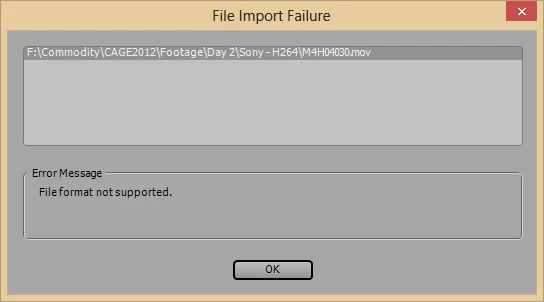
These are files that previously imported correctly under Windows 7. They're ones I encoded into H.264 using MPEG_StreamClip. File details:
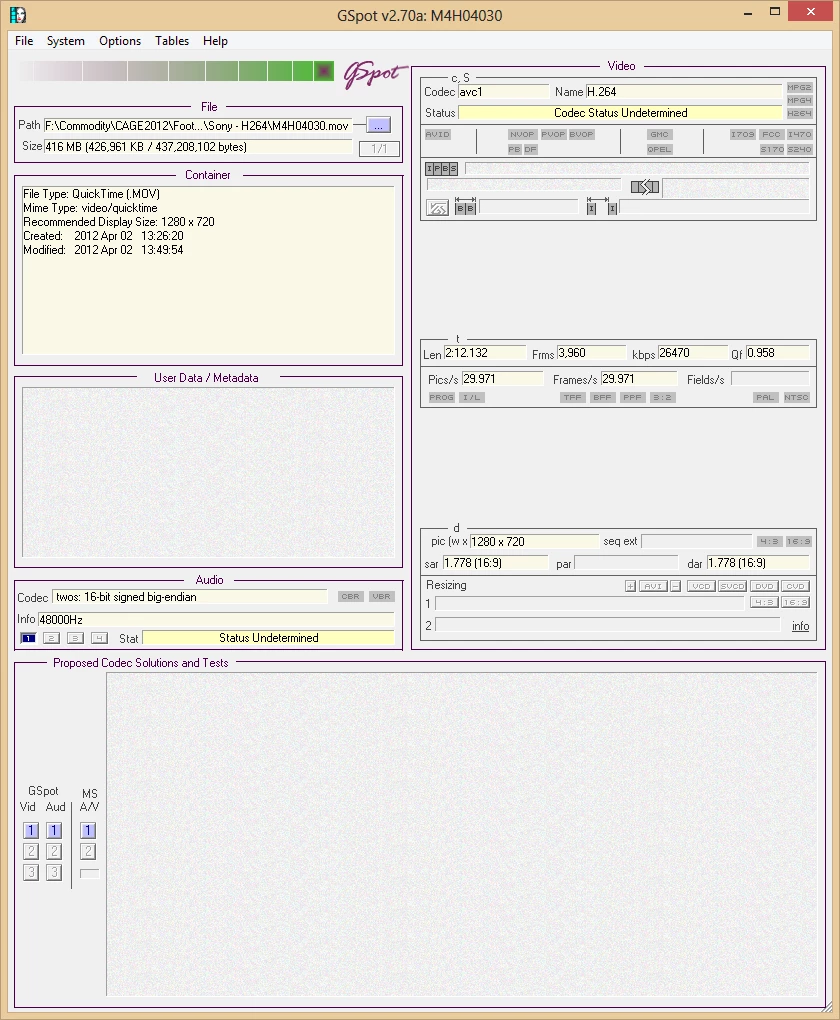
So it looks like the codec is missing, is that the problem? I'm a bit unconvinced as I can run the videos in Windows. Is there a codec I should try?

I've installed Windows 8 on a partition so I'm happy to play around with this providing I can still deactivate the Master Collection at the end. I'm going to be away for a couple of days next week so apologies in advance if I don't answer straight away 🙂

Stu.

Message was edited by: Stuart Clark (images reinstated)

This topic has been closed for replies.

9 replies

John T Smith
Community Expert
Community Expert
September 16, 2012

Even the much newer, and 64bit, Premiere Elements 10 does not seem to work properly with Win8

http://forums.adobe.com/thread/1066799

I don't know what Microsoft did, but it seems they changed Win8 "enough" to cause problems with some programs... at least, with Premiere


MoonKlashAuthor
Participating Frequently
September 17, 2012

Thanks John - that's very interesting and for my own sanity I'm glad to see I'm not the only one having problems. I have to admit I hadn't expected there to be much difference in installing Premiere CS3 on Vista or 7 (as it wasn't designed for those either) however it looks like there's definitely been some tweeks that are causing a few issues.

Of course, CS3 is old now and I was expecting something not to work, hence the testing before upgrading. I think that when Windows 8 finally goes on sale I may end up dual booting, at least until there are some ways around the problems.

Just found this:

http://www.microsoft.com/en-us/windows/compatibility/en-US/CompatCenter/ProductDetailsViewer?Type=Software&Name=Adobe%20Premiere%20Pro%20CS3&Version=3&Vendor=Adobe&Locale=en

And this:

http://www.microsoft.com/en-us/windows/compatibility/en-US/CompatCenter/ProductDetailsViewer?Type=Software&Name=Adobe%20Creative%20Suite%203%20Master%20Collection&Version=1&Vendor=Adobe&Locale=en

Amusing(ish) that Microsoft indicate the Master Collection is compatible with Windows 8, but Premiere needs to be upgraded :-S

John T Smith
Community Expert
Community Expert
September 17, 2012

Dual booting is certainly a viable option... I have an old Pinnacle DV500 digitizer card that will not work with Win7 due to the old device drivers

Every now and then I find an old VHS tape stuck away in a box (amazing how things can get misplaced while moving, and you only find A when you are looking in a box for B) so I dual boot my computer with WinXP and Win7

I don't restart very often, and Win7 is the "default" so when a Windows update does an automatic restart it all goes back to Win7... works for me

MoonKlashAuthor
Participating Frequently
September 6, 2012

Today I was more careful with my imports and discovered that it isn't the H.264 encoded files that are the problem - it's a batch of 200 motion-jpg encoded .mov's I'd forgotten about! When Premiere tries to import these it causes Premiere to mess up - CPU activity continues but nothing really moves forward.

At least now I know this I can convert these to a different format, although I have to say I'm surprised as I've not heard of Premiere CS3 having issues with motion jpeg before!

John T Smith
Community Expert
Community Expert
September 6, 2012

Some saved links... and which MJPEG codec do you have installed?

1st link is an article by Bill Hunt that may help

MJPEG http://forums.adobe.com/thread/730396

- problems with Samsung codec http://forums.adobe.com/thread/699493

- and Fuji http://forums.adobe.com/thread/1015922

MoonKlashAuthor
Participating Frequently
September 6, 2012

Ah interesting - thanks John! I've just logged on to my home PC and taken a look. Wasn't sure of the best way to check so I've loaded Windows Media Player, gone to Help => About and taken the following from the "Technical Support Information" link:

I can't see it listed - I've not installed anything specifically for this (but I don't think I had to under Windows 7). It is (from memory) a Fujifilm FinePix S5200 so you may already have supplied the answer in the Fuji link - I'll check it out!

MoonKlashAuthor
Participating Frequently
September 5, 2012

Tested assets:

  • Audio imported okay
  • PSDs imported okay
  • JPG photographs imported okay
  • But H.264 encoded .mov files are taking hours to import even a small percentage (but appear to still be running).

Initial conclusions: something in Windows 8 is making it hard, but not impossible, for Premiere CS3 to import my movie files.

MoonKlashAuthor
Participating Frequently
September 4, 2012

Okay, the file froze at the same point.

I tried opening another file which had footage made on the same camera.

This froze at the same point - but then managed to move on and opened the file.

So I'm not sure where this leaves me - does that mean the problem must be with a particular asset? Still not sure why this opens some projects but not others.

MoonKlashAuthor
Participating Frequently
September 4, 2012

Although if it were just an asset, would Premiere simply report an error and skip it? The strange thing is that even though it can hang for days, there's still activity showing in task manager and the system resource screen.

Sorry for all the waffle, I'm just trying to log all my tests for my benefit and for anyone else that has the same issue in the future.

MoonKlashAuthor
Participating Frequently
September 4, 2012

Just found something out which may be relevant.

It ocurred to me that, since I only accessed some folders via Windows File Explorer when I was using Windows 7, 8 may not have permission to access all those folders (for example, this message):

I decided to go a-clicking through all my project folders, and suddenly I noticed there were preview folders created when Premiere tried to open the project:

Under Windows 7, to help me manage disc space easily I set Premiere to use a seperate drive for scratch, media etc, which means the folders of pointed arrows to above must have been created under my Windows 8 installation. I'd forgotten to apply these settings in Windows 8. I opened Premiere, created a new file so I could access the settings. I checked Premiere and the file paths look a bit messed up:

I corrected these:

I cleaned the Media cache (which points to C so I'm guessing it should be okay):

- And now I've tried opening the file again. No change so far though but I'll leave it running :-(

Any other ideas?

MoonKlashAuthor
Participating Frequently
August 31, 2012

Tried leaving it open over night. It just hangs on the Load Project screen :-(

John T Smith
Community Expert
Community Expert
August 31, 2012

Can you create a new project and either (1) import the old project [sometimes will "fix" a corrupted project] or (2) just work with the new project, importing the video files?

When I still had CS3 I never worked with anything other than DV AVI video, so I really can't help with the files you have

MoonKlashAuthor
Participating Frequently
August 31, 2012

Hi John,

It hadn't occured to me to create a new project file and import the old one into it - I guess I do that as if it were any other asset? I'll certainly give that a shot. 

I won't try to recreate the old movie from scratch because it's quite complicated (for me, anyway!) and it's finished. I'm just making sure both new projects and old will run fine if I upgrade to Windows 8 in October, so this is more of a test before I upgrade than anything else.

I only realised yesterday that CS3 wouldn't have all of the patches applied (I believe that because this is an old version they don't update automatically). I downloaded and installed all the patches from Adobe yesterday before trying to open the file in the screenshot above but alas, no change :-(

I need to research this, but I'm really hoping Premiere has some kind of error log hidden somewhere. If I can identify what file it's struggling with I'll be one step closer to finding out why it's doing this under 8 when it didn't under 7.

MoonKlashAuthor
Participating Frequently
August 30, 2012

Very quick update for you, however I tried opening a couple of project files from earlier projects. These seemed to hang forever.There were a lot of H.264 .mov's.

I'd expect these to work as they run in Premiere Pro CS3 on Windows 7. It's possible these aren't the cause, and that it's a different asset - are there any logs recorded in Premiere Pro CS3 that would indicate what asset may be causing it to hang?

Legend
August 25, 2012

I've got the CS6 suite running just fine under the Release Preview.  No compatibility adjustments were required.

The larger issue may be that H.264 in an MOV wrapper is a fairly new format used mostly by DSLR's, support for which wasn't really added to PP until CS5.

John T Smith
Community Expert
Community Expert
August 25, 2012

Since you have Quicktime installed, your MOV file "should" open

Are you using any compatibility settings to run that "old" CS3 on the "new" Win8?

Go to http://search.microsoft.com/search.aspx?mkt=en-US&setlang=en-US and search for Win8 compatibility settings

MoonKlashAuthor
Participating Frequently
August 25, 2012

Ah no - that’s a very good point, I wasn’t.

Just cooking ATM but I’ll try that over the weekend and see what happens. It’s very strange as the movie does open in other programs, it’s just Premiere that doesn’t appear to like it.

Sent from Windows Mail