
Participant
August 30, 2018
Question

Premiere Pro CS6 Entry Error HandlerTitler.dll

  • August 30, 2018
  • 1 reply
  • 1271 views

I am getting the following error trying to run Premiere Pro CS6:
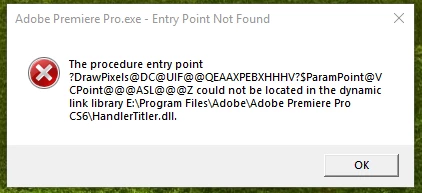
I have uninstalled/reinstalled, used the CC Cleaner, pretty much everything I could find in the forums to no avail.

I have a Windows10 Pro system, Intel7 processor, AMD Radeon 480 graphics card, 32Gb RAM, OS and all drivers are up-to-date.

Any Suggestions?

This topic has been closed for replies.

1 reply

John T Smith
Community Expert
Community Expert
August 30, 2018

Two ideas that MAY work to install and/or run old programs in Windows 10

-RIGHT click the program icon or EXE and select a compatibility mode in the pop up option window

-or Run as Administrator http://forums.adobe.com/thread/969395 to assign FULL Windows permissions may help... this says Encore, but is sometimes required for ALL Adobe programs (this is NOT the same as using an Administrator account) so follow the instructions, substituting the name and location of your specific program for Encore

Search bar at the top of http://www.microsoft.com/en-us/default.aspx to find and re-install the C runtime

Participant
August 30, 2018

I have tried all that to no avail. Which C runtime should I install? If I have the incorrect runtime, wouldn’t the other programs in the Suite also not work?

John T Smith
Community Expert
Community Expert
August 30, 2018

Check at the Microsoft link I posted... as far as I know (my runtime doesn't have any problems) you use the runtime for your version of Windows