
Participant
May 30, 2019
Answered

Premiere and After Effects Viewport / Preview Graphics Driver Problem

  • May 30, 2019
  • 4 replies
  • 1126 views

Hello guys,

I have a massive issue since months and now I had to struggle with it because I have a little job with Premiere and AE to finish.

The problem occured as I build up a new computer and installed the new adobe CC. The viewport wasnt showing something, so I tought it was a codec problem. after installing some codec packs, the problem still remained.

Yesterday I deinstalled the graphics card drivers (960 gtx) and after a short restart of the computer, it installed some drivers automaticly and premiere was running perfectly. (I didnt reinstall premiere in the time, so it was surely some sort of a graphics card driver problem)

I saved the project after cutting a first draft and got to sleep.

The next day, starting premiere, the problem occured again... This time it didnt work to do the same thing.

Since then I reinstalled graphics card, testing other cards in the computer, chacking bios, reinstalled both premiere and AE but still the same issue.

I also switched from CUDA to software. No results. AE is crashing by doing this (even when the project only includes a fresh sequence with noting in it)

I found a lot stuff in the internet about black screens or slow timeline stuff but nothing about this.

As you can see, the window is tiling where the video sould be when I resize the window.
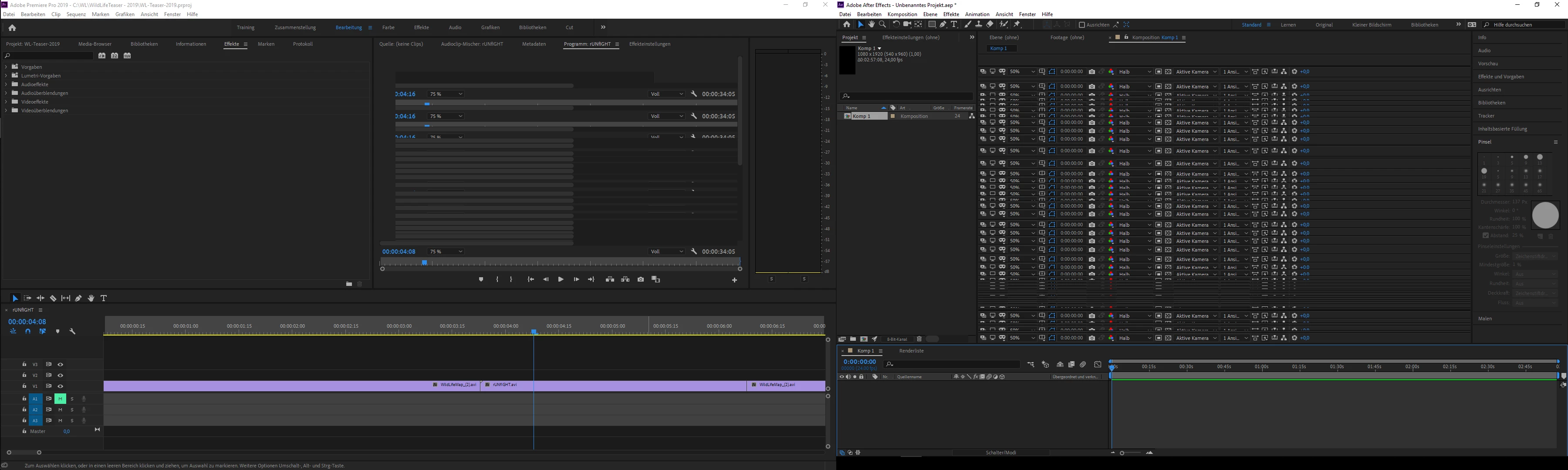
Photoshop is working nicely.

One other very suspicious thing is, that premiere isnt closing properly. It remains in the task manager with 8-9% cpu workload. I believe this is connected to my problem.

Short update: While writing this, I killed some NVIDIA Containers from the task manager and started premiere again. First an empty project and put a color layer into it and because this worked, I started my project and it worked too.

I will work with that and try to not close it but would be nice to find a permanent solution for this.

Maybe this is not the right forum, because it is clearly a graphics driver problem but I think it is connected to what AE and premiere are trying to do with it.

    This topic has been closed for replies.
    Correct answer alicank70084482

    meanwhile I installed a RTX 2070 with 8gb vram. The problem is still there. When I close premiere, it remains in the task manager with 8-9% of cpu usage.

    EDIT: The problem was nahimic/realtek sound driver. I came to the solution because houdini was also crashing with the report of a segmentation failure.

    Updating to the newest sound driver (it restarts the computer twice) solved the problem. Now Premiere works properly and doesnt stay in the task manager with 8-9% cpu usage.

    4 replies

    alicank70084482AuthorCorrect answer
    Participant
    August 3, 2019

    meanwhile I installed a RTX 2070 with 8gb vram. The problem is still there. When I close premiere, it remains in the task manager with 8-9% of cpu usage.

    EDIT: The problem was nahimic/realtek sound driver. I came to the solution because houdini was also crashing with the report of a segmentation failure.

    Updating to the newest sound driver (it restarts the computer twice) solved the problem. Now Premiere works properly and doesnt stay in the task manager with 8-9% cpu usage.

    Participant
    June 1, 2019

    Okay guys,

    I played a little around.. Killed all Intel Graphics stuff and NVIDIA stuff from the computer, plugged off cpu graphics in bios and reinstalled only nvidia drivers (newest).

    Didnt work.. I also tried to put some seemingly missing registrys of opencl and nvopencl etc. Also no effect.

    Then I played with the adobe tools. I switched AE from Preview CPU to GPU. Now it works! Looks like there is no other problem in AE.

    Premiere is still making this move, but when I start a blank project first, then my project, it works.

    I have the 2GB version of the 960gtx and a 2gb 660ti. I guess you guys are right and it has to do with the GPU memory. As I said, when I start a blank project first, then my project, it runs. Maybe because premiere trys to start a lot stuff at once? I upgraded my computer entirely except the GPU. Everything is very fast. Maybe this difference causes the problem?

    I will buy a new GPU the coming weeks. Maybe this helps. For now I'm just happy that it runs in some way.

    Thank you guys!

    Legend
    May 30, 2019

    There were some GTX 960's that had 4 GB of VRAM. Yours might or might not have been one of those; however, more likely it had only 2 GB of VRAM.

    At any rate, the GTX 960 is itself a dog of a GPU, especially for the price that it retailed for when it was new. It was barely any more powerful than a GTX 750 Ti despite having 60% more CUDA cores.

    Averdahl
    Community Expert
    Community Expert
    May 30, 2019

    It seems to be an issue with the graphics card. It has 2GB memory and that´s the bare minimum for Premiere Pro and After Effects. It will work, but you may experience some lag.

    What other cards did you try and what was the result?

    Driver version?

    Adobe Premiere Pro System Requirements