
chrisb14187590
Participant
October 16, 2018
解決済み

Problem importing MP3 and WAV audio into Premiere Pro

  • October 16, 2018
  • 返信数 3.
  • 12859 ビュー

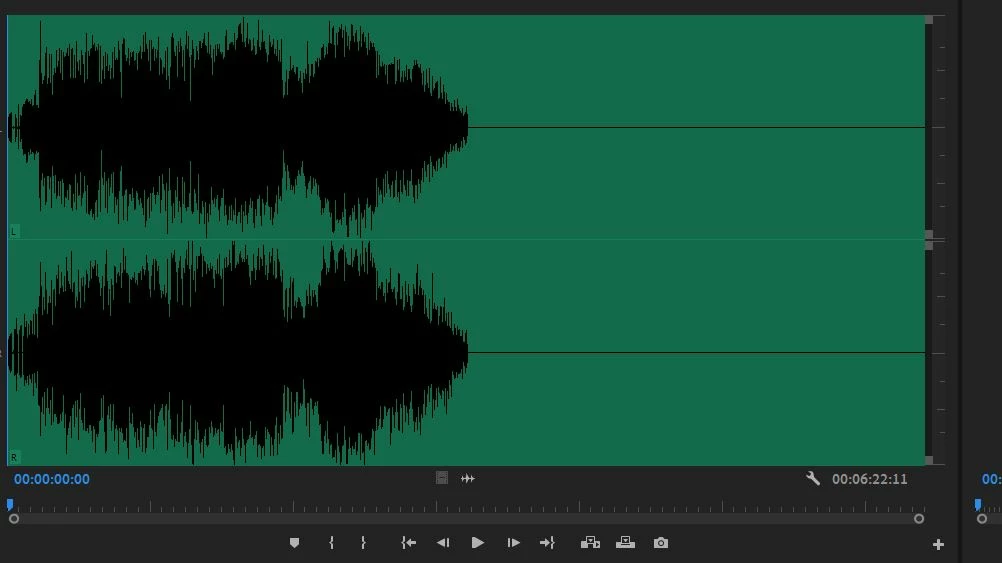
when i import an audio music track, the sound appears to be compressed into half the space. The second half of the space is silent! I have tried converting MP3 to WAV, it did work on one then failed on another. Anybody understand why? Thank you. Chris
このトピックへの返信は締め切られました。
解決に役立った回答 chrisb14187590

The problem was due to audio cache unable to create files to the present cache location. The very nice people at Adobe were able to solve it. Thank you to all who also suggested solutions.

返信数 3

LITPguam
Participant
March 5, 2019

I am also having this problem. In addition, after importing an audio file to the timeline, it plays back a segment of a previously recorded voiceover! I have no clue how to fix or address this problem and I cannot even build a video because of it. HELP!!! How did you get the folks at ADOBE to fix it?

Jeff Bugbee
Community Expert
Community Expert
March 5, 2019

Try making a copy of that audio file (outside of Premiere) and rename it something different, then bring it back into Premiere. Does the file playback correctly?

Participant
August 26, 2021

This worked for me, thank you. I was experiencing the same issue, only I lost the audio of the entire audio clip instead of half of it. It was occurring on both my PC and Mac. I didn't rename the file, but copy and pasted it somewhere else. I imported it into my project, and the audio was finally seen and could be heard.

chrisb14187590
chrisb14187590作成者解決!
Participant
October 18, 2018

The problem was due to audio cache unable to create files to the present cache location. The very nice people at Adobe were able to solve it. Thank you to all who also suggested solutions.

Participant
April 25, 2024

Could somebody please ellaborate on this? What might be preventing Premiere from writing to the cache file location?

Participant
April 25, 2024

Aha, luckily I was able to solve the problem by clearing the media cache. For those of you who don't know, you can do this by holding the "ALT" key ("Option" for Mac) while opening Premiere, and then clicking "Clear Media Cache". 

Jeff Bugbee
Community Expert
Community Expert
October 16, 2018

Are you positive this audio file has audio to the very end?

chrisb14187590
Participant
October 16, 2018

yes, the audio track on my hard drive is complete. Only when I import it,

it undergoes a change

On Tue, Oct 16, 2018 at 11:26 PM Jeff Bugbee <forums_noreply@adobe.com>

Jeff Bugbee
Community Expert
Community Expert
October 16, 2018

What version of Premiere does this occur in? The reason I ask is this happened to me a while back in CC2017. When I opened the file in CC2018, the entire file came in.

A quick workaround is to open the file in Quicktime and export as a WAV file, then import the WAV into Premiere.