

Show files' chroma subsampling & color bit depth (e.g., 4:2:0/8-bit) in project panel?
You can right-click and select "show properties" on files in the project panel (of source files), and this shows the chroma subsampling:
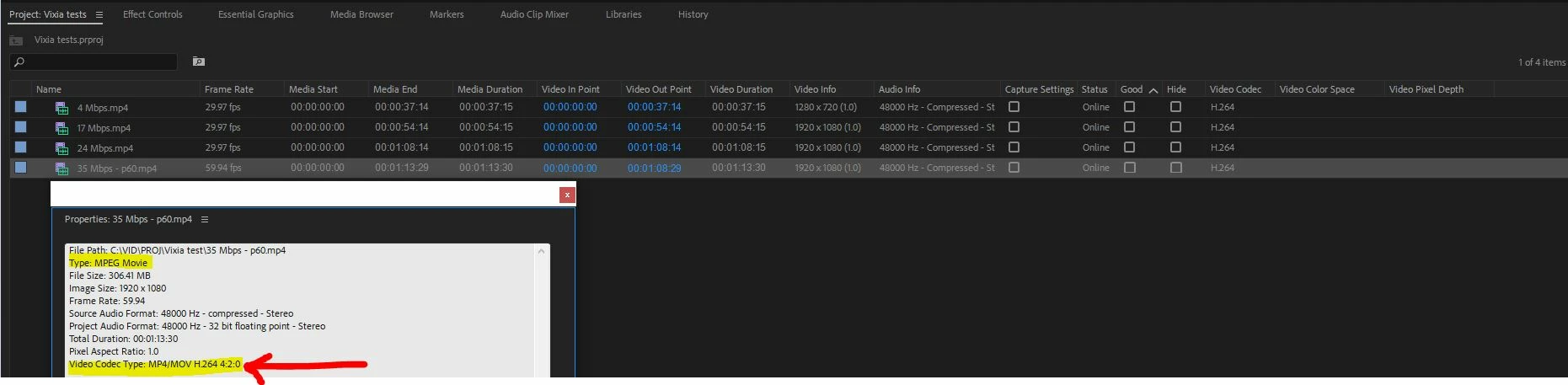
However, it does not show the color bit depth (8-bit, 10-bit, etc.). Can Premiere Pro provide color bit depth anywhere?
Also, it would be nicer if chroma subsampling (and color bit depth too) were simply columns we could set to display. For example, in the screenshot above, from the Metatdata Display options, under Premiere Pro Project Metadata, I turned on the column for Video Codec (near the bottom of that long list), and this shows "H264" ... but not the chroma subsampling or color bit depth.
I've looked around a bit, without luck. Is there other columns somewhere that have chroma subsampling and color bit depth?
 AdChoices