
alexc76805555
Participating Frequently
September 13, 2018
Answered

Slip tool frame accuracy & preview windows

  • September 13, 2018
  • 2 replies
  • 1536 views

Hardware:

MacBookPro11,5

  Processor Name: Intel Core i7

  Processor Speed: 2.5 GHz

  Memory: 16 GB


AMD Radeon R9 M370X:

Intel Iris Pro:

Mac OS X 10.11.6 El Capitan

Hi, I have a couple of issues that I thought might be rectified with updates, etc. I can't believe I'm the only one with the issue, but I can't find any discussions here specifically.

Basically, the slip tool preview windows are small if I have resized the source image. I used to get two screens filling the whole program monitor now I get two v small screens which are almost useless and sometimes a third or fourth screen meaning this function is next to useless.

Also when using the slip tool I notice I constantly have to amend one frame as the tool is no longer accurate, so I'll use the previews to find beginning and end of one shot then in the timeline that it will have a frame from an incoming shot. This happens ALL the time with the slip tool now and is a real pain in the proverbial.

Did anyone have any ideas? Is this a known bug, anyone else suffering?

Thanks for your support.
    This topic has been closed for replies.
    Correct answer Ann Bens

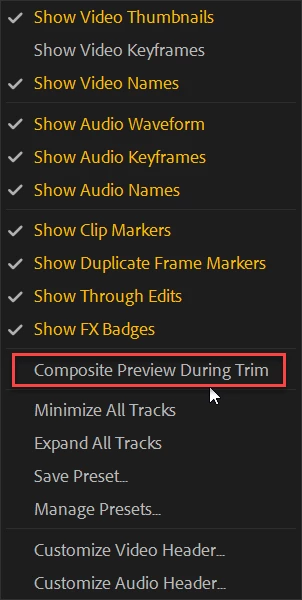
    Might want to turn off under the wrench in the timeline

    2 replies

    Ann Bens
    Community Expert
    Ann BensCommunity ExpertCorrect answer
    Community Expert
    September 13, 2018

    Might want to turn off under the wrench in the timeline

    alexc76805555
    Participating Frequently
    September 13, 2018

    Gahh! Thanks Ann!

    Any ideas about the frame accuracy?

    Ann Bens
    Community Expert
    Community Expert
    September 13, 2018

    I dont have a issue with frame accuracy.

    So dont know how to help.

    Post screenshot.

    Mike Dziennik
    Community Expert
    Community Expert
    September 13, 2018

    You will get a third or fourth screen depending on whether or not you have a clip before and after the clip you are slipping. The smaller monitors are just to show you a indication of what the next clip is - you are not slipping that clip so its preferable to having bigger monitors to display the first and last frame of the clip you are currently slipping. This appears to work fine for me and is designed that way as far as I can tell.

    If you are getting smaller preview monitors than expected, can you post a screenshot?