
thomasn58868057
Participant
January 18, 2017
Answered

Stretching the timeline on second screen with Premiere Pro on Mac

  • January 18, 2017
  • 2 replies
  • 1878 views

Hello there,

I have a question. After a long period of time I used a Mac. Last year I used a windows. Didn't work for me at all. But one thing I loved that

I could extend my timeline on 2 screens. But, now I can't.

Can anyone help me? I made a video to show you how it looks right now, can't extend it.

Premiere extend - YouTube      <--- clickable

And this is how it should look:

https://i1.creativecow.net/u/55950/photo1.jpg

(Crappy version though)

Thomas
This topic has been closed for replies.
Correct answer David Arbor

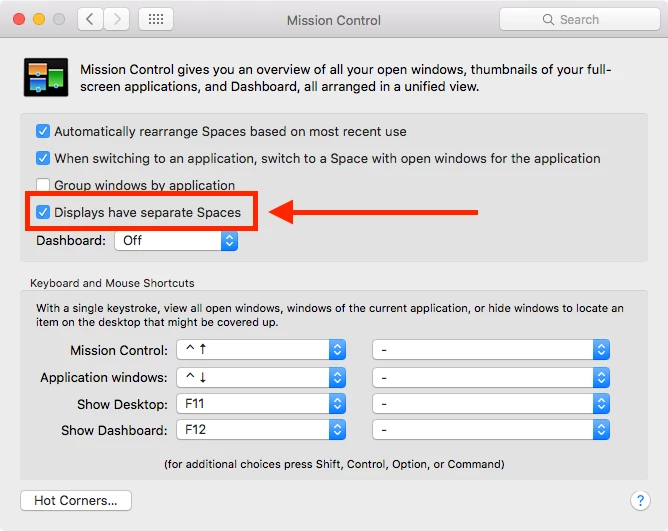
You have to disable the "Displays have separate Spaces" option in the Mission Control settings of the System Preferences. Then you have to log out. After you do that you can stretch any window across multiple monitors.

2 replies

thomasn58868057
Participant
January 18, 2017

Thank you so much! That's it!

Here is the result:

f80ffce594.jpg

David ArborCorrect answer
Inspiring
January 18, 2017

You have to disable the "Displays have separate Spaces" option in the Mission Control settings of the System Preferences. Then you have to log out. After you do that you can stretch any window across multiple monitors.