

Workflow with Essential Graphics templates and sharing with customers
Hi,
Before this upgrade, I used to create a Premiere Pro project file with a set of sequences where I included .aecap files to show what my clients could do with the templates. The .aecap files resided inside a folder in the project panel and clients duplicated these to make own work.
The .aecap files was placed in a gfx folder and zipped into a package which my clients could unzip and then relink the aecap files to use.
Whenever I made new versions of the aecap files, I sent them a new zip file which included an updated Premiere-project with new files. These zip files was versioned, so that they would know which version to use.
With the introduction of Essential Graphics and .mogrt files, I think I need to re-think my workflow.
The reason is that the .mogrt files need to be installed. Ok, so I'll install all of the .mogrt files, and place them into folders in the Essential Graphics browse panel.
If I zip this project and send it, the installed files will perhaps follow along in the local Essential Graphics library?
- Nope.
(Implement this, and my problem would be solved.)
How about installing all of the .mogrt files at once? Nope. So I'll have to say to my clients they have to install the templates one by one each time I send them an upgrade? At least 21 files every time. Not going to happen.
Ok. So I'll place all of the .mogrt files on a timeline like I did before. What happens?
Premiere creates a folder called "Motion Graphics Template Media"
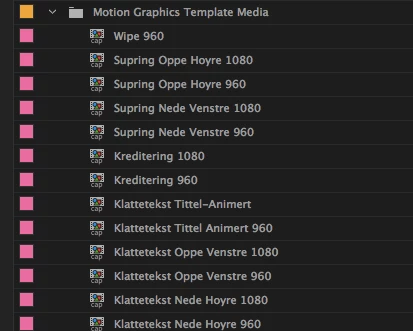
My clients would then not be able to use the Browse panel in Essential Graphics. But is this going to work?
I save my project together with a folder Premiere has created in my project folder, also called "Motion Graphics Template Media" to a new location, and disconnect my computer from the network I created my "master" project on.
Opening up the duplicate on a different computer - in the previous version using aecap files - this would have Premiere prompt for relocating files. I had them organized in a folder I had created myself (with different folders for different resolutions) - not a temp folder Premiere now has created for me.
What happens now is that premiere is offlining all of the files inside Motion Graphics Template Media.
I right-click on the folder and chose relink. Premiere now asks me to relink files within folders with a temp name.
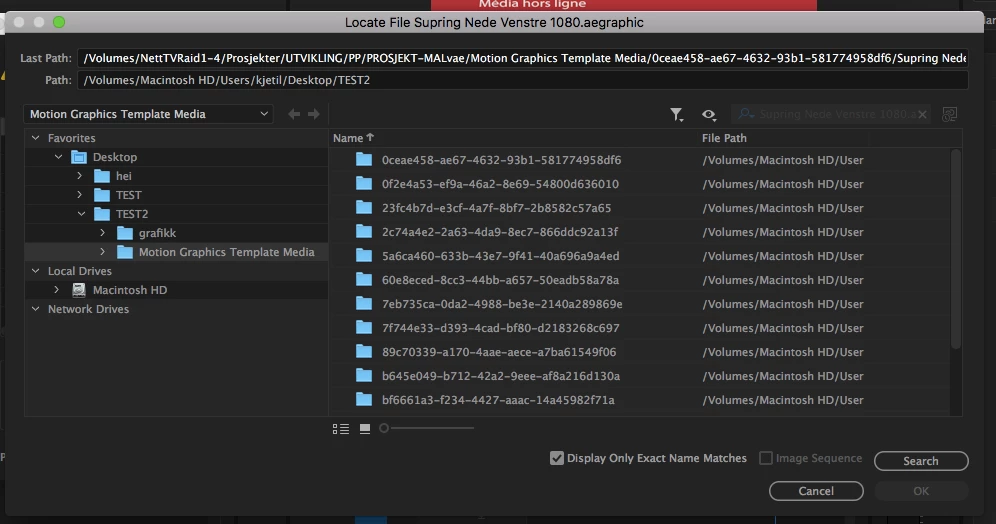
Once I found one of the files (now called .aegraphic  ) by looking at the temp folder names, Premiere finds the other files.
Now. This worked. But this not only seems like a bad workflow. It also seems unprofessional to start the application with a project showing nothing but "Media offline" and have to ask clients to relink to folders with temp names.
The one thing I haven't mentioned here is Creative Cloud Libraries - but I just wanted to share with you my old workflow - and frankly, I am not sure all of my clients would have access to CC Libraries because of strict firewalls. We have also have had problems with sync issues when testing Creative Cloud folders in the past. But I will test this as well and post back.
 AdChoices