
heikes48930578
Participating Frequently
March 5, 2025
Question

Abrechnungsproblem

  • March 5, 2025
  • 3 replies
  • 1342 views

Hallo Community,


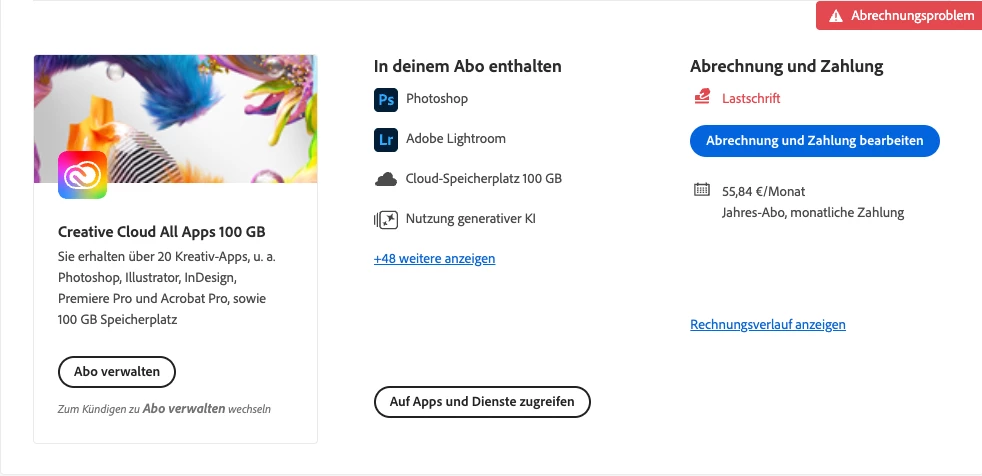
offensichtlich scheint es bei meinem Creative Cloud Abo 100 GB ein Problem mit der Verbuchung meiner Zahlung zu geben. Obwohl der Betrag der letzten Rechnung vom 27.02.2025 bereits von meinem Konto abgebucht wurde, erscheint beim Öffnen einer PDF-Datei oben rechts „Abrechnungsproblem“.


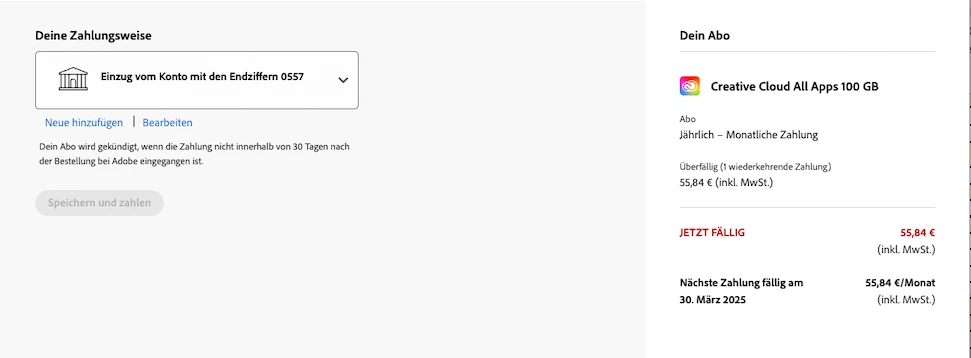
Bei einem Klick darauf, werde ich zu einem Fenster geleitet, auf dem unter Abrechnung und Zahlung ein blauer Button „Abrechnung und Zahlung bearbeiten“ steht. Von dort aus geht es auf eine Seite, die mich aufgefordert meine Zahlungsweise zu bearbeiten.


Da der Rechnungsbetrag der letzten Adobe-Rechnung allerdings schon von meinem Konto abgebucht wurde, verstehe ich diese Aufforderung nicht und möchte auch nichts an der jetzigen Zahlungsweise ändern.


Was ist da also los, der Rechnungsbetrag der letzten Rechnung ist abgebucht und die nächste Rechnung erst Ende März fällig?


Ich würde mich über eine Lösung des Problems freuen!
    3 replies

    Shivangi_Gupta
    Community Manager
    Community Manager
    March 5, 2025

    Hi @heikes48930578,

    We appreciate you writing in. I checked your account details and found that you have both individual and team's license associated with this email address.

    Also, your account shows payment related issues at my end too. Since this is a public forum, I may not be able to discuss this in detail here.

    I would recommend you to contact our support team and start a private chat session with them here: https://adobe.ly/43mYgrO

    Let me know if you have any questions.


    ^Shivangi

    heikes48930578
    Participating Frequently
    March 5, 2025

    Hi Shivangi.

    Thank you very much for your message, but the virtual Adobe assistant is unfortunately helpful for my problem in the smallest way. It's an hour-long back and forth without getting any further. This costs an infinite amount of time and for me simply has nothing to do with good support.

    As described, there was obviously and suddenly a problem with the booking of my payment with my Creative Cloud subscription 100 GB. This problem occurred for the FIRST time, although payments have always been debited from the same account for years and there have been no changes at all.

    As already written, the amount of the last invoice of 27.02.2025 was already debited from my account on March 3rd and yet when I opened a PDF file today, "billing problem" suddenly appeared in the upper right corner.

    Now that I have edited my payment method and entered my name and address, the message "billing problem" no longer appears.

    Please now make absolutely sure that the monthly payment is not debited a second time!!!

    I have and want only ONE license, as I only use it for my personal work. If, for whatever reason, there is suddenly a second license, please delete it immediately!

    Sincerely,

    <info removed-kglad>

    Shivangi_Gupta
    Community Manager
    Community Manager
    March 11, 2025

    Hallo Jeffrey,


    mein Name ist Christian und wir haben das selbe Problem wie Heike und auch wir haben das 100 GB-Abo. Am 6. März bekamen wir plötzlich eine Mitteilung beim Start von Acrobat DC, dass wir diese App nur noch bis 10. April nutzen könnten. Seit zehn Jahren wird ohne Probleme von unserem Bankkonto abgebucht - dies geschah zuletzt auch am 10. März 2025. Wir haben nie etwas an unseren Einstellungen geändert. Es ist also sehr seltsam, weshalb nun diese Meldung kommt. Das Geld wurde ja abgebucht...


    Vielen Dank im voraus für Ihre Hilfe,

    Christian  


    Thanks for reaching out, Christian. I can also see pending dues in your Adobe account at my end. Could you confirm when was the money deducted from your bank account? 

    We are here to help.


    ^Shivangi

    kglad
    Community Expert
    Community Expert
    March 5, 2025

    is that a screenshot from your account, https://account.adobe.com ?

    heikes48930578
    Participating Frequently
    March 5, 2025

    Yes.

    kglad
    Community Expert
    Community Expert
    March 5, 2025

    contact your credit card provider and ask if there's an adobe payment problem.

    kglad
    Community Expert
    Community Expert
    March 5, 2025

    in the future, to find the best place to post your message, use the list here, https://community.adobe.com/

    p.s. i don't think the adobe website, and forums in particular, are easy to navigate, so don't spend a lot of time searching that forum list. do your best and we'll move the post (like this one has already been moved) if it helps you get responses.


    <"moved from using the community">
    heikes48930578
    Participating Frequently
    March 5, 2025

    I would be very grateful if you could send me a link that would take me directly to where I can make a query in the community. Unfortunately, even after a long search, I could not find how to create a post?

    kglad
    Community Expert
    Community Expert
    March 5, 2025

    your post has already been moved to the correct (account, payment and plan) forum.