
Participating Frequently
May 9, 2023
Answered

Adobe forcing customers to change subscription plans?

  • May 9, 2023
  • 6 replies
  • 10480 views

Hello,


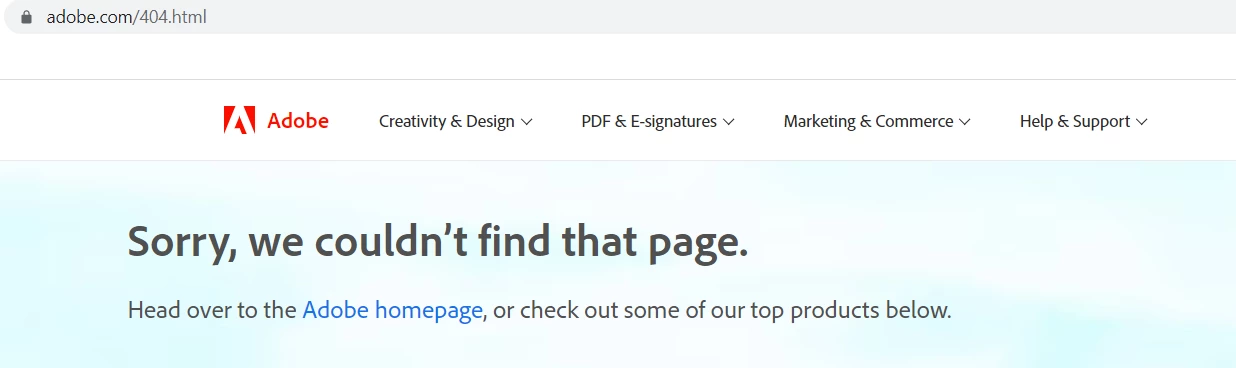
I was logging into Adobe.com to update my payment details and noticed that whilst the Adobe.com accounts page directs you to the Adobe Store to manage payments, I was getting constant errors no matter what I did:
 

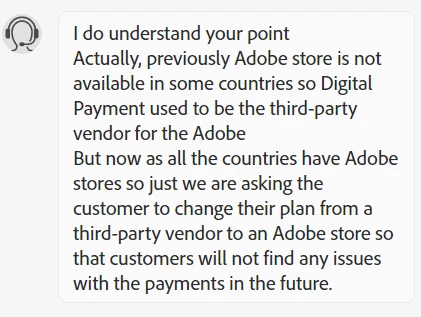
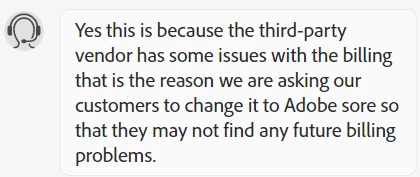
After speaking to two chat agents, I'm learning that Adobe previously outsourced my subscription to Digital River, since "Adobe Store were not available for some of the countries then digital river use to work for them to make the purchase as it is authorized by Adobe". Now since there's some relationship issue or payments issue or some issue between Adobe and Digital River, I can't update my payment details.


The chat rep then very kindly and smoothly offers to cancel my current subscription and re-subscribe me on the Adobe.com direct subscription because it will resolve my payments issues as no extra charge.


My frustration here is:

  1. Why wasn't this communicated to me as a customer? Why did I have to wait till there was some issue with payments to find out from a chat rep that this was happening?
  2.  When I probed to understand the context behind this, I don't get clarity beyond pre-packaged responses and an apology. I understand the rep's situation but I do also want to understand how my subscription T&C changes with this. Yet I can't get that answer out of the rep.
  3.  The way this has been managed feels like I'm being forced into a new contract with Adobe, under the pretense of 'oh we're making life easier for you! Check it out you can now make payments easily since we locked you out of the other one!'
 

I'd like to understand:

1. Are there others experiencing this issue as well?

2. Are there any concerns I need to be aware of with cancelling my current 'defunct' subscription, and signing onto a new one with Adobe.com directly?

This topic has been closed for replies.
Correct answer kglad

@marknicholas88 


contact adobe support. there are 2 ways to contact adobe; chat and twitter:

chat:
use a browser that allows popups and cookies
and click here, https://helpx.adobe.com/contact.html?rghtup=autoOpen
in the chat field (lower right), type AGENT
be patient, it can take quite a while to reach a human.

twitter:
tweet @AdobeCare

p.s. if you're contacted by anyone (via email or private message), it's much more likely to be a scammer than an adobe representative. ie, double check for an employee badge if contacted in the forums and look for an adobe.com domain in the email address if you click reply to an email. then check again and be very suspicious. any other method of contacting (or offering to contact you) is almost certainly a scam, https://community.adobe.com/t5/using-the-community-discussions/staying-safe-in-the-adobe-support-community/td-p/12919684/redirect_from_archived_page/true

6 replies

Participant
October 23, 2024

Same issue. And the rep was blatantly lying saying I bought subscription through Ditial River. Which i didn't as I boughtt my plan ages ago in Adobe's official website.

Participant
August 15, 2024

Hi, I have encountered the same issue. First, received an email saying 'Creative Cloud Membership Renewal has failed', and asking me to follow the link to the account to manage it. It appeared genuine except that the name in the email was the name on the credit card used, and not on the membership, but that had been the case when the membership was started as well. 


The account does not show any billing information, but asks to go to Adobe store, just like yours did. And the link to the store is broken - there is a 404 error there. 


So I reached out to the customer care through the help and support section. Even before I explained my problem, the agent messaged "I would like to inform you that earlier your country did not have an Adobe direct store, so you purchased the plan from our payment partner, i.e. Digital River store. But now Adobe has a direct store in your country, shall I change the plan that you have purchased from the third-party store and place a new order for the same plan and price from Adobe's direct store? Once I make the changes, it will be super easy for you to update the payment, download the invoice, and change the plan from your end the best part is we can collect the payment right away to proceed quickly and everything will be working then and you can manage all your account on your own. May I know if you wish to proceed with that?"


This kind of behaviour, when they push you to purchase or enter your credit card details, is typical of scammeres. And it continued throughout the conversation. No answer was given when I asked when the change was made or why customers weren't informed through the website or via mail. The Adobe store site reached through Google and a link given on the chat is extremely basic looking, very unlike Adobe. However, it does have previous orders stored there.

So my question is: is this a very sophisticated scam, in which hackers have taken over part of the Adobe website or simply really poor customer care from Adobe? Has everyone else's subscription continued smoothly after the change?


PS: Since the plan is being changed midway (it is a student teacher plan), I expect there will be a penalty - which the customer care person did not mention either.  

kglad
Community Expert
Community Expert
August 15, 2024

1. there's no penalty for changing plans.

2. no one forced you to accept adobe's offer

3. is there a current problem?

Participating Frequently
May 29, 2023

When we bought these plans we bought them from Adobe on the Adobe web site under our Adobe account. It is only after the transaction and you get the invoice / receipt by email that you are informed that the seller is Digital River. If Adobe have fallen out with Digital River then that is not our fault and the matter should be rectified by Adobe. 

There is a total lack of transparency on this. 

kglad
Community Expert
Community Expert
May 29, 2023

@marknicholas88 


do you own or administer a teams or enterprise subscription?

Participating Frequently
May 29, 2023

No I just have two personal plans. “Adobe Acrobat Pro” and “Photography Plan (20GB)”.

Participating Frequently
May 29, 2023

Did you manage to sort it out ?

Participating Frequently
May 29, 2023

Yes I am having exactly the same issue

kglad
Community Expert
kgladCommunity ExpertCorrect answer
Community Expert
May 29, 2023

@marknicholas88 


contact adobe support. there are 2 ways to contact adobe; chat and twitter:

chat:
use a browser that allows popups and cookies
and click here, https://helpx.adobe.com/contact.html?rghtup=autoOpen
in the chat field (lower right), type AGENT
be patient, it can take quite a while to reach a human.

twitter:
tweet @AdobeCare

p.s. if you're contacted by anyone (via email or private message), it's much more likely to be a scammer than an adobe representative. ie, double check for an employee badge if contacted in the forums and look for an adobe.com domain in the email address if you click reply to an email. then check again and be very suspicious. any other method of contacting (or offering to contact you) is almost certainly a scam, https://community.adobe.com/t5/using-the-community-discussions/staying-safe-in-the-adobe-support-community/td-p/12919684/redirect_from_archived_page/true

Participating Frequently
May 29, 2023

Thanks. I have been in contact with them most of today via the online chat. I got through to a human this evening who seemed to understand and said he will email me.  

kglad
Community Expert
Community Expert
May 9, 2023

i don't recall seeing other complaints like this, so it's not a common problem.  just how you got from adobe's website to digital river would is probably not reproducible.  in fact, it's not even understandable unless the adobe website detected you were in another country when subscribing initially.  were you?

Meow2212Author
Participating Frequently
May 9, 2023

Thanks for your response. Thought you might be right about it detecting i was in another country so i just tried logging into my account on a different computer. Same issue.

  • So I log into adobe.com using my adobe account and I'm able to log in.
  • There's then a pop-up that says the adobe site doesn't match my location. So I select the relevant location and two things happen:
    • It opens up a new window that results in an adobe "sorry we couldn't find that page" error; and
    • In the initial page, I get taken to my adobe account page. The one that lets you manage you subscription plan, edit your profile etc.
  • From here, the Adobe FAQ pages say that if you want to change your billing/payment details, you've got to click "Go to Adobe Store"
  • This again results in a new window popping up with an Adobe "sorry we couldn't find that page" error


To clarify, I didn't end up on Digital River's site at any point in this journey. I just learned from the chat agents who helped check on my account that my adobe subscription was signed up through Digital River, as they were the partner vendor for my country when the adobe.com stores weren't available in my country previously.

So this then takes me back to the 2nd paragraph on my previous post - that the issue here is there's some kind of issue between Adobe and Digital River, and that's resulting in me not being able to access the relevant Adobe Store pages to change my payment details.

Up until today when I spoke with the chat agents, I've been able to do everything like a normal subscriber would be able to - access my account pages (which I still can), and access the billing page to adjust payment details (which I now can't).

What's annoying is that there doesn't seem to be any explanation nor fix beyond "just cancel your subscription, and we'll sign you up with adobe.com". 

Hope that makes a little more sense?

kglad
Community Expert
Community Expert
May 9, 2023

see if you can get adobe.com to correctly recognize your country:


The country associated with your adobe id must match the store you purchase from and must match the payment address. otherwise, change what's necessary:


change your country on adobe.com, https://www.adobe.com/international/selector/


change country associated with adobe id - https://helpx.adobe.com/x-productkb/policy-pricing/change-country-associated-with-adobe-id.html


change credit card and/or billing address, https://helpx.adobe.com/manage-account/using/update-billing-information.html


change currency - https://forums.adobe.com/thread/1999694 change store - http://www.adobe.com/store_selector/storeselector.html


change adobe.com website language - https://forums.adobe.com/thread/1999693