
Participant
May 8, 2025
Answered

Cancelación de cuenta Adobe

  • May 8, 2025
  • 2 replies
  • 636 views

Ayer 07/05/2025 finalizó mi suscripción gratuita de Adobe, debido a que no hice uso de ella (nunca se instalaron las funciones extras), olvidé hacer la cancelación de la suscripción en los días pasados. Hasta el día de hoy 08/05/2025, quise realizar la cancelación, por obvias razones de política ya no me dejó cancelar.

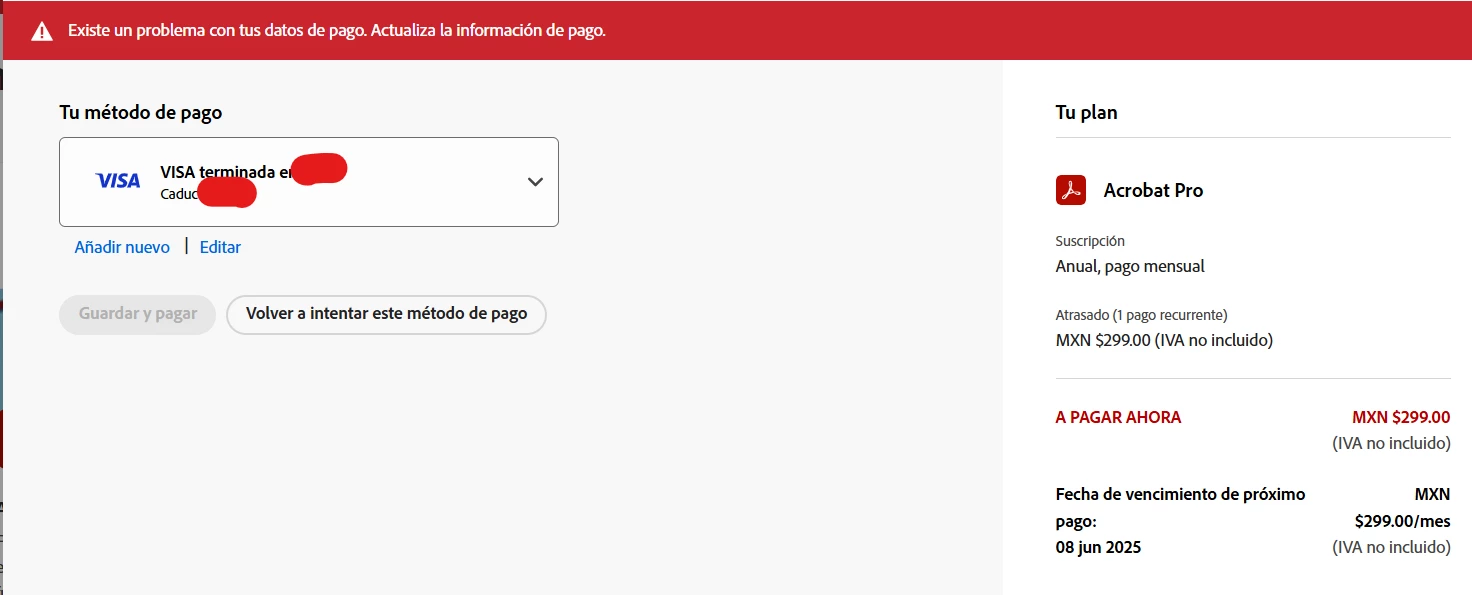
La cuestión aquí es que, debido a que yo tengo mi tarjeta VISA "apagada" (es la tarjeta digital) el pago no fue procesado y éste fue rechazado.


Investigué un poco y leí que puedo realizar el pago y pedir un reembolso de mi dinero (aún no pasan los 14 días), y así mismo también puedo cancelar mi cuenta sin costo extra.


Entonces mis dudas aquí son (¿qué me conviene más?);

1.- ¿Me conviene pagar los $299 (pesos mexicanos) y pedir un reembolso inmediatamente (y cancelarla después)?


2.- ¿O es mejor que no active mi tarjeta VISA y esperarme a que Adobe me cancele mi plan?

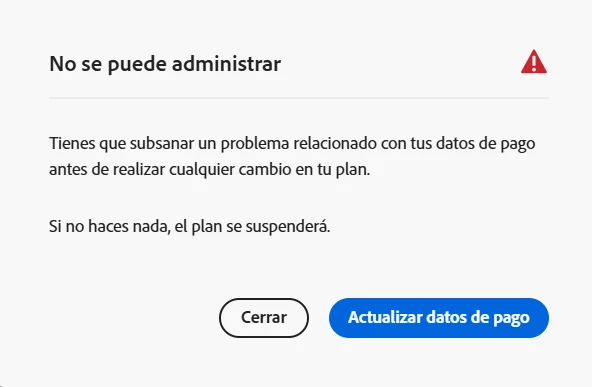
De la segunda pregunta, escribí eso debido a que en la página de Adobe me aparece un anuncio que dice; " Tienes que subsanar un problema relacionado con tus datos de pago antes de realizar cualquier cambio en tu plan. Si no haces nada, el plan se suspenderá", a lo cual, supuestamente si no realizo el pago mi plan se cancela automáticamente.


Correct answer kglad

you should fix your payment, https://helpx.adobe.com/manage-account/kb/fix-failed-missed-payment.html


and then cancel:  make sure you're aware of the cancellation terms by selecting your plan type (at the top of the page here), https://helpx.adobe.com/manage-account/using/creative-cloud-subscription-terms.html


and for info on how to cancel your subscription, this page describes the few steps involved, https://helpx.adobe.com/manage-account/using/cancel-subscription.html

p.s. if you're contacted by anyone (via email or private message), it's much more likely to be a scammer than an adobe representative.


if you're unable to follow the steps described, you'll need to await help from an adobe employee for the next step.  (if you don't get a reply here from a badged employee within 24 hours, repost.)

2 replies

Shivangi_Gupta
Community Manager
Community Manager
May 9, 2025

We appreciate you reaching out, @jovany_8274.
As @kglad mentioned, cancellation can only be done once all dues are cleared. Please follow the articles as the expert has shared above. 


^Shivangi

kglad
Community Expert
kgladCommunity ExpertCorrect answer
Community Expert
May 9, 2025

you should fix your payment, https://helpx.adobe.com/manage-account/kb/fix-failed-missed-payment.html


and then cancel:  make sure you're aware of the cancellation terms by selecting your plan type (at the top of the page here), https://helpx.adobe.com/manage-account/using/creative-cloud-subscription-terms.html


and for info on how to cancel your subscription, this page describes the few steps involved, https://helpx.adobe.com/manage-account/using/cancel-subscription.html

p.s. if you're contacted by anyone (via email or private message), it's much more likely to be a scammer than an adobe representative.


if you're unable to follow the steps described, you'll need to await help from an adobe employee for the next step.  (if you don't get a reply here from a badged employee within 24 hours, repost.)

Participant
May 15, 2025

Hola amigo, ¿al momento que realice la cancelación, la devolución de mi dinero se aplica automáticamente? 


¿O debo realizar algún otro paso para solicitar mi devolución?

kglad
Community Expert
Community Expert
May 15, 2025

@jovany_8274 


you have two email confirmations from adobe.  


one for the trial start: what's the date shown on that email?

one for the cancellation: what's the date shown on that email?