Participant
February 20, 2023
Answered

Cant cancel my trial period

  • February 20, 2023
  • 1 reply
  • 644 views

Hi! 

I cant cancel my trialperiod, it says that i have 3 days left and when im trying to cancel it on my profile i cant see any plans or the "manage plans" button. 


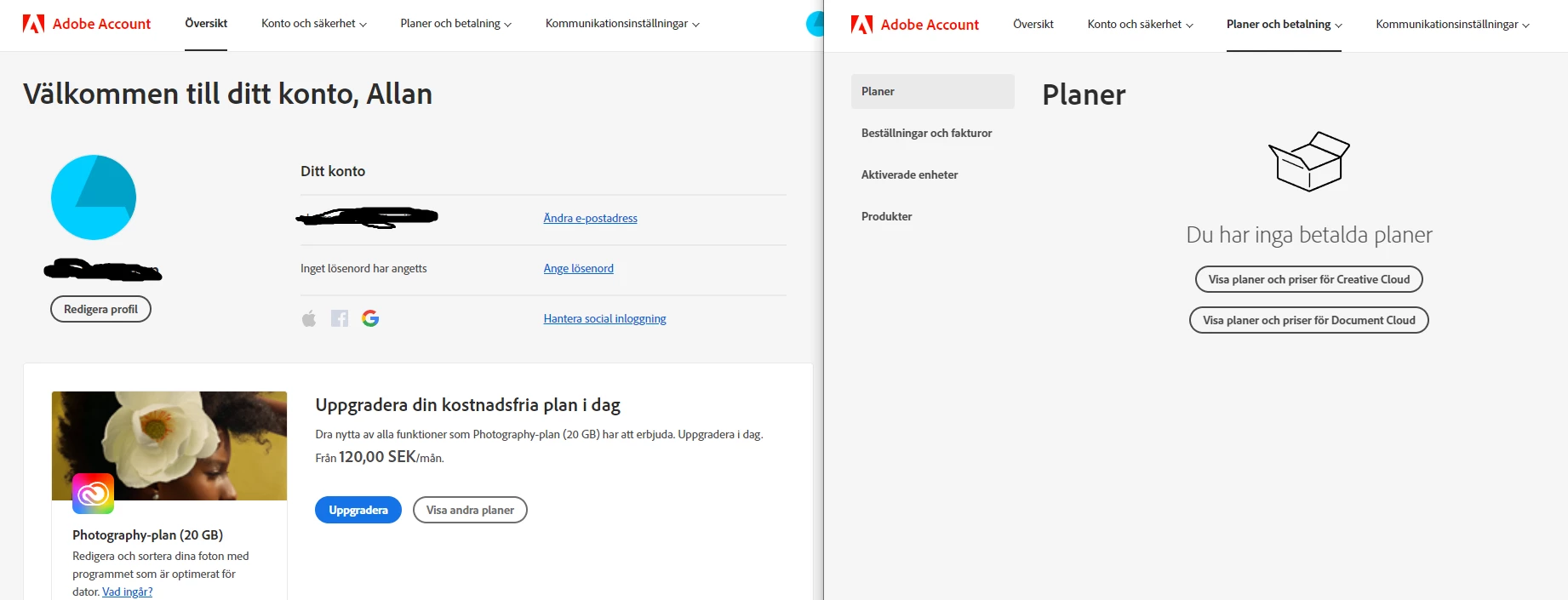
The picture i uploaded shows that i cant "manage" a plan, and the other one shows my plans, wich says " you have no payed plans".
Its in swedish, but i hope you can see the issue.


What can i do? Thank you! / Allan

This topic has been closed for replies.
Correct answer Rashmi27002770wxve

Hi there,


Happy to help!


We have checked your account and we see that you do not have any active subscription under the email address associated with the community.

Please check if you may have signed up with Adobe using an alternate email address.


Please log in to the Adobe account and you should be able to see all the active plans.

https://account.adobe.com/


For future reference, we are sharing a couple of help articles which will help you to understand how to

  • cancel a subscription
  • the cancellation terms of your subscription.


https://helpx.adobe.com/manage-account/using/cancel-subscription.html

https://helpx.adobe.com/manage-account/using/creative-cloud-subscription-terms.html#cancel


In case you are still unable to cancel the subscription with the help of the links, feel free to contact the Support team via chat for further assistance.

https://helpx.adobe.com/contact.html?rghtup=autoOpen


If you are not able to get to the chat window, then disable your adblockers, firewall, enable cookies/scripts on your browser. If it still fails then change your browser/machine/network.


Please do not share any personal/confidential information like email ID, bank details, etc here. This is a public forum.


Hope the information helped you. Have a great day!


Sincerely,

Rashmi Swain

1 reply

Rashmi27002770wxveCommunity ManagerCorrect answer
Community Manager
February 20, 2023

Hi there,


Happy to help!


We have checked your account and we see that you do not have any active subscription under the email address associated with the community.

Please check if you may have signed up with Adobe using an alternate email address.


Please log in to the Adobe account and you should be able to see all the active plans.

https://account.adobe.com/


For future reference, we are sharing a couple of help articles which will help you to understand how to

  • cancel a subscription
  • the cancellation terms of your subscription.


https://helpx.adobe.com/manage-account/using/cancel-subscription.html

https://helpx.adobe.com/manage-account/using/creative-cloud-subscription-terms.html#cancel


In case you are still unable to cancel the subscription with the help of the links, feel free to contact the Support team via chat for further assistance.

https://helpx.adobe.com/contact.html?rghtup=autoOpen


If you are not able to get to the chat window, then disable your adblockers, firewall, enable cookies/scripts on your browser. If it still fails then change your browser/machine/network.


Please do not share any personal/confidential information like email ID, bank details, etc here. This is a public forum.


Hope the information helped you. Have a great day!


Sincerely,

Rashmi Swain
Participant
February 20, 2023

Hi, first of all thank you!


I dont have any other email, and if you look at the pictures i put in my post you can see that i dont have any "acitve plans". But still when i start my Adeobe it says that i have 3 days until my trial period ends.

kglad
Community Expert
Community Expert
February 20, 2023

@Allan28492216n594, contact adobe support.  there are 3 ways to contact adobe; chat, phone and twitter:

chat:
use a browser that allows popups and cookies
and click here, https://helpx.adobe.com/contact.html?rghtup=autoOpen
in the chat field (lower right), type AGENT
be patient, it can take quite a while to reach a human.

phone:
https://helpx.adobe.com/contact/phone.html

twitter:
tweet @AdobeCare

p.s. if you're contacted by anyone (via email or private message), it's much more likely to be a scammer than an adobe representative. ie, double check for an employee badge if contacted in the forums and look for an adobe.com domain in the email address if you click reply to an email. then check again and be very suspicious. any other method of contacting (or offering to contact you) is almost certainly a scam, https://community.adobe.com/t5/using-the-community-discussions/staying-safe-in-the-adobe-support-community/td-p/12919684/redirect_from_archived_page/true