
Participant
December 15, 2023
Answered

Deactivate non-existant activation

  • December 15, 2023
  • 1 reply
  • 652 views

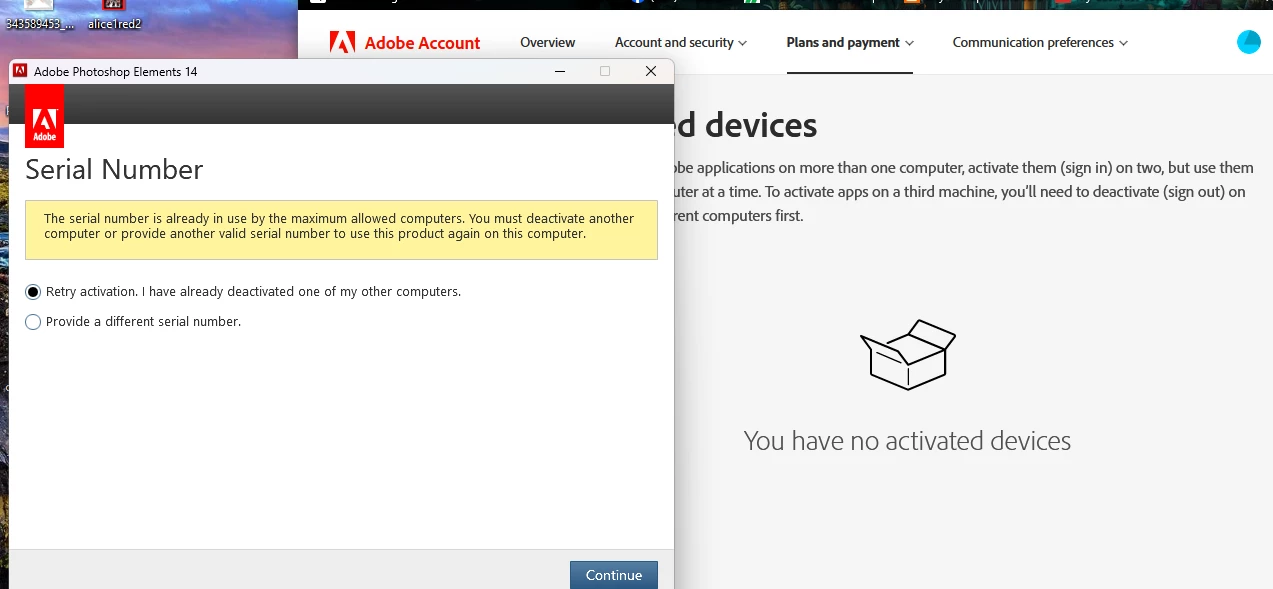
PS elements requires deactivating on computers I don't have anymore. I have 2 emails, neither shows ANY devices activated, so I can't deactivate anything. I can't get human help because according to adobe, I have no active anything on either account, but it also won't tell me how to get what it requires for me to get help. I also cannot combine the 2 accounts to streamline trying to get help.

I own the program. It is on an external hard drive specifically so I don't have to keep reinstalling.  I have a perpetual license, I do not want a subscription. I want to use my program I bought and paid for before they went to the subscribe and pay forever plan. I used it 2 days ago. Please help, or tell me how to contact an actual human who can help. Thank you.

This topic has been closed for replies.
Correct answer kglad

for others, contact adobe support and request an activation count reset.


there are 2 ways to contact adobe; chat and twitter (now x):

chat:
use a browser that allows popups and cookies
and click here, https://helpx.adobe.com/contact.html?rghtup=autoOpen
in the chat field (lower right), type AGENT
be patient, it can take quite a while to reach a human.

twitter/x:
tweet @AdobeCare

p.s. if you're contacted by anyone (via email or private message), it's much more likely to be a scammer than an adobe representative.

1 reply

Participant
December 15, 2023

I solved it. I called adobe at 18008336687 (found by google) and they fixed it. The problem was that it was not cloud based, so they can't see the active devices. The agent fxed it in 30 seconds. If have a perpetual license, call them, save yourself the eternal run around and exasperation headache.


kglad
Community Expert
kgladCommunity ExpertCorrect answer
Community Expert
December 15, 2023

for others, contact adobe support and request an activation count reset.


there are 2 ways to contact adobe; chat and twitter (now x):

chat:
use a browser that allows popups and cookies
and click here, https://helpx.adobe.com/contact.html?rghtup=autoOpen
in the chat field (lower right), type AGENT
be patient, it can take quite a while to reach a human.

twitter/x:
tweet @AdobeCare

p.s. if you're contacted by anyone (via email or private message), it's much more likely to be a scammer than an adobe representative.

Participant
November 14, 2024

Bit late to the party, but I'm having the same issue; old computer got bricked and now my CS6 is at its activation limit. Tried contacting a human via chat and the chatbot says "there are no active plans on your account" and prevents me from going further. I don't suppose Adobe Help has an email address...?