- Home
- Account, Payment, & Plan
- Discussions
- Re: Laut Konto ist mein Foto Abo bis Aug 2026 gült...
- Re: Laut Konto ist mein Foto Abo bis Aug 2026 gült...
Laut Konto ist mein Foto Abo bis Aug 2026 gültig; LRc oder PS sagen "abgelaufen"

Copy link to clipboard
Copied
Hallo zusammen,
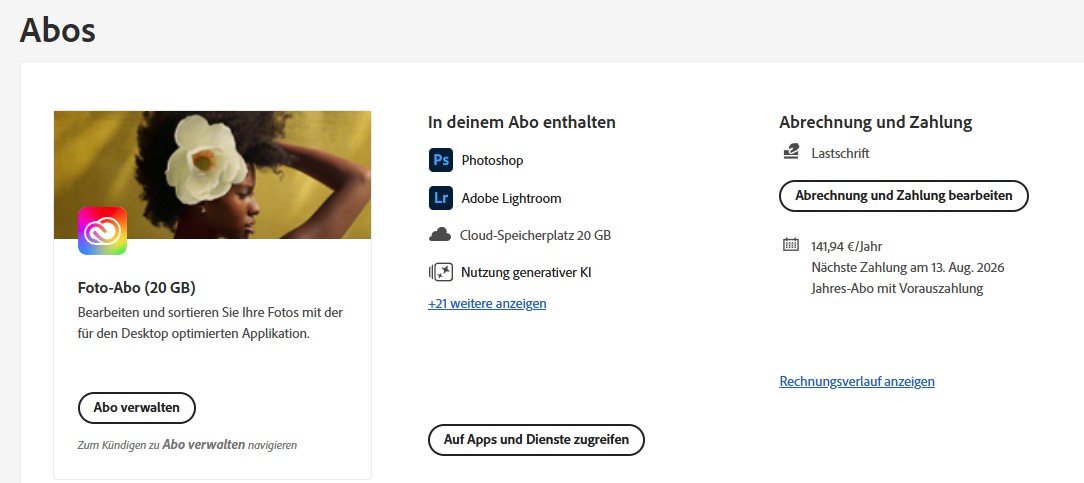
in meinem Konto steht, dass mein Foto Abo bis 13. Aug 2026 gültig ist.
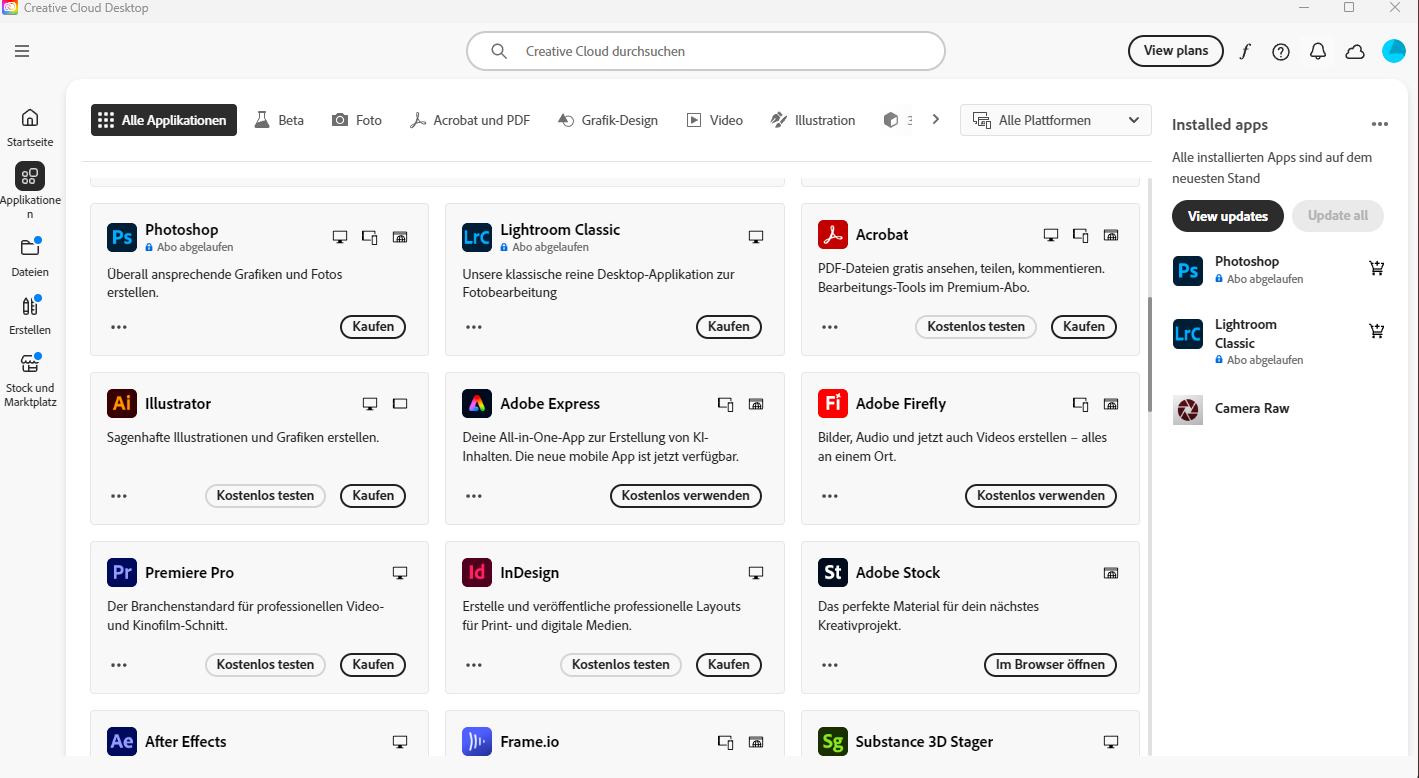
Bei den Anwendung oder in Creative Cloud steht abgelaufen.
Alle angebotenen Hilfestellungen haben nichts genützt:
1. Ab- und wieder Anmelden bei der Applikation
2. Anmelden mit einem anderen Profil: habe kein 2tes Profil; Einzeluser
3. Starten des Produkts über den Creative Cloud-Client: geht nicht, denn auch dort steht abgelaufen
4: Entfernen der Einträge zu Adobe aus der Hosts-Datei: Keine Einträge vorhanden
5: Neustart der Anmeldeinformationsverwaltung oder Sperren/Entsperren des Schlüsselbundzugriffs durch Keychain Access: Keine Wirkung
6: Entfernen der Adobe Intermediate CA- und Adobe Content-Zertifikate: Keine Wirkung
7: Entfernen der Benutzer- und Applikationszertifikate von Adobe:Keine Wirkung
8. Vollständige Deinstallation und Neuinstallation: Keine Wirkung
Da muss intern etwas schiefgelaufen sein, bitte schauen Sie einmal anch.
Vielen Dank


 9
Replies
9
9
Replies
9


Copy link to clipboard
Copied
start here - https://helpx.adobe.com/manage-account/kb/stop-creative-cloud-trial-mode-after-purchase.html
if that fails, proceed to these steps - https://helpx.adobe.com/enterprise/kb/resolve-trial-and-license-expired-errors.html
if that fails, https://helpx.adobe.com/download-install/kb/adobe-license-issues-keychain-credential-mgr.html
if those all fail, change your cc language. eg, try international english
if that fails, change the install location
Copy link to clipboard
Copied
Does'nt work on different machines, please help!
Copy link to clipboard
Copied
what's your adobe account show?
Copy link to clipboard
Copied
Copy link to clipboard
Copied
sign out and then back in to your cc desktop application using the same adobe id used to verify your subscription: http://helpx.adobe.com/creative-cloud/kb/sign-in-out-creative-cloud-desktop-app.html
Copy link to clipboard
Copied


Copy link to clipboard
Copied
Worhd, I am sorry you are unable to access your active subscription. I know how frustrating it can be to pay for something and then be blocked from using it. How many desktop computers are you using, Worhd? I reviewed the account you used to post to this public discussion forum, and I see successful recent use of the desktop applications. Please see https://adobe.ly/4lRBJJl for additional steps you can take, in addition to the helpful suggestions offered by Kglad, to allow the computer to see your active subscription. ^JW
Copy link to clipboard
Copied
Thanks for your check, your are right, I can start LRc BUT then den Screen says you have to buy an Abo and a sec later, you have already on.
After this I can work in LRc but cant use the "Developer" and "Map" modul.
This happens on
- a Win 11 Machine,
- a Win 10 Machine,
- a shortly upgraded Win 11 machine...
At the end I've tried 4 desktop maschines...and I've always worked in the limit of maschins.
I've tried all the helpful hints from Kglad already and all desktop machines are up to date.
I did'nt change anything especially not on 4 machines.cIt works fine for over 10 years.
Though this happens right around the renew day 16. Aug and Adobe Change of Plans may my Account gets corrupted?
Hint "Issues with profile": I've tried this on one machine with the same bad result .
Hint "Corrupt installation files": Though this happens on 4 different dektops/machins this can't be I have tried this yesterday without any effekt.
Sorry, nothing works.
Just to rember...it starts in my Account, there are the different Infos: ABo = active, Apps=deactiv.
So this will be the same on every desktop CC.
Copy link to clipboard
Copied
Thanks for the update, and Worhd, and I am sorry for the inconvenience. While I see you are a long-time subscriber, I don't see any support cases, Worhd. Please click on https://adobe.ly/47ktDW8 to connect directly with a member of our team who can help you investigate this situation further. You may need to use a different device to reach us if you find yourself redirected to public discussion forums or are unable to speak with anyone. ^JW


Get ready! An upgraded Adobe Community experience is coming in January.
Learn more
 AdChoices