
Participant
May 2, 2022
Question

Need to Disable two step verification to login Adobe Account

  • May 2, 2022
  • 2 replies
  • 3841 views

Hi Team,

 I would like to disable Adobe 2 step verification on my Adobe account since it asks for an OTP each time I log in which feels very uncomfortable, and I checked the setting to disable 2 step verification on the privacy and security page, but there is no option to disable it.


No buttons available to disable it :  
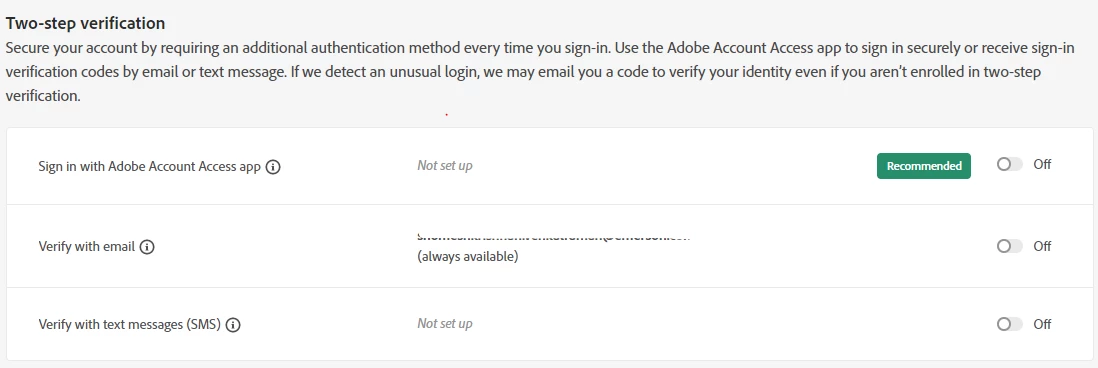
 

This topic has been closed for replies.

2 replies

Inspiring
May 3, 2022

Hi @Shomesh5F8D ,


Thank you for posting your query here.


Please Sign in to the Main Adobe website: adobe.com. Sign into your account and go to your profile and follow the following steps :  https://www.google.com/search?q=disable+2+factor+authentication+on+adobe.com&oq=disable+2+factor+authentication+on+adobe.com&aqs=chrome..69i57j69i60l2.16780j0j7&sourceid=chrome&ie=UTF-8


I hope this works.


Thanks.

Participant
May 4, 2022

Thanks @Dj_Creative_enthusiast 

Although I have tried all the above 2 suggestions, I still receive an OTP when attempting to log in. Could you please assist me with this in any way you can.

Inspiring
May 11, 2022

Hi,


Thank you for trying the steps and as you require further assistance, please contact Adobe Support Team by clicking on 

https://helpx.adobe.com/contact/support.html for chat or https://helpx.adobe.com/contact/phone.html
-click the chat icon at the bottom right of the page to open a chat session
-the chat icon looks like '3 dots inside a circle' at the lower right
-type AGENT into the chat window to connect directly to a person rather than the AI

Hope this helps. 


Thank you.

Nancy OShea
Community Expert
Community Expert
May 3, 2022

[Moderator moved from Stock Contributors to Account, Payment & Plans.]

Log-in to your Adobe account with another web device that accepts cookies and does not have script blockers.

https://account.adobe.com/security


Nancy O'Shea— Product User & Community Expert
Participant
May 3, 2022

Thanks @Nancy OShea 

I tried another web device that accepts cookies and does not block scripts, as you mentioned above.But still issue repeats.Please help on this.


Legend
May 4, 2022

Did you make the suggested changes. Or just log in?