


Participating Frequently
April 10, 2015
Answered

Acrobat DC User Interface: Way to Change Theme? (Too Bright)

  • April 10, 2015
  • 54 replies
  • 162409 views

Just installed Acrobat Pro DC -- an first thing I notice compared to my typical darker themes (Windows, Office, and even previous Adobe product versions) is that the user interface is extremely bright. It's like surfing bright webpages, and hard on the eyes.

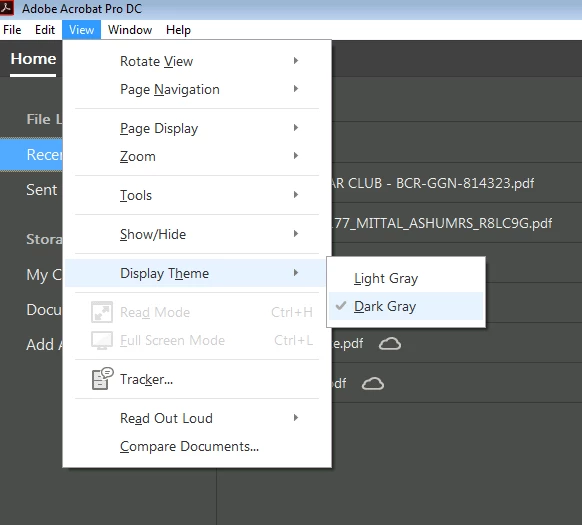
Is there any way to darken the UI (Themes, etc.) ?
This topic has been closed for replies.
Correct answer AshuMittal9644438

Hi Travis,

Acrobat DC update released today (10th May, 2016) introduces a new darker theme. Please open Acrobat DC application and go to Help > Check for updates to apply the latest update (2015.016.20039).


Next, go to View > Display Theme > Dark Gray and restart Acrobat.

More details here: What's new in Adobe Acrobat DC

Please try this out and let us know your feedback.

Thanks,

-ashu

54 replies

chrism75485596
New Participant
October 23, 2015

I second all the comments here that this new look / UI is absolutely TERRIBLE!!!!.. and how do I get the list of recent documents "page" to stop popping up after each document I close out of.

Serious failure - you took a decent interface and made it SUCK. Bad, bad, bad.

zenz49856264
New Participant
November 1, 2015

I signed up to comment just to tell your UI developers that "New look" usually means "We broke something that worked fine"..

OK Initial fury over..

Acrobat reader DC (version 2015.09.20069 installed 2 Nov 2015)

I found the following settings might help to reduce wasted white space

Press CTRL-H to enter read mode. This is a quick way to close all the extra stuff; but is not a permanent fix.

edit>preferences>general>open documents as new tabs in the same window (UNTICK) - this will put the toolbar up on the same level as "Home/tools".

edit>documents>restore last view settings when reopening documents(TICK) and Open tools pane for each document (UNTICK)

Toolbar can be customised by right clicking on it to remove un-wanted items.

You can also completely remove the Home/Tools/Toolbar by removing some of the software components; though this is a bit drastic:

https://forums.adobe.com/thread/1817184

http://cloudsurvivalguide.com/removing-cloud-adobe-reader-dc-acrobat-customization-wizard/

c.pfaffenbichler
Community Expert
November 22, 2015
"New look" usually means "We broke something that worked fine".

Good one.

Known Participant
September 12, 2015

I just sent them a feature request. Maybe if more people send them one they'll actually do something?

anotherdog
Participating Frequently
September 12, 2015

If they had concerns about customer satisfaction would they have left this broken interface in place? Nope its a Monopoly. They can serve slop now and ignore complaints.
not even a promise to look into it. I am disgusted, yet I must continue to use.

Known Participant
August 20, 2015

I can't believe this hasn't been addressed yet.

This UI is the worst I have used in a long time. Please add the option to change the colour scheme.


Adobe, it's ok to admit you made a mistake with this.

steveb40496766
New Participant
August 6, 2015

Agreed, the new contrast ratio is way too light.  for us that work on screens 8 to 16 hours each day, this is painful.

Please allow adjustments to backgrounds and toolbars

Allta Media
Community Expert
August 20, 2015

A couple of things to address points brought up earlier in this thread:

  1. The new Acrobat DC UI can respond to high-contrast modes, with new icons customized for light or dark backgrounds details at: Acrobat DC and Reader DC accessibility update « Adobe Accessibility
  2. The display state of the right-hand pane is now sticky (collapsed or open) with the July update of Acrobat DC. Details at: Acrobat Help | New features summary.
    In Reader DC, this is a preference under Edit > Preferences > Documents.
  3. You can dock/undock the heads-up display under View > Show/Hide > Page Controls.
  4. If anyone is interested, here is some background on the UI redesign titled Reimagining Acrobat: An Interview with Design Director Jamie Myrold.
aeronb11762414
New Participant
August 21, 2015

As long as a new installation of the OEM version of Acrobat DC continues to require an Adobe Account for activation, it is DEAD IN THE WATER as far as I am concerned. This is way too much hassle for my organization. And no, the volume license edition is not a solution to that problem. It costs significantly more money that the OEM version, and I am not going waste time jumping through hoops to build some kind of custom deployment template to remove the Adobe account requirement. I noticed that Dell is once again offering Acrobat XI through OEM in addition to DC. That is very telling.

aeronb11762414
New Participant
August 3, 2015

This is what happens when Adobe forces everyone to a subscription model and so many people just jump on board without fighting back. Now Adobe can just push out whatever kind of trash they want with little resistance. They are getting their subscription payments either way. In my opinion, software subscriptions kill innovation and are bad for everyone involved.

June 16, 2015

I am very disappointed to see the new GUI, but I am absolutely appalled by the lack of customization.

To be productive, I need to:

  1. Change the background color (current color is too bright)
  2. Change the menu entry color so I can read the entries
    1. Between the bright background and the light grey font, I see a lot of eyestrain and headaches in my future.
  3. Disable the Tools pane. Like most people, I work in multiple applications and I can't afford to lose the screen real estate.
    1. I keep turning it off and it keeps coming back. Shift + F4 might become my favorite command.
  4. Can't disable the floating toolbar at the bottom. Why would I want a big black bar blocking my view when I'm trying to do something?
  5. Can't change the icon size on the Tools pane. I have to scroll through the icons unless I maximize the window. Adding favorites to the Tools panel is a workaround.
    1. I guess that's why they keep shoving the Tools panel in my face. They let me customize the part of the UI I don't want...
    2. BTW, I'm actually OK with swapping out Document pane for the Tools pane. I just want to make it useable.

I'm so sick of Metro/Stupid User/Mobile GUI in desktop apps. Fork the GUI if you feel the need to be trendy. I have work to do, and my productivity takes a big hit when I rant on the forums.

I'm really glad that I'm an occasional Acrobat user, because the eyestrain is ridiculous. Maybe it is time to file an ADA complaint because they discriminate against people with vision limitations.

sdspieg
Participating Frequently
June 18, 2015

I was told by customer support that "Nishant K: Stephen, Acrobat Pro DC is the latest version in the Acrobat family. It has completely replaced the Acrobat Pro XI, so you will only get the option to install the Acrobat Pro DC." Is this true??? Because this is a WORSE UI debacle than Microsoft and Metro. Like the previous person said – I use this for work, and am now forced to use a demonstrably inferior (AND less efficient – many more clicks required to get to what you need) interface that’s not even customizable! Where is the petition to sign?

Known Participant
June 18, 2015

That is not correct. You can uninstall Acrobat DC and reinstall XI. Here's the link...  Acrobat DC uninstalled Acrobat XI | How to get Acrobat XI back

New Participant
June 16, 2015

I never reply, but this interface is so terrible i needed to post a comment here. I'm using all of adobe software day in and out for like 10hrs a day. But this UI is so terrible, within 10 minutes rolled back to XI pro!

Please Adobe, never do this again! Go shame yourself.

Known Participant
June 15, 2015

Do Adobe employees use this? Has Adobe responded to these complaints? I have long-term concerns. Are we stuck with the new terrible "My Little Pony" DC version (if we update, I rolled-back to XI)? I can't imagine Adobe employees using this.

Mickey Houlder
New Participant
June 16, 2015

ctgizmo wrote:

Do Adobe employees use this? Has Adobe responded to these complaints? I have long-term concerns. Are we stuck with the new terrible "My Little Pony" DC version (if we update, I rolled-back to XI)? I can't imagine Adobe employees using this.

I have raised this isse with Adobe via their request a feature service - suggesting that some kind of dark theme and alternative 'classic; shell feature added. This was about a month ago, not heard a single thing from them....  *Sighs. I don't know anyone who uses it everyone I speak to has rolled back.... I used to manage a software team of 12 developers and I literally have no idea how this ever passed any sort of Beta testing let along any kind of official global release.... total madness??

Participating Frequently
June 6, 2015

This update is so painfully awful!! Has made me upset more than any software as ever before. Designed by the utmost stupidity.

Does anyone know if you switch to dynamic zoom mode (so scrolling on your mouse zooms instead of scrolling), how you can switch back to normal scrolling? Because just clicking back on the icon won't do that. Why would it?

I hate you Adobe.

anotherdog
Participating Frequently
June 5, 2015

Is there a timeline on an update for DC? I cannot use it and have rolled back to XI pro. There are a couple of features that look useful, but this damned non Adobe interface just makes me shudder. Adobe; please go back to Classic Coke!


This is what happens when a race is won. Macromedia swallowed, Corel banished to the hinterlands. Adobe becomes a tyrant inflicting its whim on the design community. This interface is a prime example of the arrogance of a design team cut off from reality. Did they not roll out Betas? Fix the problem, I cannot upgrade!