


Participating Frequently
April 10, 2015
Answered

Acrobat DC User Interface: Way to Change Theme? (Too Bright)

  • April 10, 2015
  • 54 replies
  • 162409 views

Just installed Acrobat Pro DC -- an first thing I notice compared to my typical darker themes (Windows, Office, and even previous Adobe product versions) is that the user interface is extremely bright. It's like surfing bright webpages, and hard on the eyes.

Is there any way to darken the UI (Themes, etc.) ?
This topic has been closed for replies.
Correct answer AshuMittal9644438

Hi Travis,

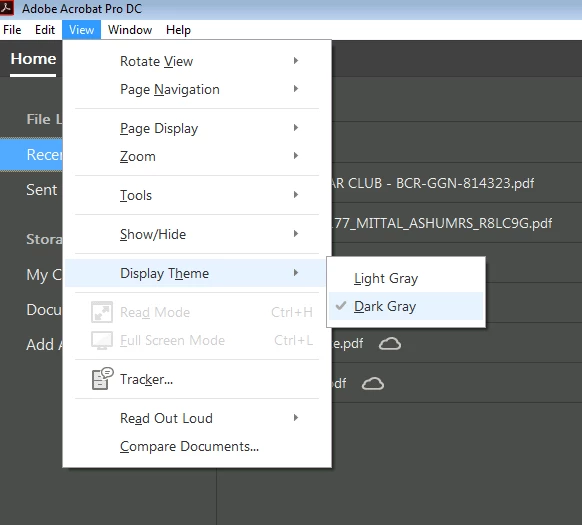
Acrobat DC update released today (10th May, 2016) introduces a new darker theme. Please open Acrobat DC application and go to Help > Check for updates to apply the latest update (2015.016.20039).


Next, go to View > Display Theme > Dark Gray and restart Acrobat.

More details here: What's new in Adobe Acrobat DC

Please try this out and let us know your feedback.

Thanks,

-ashu

54 replies

Participating Frequently
April 18, 2016

I'm coming into this discussion a year after the OP, because our office just switched to this new version.  Acrobat has been getting harder and harder to work with (hard to get rid of tool sidebars, for example), and this new version is decidedly uglier and harder to read, etc.

There are alternatives.  At home, I use PDF-XChange Editor (I can't seem to paste into this reply box, but web search will find it).  The free version does everything I need, and if you need more, there are pay versions.  (I do not work for them.)  Or do a web search for PDF editors, there are plenty out there.

Allta Media
Community Expert
May 10, 2016

Today's Acrobat DC update introduced a new dark gray UI theme (similar to the CC UI) for Acrobat DC (continuous track/subscription). You can turn it on under View > Display Theme > Dark Gray.

Dark_gray_theme.png

Adobe Employee
February 16, 2016

Hi,

Thanks for sharing your feedback on light UI.

The issue has been passed on to the engineering team and the team is working to provide a better user experience and address all the concerns shared with them.

Thanks!

c.pfaffenbichler
Community Expert
February 16, 2016

Good of you to provide feedback.

With some Adobe product teams it might be easy to imagine one is being ignored when it comes to bug reports and feature requests …

Known Participant
February 15, 2016

Come on Adobe, fix this UI.

This is now beyond a joke.

Participating Frequently
January 8, 2016

So I finally got a hold of someone at Adobe and voiced my, and most people's, concerns regarding the new UI, useless changes, and overall headache that DC has caused. The Adobe rep thanked me for alerting them of the issues we are having. I asked them why the changes were made in the first place and was told that since Adobe has a monoply in the business, they really don't care about what the customers think or feel. They said that Adobe has realized that it is pointless to invest any money in improving the product as "customers have nowhere else to go".... it actually makes sense; funding any development doesn't really increase any revenue, so it's pointless to improve the product. They are also further cutting costs by hiring brainless app developers that can't find jobs they are more qualified to do as fast food restaurants aren't hiring.

He once again thanked me for my concerns and assured me that Adobe doesn't give a flying fk what we think.

New Participant
February 10, 2016

I so agree with all the comments made here. Interface bright, ugly buttons, no customization of anything.

Please let us customize or at least give us the option of selecting the old style interface which was way superior to this.

Known Participant
December 20, 2015

Eight months on and, I dare say, many feature requests from users and this UI is still a big buttoned white mess.

Every other program in the Creative Cloud suite defaults to a darker theme which I have embraced - so why the insistence on an overly bright UI for Acrobat? Sure, make Acrobat Reader a Fisher Price Toy for the masses if you think it makes sense, but please don't patronise Acrobat Pro users.

Please fix this Adobe, enough is enough.

Known Participant
November 30, 2015

Just another user here hunting for my sunglasses before I can use Acrobat DC. This nasty looking program is such a backwards step it's hard to believe that Adobe ever passed it. It looks like a beta-layout example, not a finished product.  Do not even dare to hope that Adobe read these forums - they don't. Fill in the feature request form like I did (Feature Request/Bug Report Form), although judging by years of experience with this lazy Adobe company, none will EVER be actioned. All those fools who signed up to CC have helped Adobe become even worse, since they no longer have to do any work at all to keep their fat monthly pay checks rolling in.

c.pfaffenbichler
Community Expert
November 30, 2015
although judging by years of experience with this lazy Adobe company, none will EVER be actioned.

As for Adobe’s bug fixing history: Bugs have gotten fixed, not all bugs naturally, but some (at least with Photoshop I have observed that, but then there is a separate Forum for Photoshop bug reports and feature requests that is being monitored by Adobe personnel).

As long as the Illustrator team can boast not having fixed a known bug for more than a decade, though, it seems fairly difficult to defend Adobe’s performance in that regard.

Participating Frequently
December 8, 2015

SERIOUSLY ADOBE???

Adobe Acrobat DC????

What were you thinking?!

Focus! focus! focus!

End rant.

New Participant
November 24, 2015

How did this get passed user testing? This isn't a preference its a usability issue, the white interface dominates and distracts from the PDF I'm working on and makes it hard to focus on PDF content.

Participating Frequently
November 16, 2015

I hate you Adobe. I just hate you so much.

New Participant
November 12, 2015

I just completely uninstalled it and using my Acrobat 11 Pro. I am so not in favor (not just the color) of that whole user interface. First I looked on the forum to see if I can change the UI including where the save as etc buttons are then I gave up and uninstalled.

New Participant
November 6, 2015

Agree. The Acrobat Reader DC UI is way too bright and makes it very difficult to judge colours onscreen & to read a document as there is little to no differentiation between a white page background and the outside of the page.