
Participating Frequently
December 3, 2020
Question

Acrobat PDF / Page Transitions Not Displaying or Working / Acrobat Pro DC

  • December 3, 2020
  • 14 replies
  • 23136 views

PDF not showing transitions when in full-screen view?


====

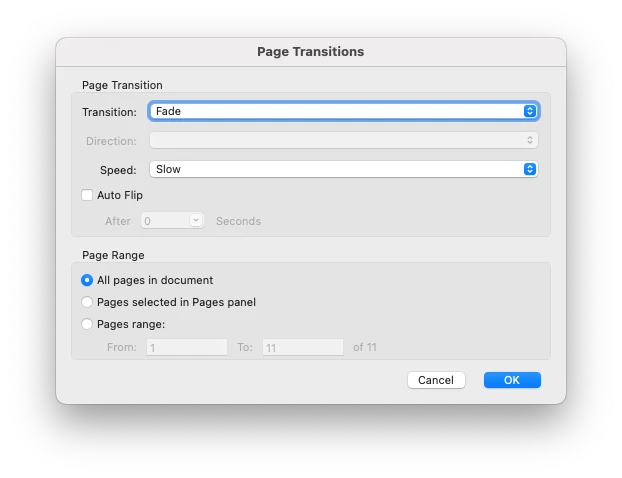
A PDF that includes page transitions of  "Fade" and "Slow" on ALL pages is no longer showing the transitions. The full screen view only jumps (like a jump-cut) to the next page, it does not do the smooth transition I normally expected.


What might I be doing wrong?
Image of the settings I nromally use and my Mac specs below.


Replies appreciated!

-- SEAN
 

Specs for me //

• OS = Big Sur 11.0.1
• Adobe Acrobat Pro DC = Continous Release 2020.013.20064
• MacBook Pro (15-inch, 2019, 2.4GHz 8-Core Intel Core i9) 32 GB 2400 MHz DDR4
• Graphics Radeon Pro 560X 4GB

14 replies

New Participant
January 5, 2025

Has this been solved? I'm still having this issue 01/05/2025

New Participant
January 7, 2025

Obviously, NO. It has not been solved. The only thing Adobe has done about it is IGNORE IT. And ignore it's users. I sent them a desktop video demonstrating the problem and never got a response. Well, they may have responded in a DM on X, but I deleted my X account. It's crazyt that you get more response from them on social media than here. What the hell is this "Community" for if not issues like this. 5 years and still not fixed. 

New Participant
June 27, 2025

End of June 2025: no page transitions even though the feature is still included. WtF? Either solve the issue or take the feature out.

e.
New Participant
December 15, 2024

This issue is still ongoing now over 4 years later. It should have been a high priority and it should have been fixed. As of 12/15/24 page transitions are not working when presenting a pdf in full screen mode (or otherwise) despite having set them correctly. This used to simply work. If Adobe considers PDFs to be a legitimate presentation tool then they should support the feature.

StudioRydo
Participating Frequently
December 16, 2024

100%! Absolutely ridiculous. 

If it isn't going to be fixed, the feature should just be removed. Total joke. 

New Participant
August 3, 2024

I've complained about this to various Adobe account on X. And just got a response on one of them that seems like an actual human. Sometimes X seems to get more notice than the community support pages do. We shall see

Participating Frequently
May 30, 2024

Come on Adobe, I send out my portfolio to clients using the PDF fade feature and would LOVE for you to fix this issue. It's been 3 years!!! 

jayar256
Participating Frequently
May 30, 2024

I've given up. Along with other problems, this takes the cake. Adobe: I quit. 
Cancelled my contract. 

Harald E Brandt
Known Participant
November 5, 2021

I have doubts that Adobe even has any intents towards solving this. Consider the following post from 2018: Interactive PDF is dead. Although that blog post has a different focus, it is easy to perceive the move away from pdf as a format for content that has some elements of "rich content". 


Page transitions is only one such simple form of rich content, but there are other things that have been neglected in pdf, such as to embed movies and audio in pdf, something that would have been a natural thing in a slideshow exported from Lightroom. You could (with considerable struggle) embed movies in pdf, but its display in Acrobat relied on Flash, which has been retired. All my slideshows that have embedded movies are now "dead" since Flash is completely abandoned in the latest macOS.


The link I gave above suggests html 5, but I simply don't want to produce slideshows as a folder with html files and a bunch of separate ("easy stealable") photo files etcetera. In addition, there is no way to make this "html folder" to automatically open in a full screen slideshow mode with no clutter. The beauty of pdf was that it was a single file, which would open in full screen with nice transitions, provided it was opened in Adobe Reader or Acrobat.


I liked the simplicity of exporting slideshows from Lightroom into self contained pdfs. I don't see a viable simple alternative right now.

jayar256
Participating Frequently
November 5, 2021

It does indeed appear that Adobe doesn't care about this. At least they should say so – something like "f**k you all, find a workaround". 

New Participant
November 5, 2021

The option is still there in preferences. If it can't be used it shouldn't be there.

StudioRydo
Participating Frequently
November 4, 2021

I've been having the same problem for a year and I went to great lengths with Adobe (in November 2020) to highlight it. Beyond frustrating to see that it still hasn't been fixed. 


They must have a pile of these cases by now … 

Known Participant
October 22, 2021

This does seem ridiculous. I just hit this bug for the first time (hadn't needed transitions). Presentation is on Monday and I have no way to make this work. Guesss I'll import into Keynote or something, but come on Adobe. This is pretty important to a lot of professional designers.

 
Dave__M
Community Expert
Community Expert
October 22, 2021

Sadly, this is not the first or only bug I'm seeing spoken of here on the forums... that are taking a very long time for resolution (hopefully).

I hope this gets fixed finally.

Dave

essgenius2
New Participant
November 2, 2021

I think I'll see if I can start a new thread because Adobe are clearly ignoring this one and/or simply don't have the answer. I am surprised though that more people aren't raising this as an issue.

New Participant
October 20, 2021

Does anyone know if there's any update on this as it all seems to have gone quiet and I am only just having this problem since my employers bought me a new MacBook Pro?

Known Participant
October 22, 2021

This does seem ridiculous. I just hit this bug for the first time (hadn't needed transitions). Presentation is on Monday and I have no way to make this work. Guesss I'll import into Keynote or something, but come on Adobe. This is pretty important to a lot of professional designers.

Known Participant
October 22, 2021

Interesting you can't delete a comment, apparently? I hit the wrong "reply" button. Sorry to post it twice.

Camilla Asra
New Participant
October 5, 2021

I was attempting to apply page transitions for a presentation I'm doing in an hour.
As it (obviously) wasn't working, I then googled it, and found this thread. So frustrating.
And we're now less than two months away from the one year anniversary of this post. How long can it possibly take to fix it Adobe?

gloofer
Participating Frequently
September 26, 2021

I'm using macOS Catalina (10.15.7) and it doesn't work in this version either. Seems to be a very tricky bug for Adobe to fix, the three year anniversary for this bug report is just a few month away 😴

gloofer
Participating Frequently
September 26, 2021

Sorry, it should be "one year anniversary" of course. Still really bad.