
Participant
July 27, 2022
Answered

Acrobat Pro 2020 and Acrobat Reader 2020 causing application fault when printing

  • July 27, 2022
  • 3 replies
  • 984 views

Both Acrobat Pro and the reader causing an application fault (event id 1000) when using the print / quick print functionality from the context menu in file explorer or from Outlook. 

After the printing the following windows keeps open:
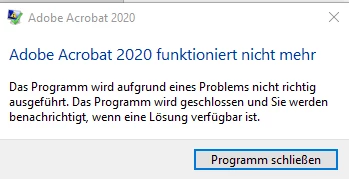
Reinstall / repair didn’t solve the problem.


System status/configuration:

W10:
Windows 10 21H2, Build 19044.1826
Edition        Windows 10 Pro for Workstations
Version        21H2


Acrobat Pro:

Outtlook:

M365 Office Application: Microsoft Outlook für Microsoft 365 MSO (Version 2205 Build 16.0.15225.20348) 64 Bit

This topic has been closed for replies.
Correct answer Amal.

Hi there


Hope you are doing well.


This issue is fixed with the recent release - version 22.2.20191. Please update the application from the help menu > check for updates and reboot the computer once.

You may also download the patch manually from the link https://www.adobe.com/devnet-docs/acrobatetk/tools/ReleaseNotesDC/index.html


Regards

Amal

3 replies

Amal.
Community Manager
Amal.Community ManagerCorrect answer
Community Manager
August 9, 2022

Hi there


Hope you are doing well.


This issue is fixed with the recent release - version 22.2.20191. Please update the application from the help menu > check for updates and reboot the computer once.

You may also download the patch manually from the link https://www.adobe.com/devnet-docs/acrobatetk/tools/ReleaseNotesDC/index.html


Regards

Amal

Silver66Author
Participant
August 10, 2022

Hi Amal,

thanks for your response. We have made a test and can confirm that the problem was fixed in Adobat Pro 2020 and Reader 2020.

Kind regards

Andreas

Participant
July 28, 2022

[P.I removed by Moderator]

Amal.
Community Manager
Community Manager
July 27, 2022

Hi there


Hope you are doing well and sorry to hear that.


Would you mind sharing the steps you are doing to quick print the PDF file? A small video recording of the steps you are doing and the issue you are experiencing will be very helpful.


Please make sure you have the recent version of the application. Go to help > Check for updates and reboot the computer once.


Please repair the installation from the help menu (Win Only) and see if that works.


You may also try to reset the Acrobat preferences as described here https://community.adobe.com/t5/acrobat-discussions/how-to-reset-acrobat-preference-settings-to-defau... and check.


Also, would you mind collecting the Adobe CC logs https://helpx.adobe.com/creative-cloud/kb/cc-log-collector.html  , procmon logs https://www.adobe.com/devnet-docs/acrobatetk/tools/Labs/acromonitor.html and share them via document cloud as described here https://helpx.adobe.com/document-cloud/help/sharing-pdfs.html so that we can isolate the issue for the fix.


Regards

Amal

Silver66Author
Participant
July 29, 2022

Thanks for getting back to me.

The deletion of the "Preferences" have solved the problem. Acobat won't cause an application fault anymore.

An empty Acrobat windows stays open after printing, but seems to be a bug which was reported multiple time in other threads.

Amal.
Community Manager
Community Manager
July 29, 2022

Hi there


Would you mind collecting the Adobe CC logs https://helpx.adobe.com/creative-cloud/kb/cc-log-collector.html  , procmon logs https://www.adobe.com/devnet-docs/acrobatetk/tools/Labs/acromonitor.html and share them via document cloud as described here https://helpx.adobe.com/document-cloud/help/sharing-pdfs.html so that we can isolate the issue for the fix.


Regards

Amal