Participant
October 11, 2023
Question

Acrobat Ruler is Off

  • October 11, 2023
  • 2 replies
  • 1941 views

I've seen this post elsewhere with no reply or replies that don't apply. My ruler in Acrobat is off. 

Clearly shows in bottom left that it's a 12" x 9" document but ruler shows it a little over 10.125".
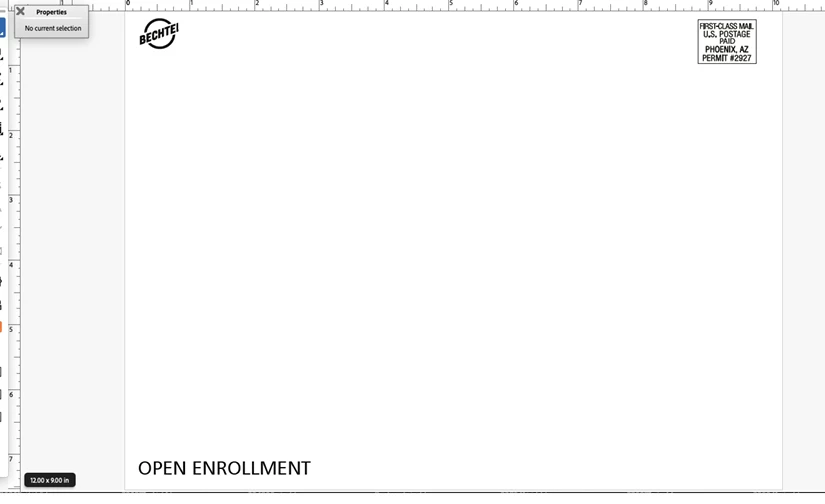



This topic has been closed for replies.

2 replies

Meenakshi Negi
Community Manager
Community Manager
October 16, 2023

Hi defaultrrv4cog2ul9l,


Thank you for reaching out.


Please let us know if this happens for all PDFs you open in Acrobat or a particular PDF.

Also, try checking the document properties. Go to Menu > Document Properties. Share the screenshot with us.

You may try repairing the installation. In Acrobat, go to Menu > Help > Repair Installation. Check if that changes anything.

Share the sample PDF with us to replicate this behavior.


Let us know how it goes. 


Thanks,

Meenakshi

Known Participant
November 7, 2023

All PDFs I currently open the rulers will report the wrong measurement.


However in the lower left corner the document size is reported correctly at the size I created the file. 


Also choosing control/command D to see file properties is listing the correct size.  But the rulers on in the acrobat interface are off by inches at times.   22x34  document shows as 19.something x 29.something.  

I read another post, https://community.adobe.com/t5/acrobat-discussions/rulers-not-reader-correct-size/m-p/14150035, that is suggesting a solution is to change my PC interface monitor scaling.  A suggestion given by one person to change their system to 110% supposedly helped the original poster of the question.   Now it is listed as a solution?   is it really?  Or is it a workaround?

I don't plan on changing my 100% PC screen scaling to get Adobe Acrobat to show rulers correctly on the document size it knows the actual size of.   Since when has that ever been necessary?   I'm certainly not choosing an arbitrary 110% scale of all things on my monitor and pc interface to make acrobat appear correct.   

I've tried reparing the acrobat install through menu/help/repair installation which was a suggestion from the community.   No improvement seen.  Does anyone know a real fix for this?

Using windows 11,  Acrobat pro version 2023.006.20360


Brad @ Roaring Mouse
Community Expert
Community Expert
November 7, 2023

First off: do you have only one monitor? Having an external monitor that has a different pixel resolution can often cause this. But even if not, because monitors are all over the map these days (hi-pitch, Retina, etc), as wella diffrent driver settings to chnage screen resolutions, Acrobat may be getting inaccurate infor as to what your resolution SHOULD be and hence your rulers will be off. Go to your Acrobat prefences under Page Display. You will see a System setting (what Acrobat thinks your resolution is based on the onfo your computer hardware is giving it) and a spot for a Custom setting. A custom setting of 110 (as mentioned before) is a good one to put in Custom. Select that, then Quit and Relaunch Acrobat to register the change, and check your rulers again.

Abambo
Community Expert
Community Expert
October 11, 2023

What are telling you the PDF properties (ctrl/cmd D)?

ABAMBO | Hard- and Software Engineer | Photographer