
Participant
August 22, 2022
Question

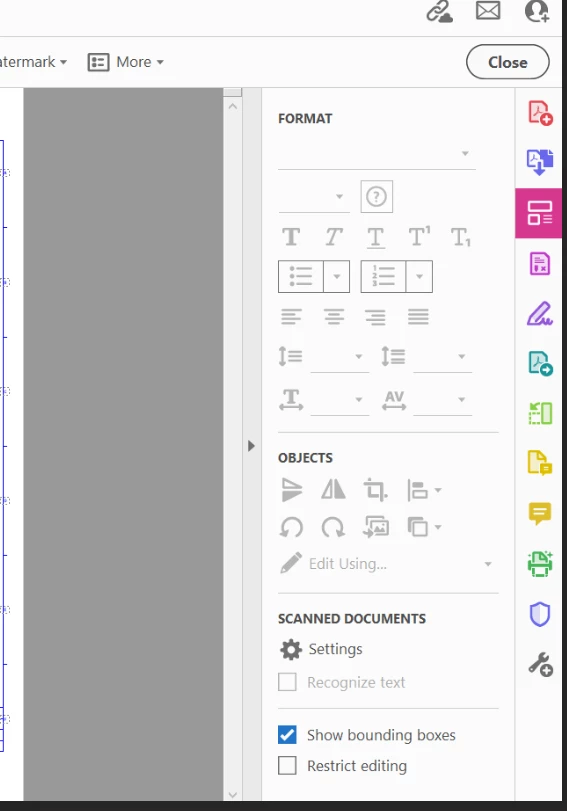
Adobe ACrobat DC Prof latest version Aug 2022 - Editing tools greyed out

  • August 22, 2022
  • 2 replies
  • 339 views

Hi,

User unable to edit.  I used to editing adobe documents in the past. 

Win 10 PC fully patched. 

Is not a licencing issue, he has logged in / out of Adobe and rebooted computer.

Any ideas anyone? 

Thansks 


This topic has been closed for replies.

2 replies

radzmar
Community Expert
Community Expert
August 22, 2022

Maybe this particular PDF doesn't contain text but an artwork or image of such?!

Amal.
Community Manager
Community Manager
August 22, 2022

Hi Edward


Hope you are doing well and sorry for the trouble.


As you have the application updated to the recent version 22.2.20191 and experiencing this issue on Win 10, please try to repair the installation from the help menu and reboot the computer and check.


Is this an issue with a particular PDF file or with all the PDFs? Please try with a different PDF file and check? If the file is stored on a shared network/drive, please download it to your computer locally and then try again.


Please try to reset the Acrobat preferences as described here https://community.adobe.com/t5/acrobat-discussions/how-to-reset-acrobat-preference-settings-to-default/td-p/4792082


You may also try to create a new test user profile with full admin rights and try using the application there and check


Regards

Amal