Participant
February 22, 2019
Answered

Adobe Acrobat Pro DC freezes for several seconds after opening a PDF - Windows 10

  • February 22, 2019
  • 53 replies
  • 106722 views

Hi Adobe Community,

Anyone have an issue with Adobe Acrobat Pro DC freezing for several seconds after opening a PDF on Windows 10. I tried uninstalling and installing as well and changing a few settings I saw suggested online like reducing the number of documents listed in the history. This problem just started today after having no issues for a long time. I didn't download, install, or update anything today.

Thanks!

This topic has been closed for replies.
Correct answer Tariq Ahmad

Hi all,

Sorry for the experience and thank you for bringing this to our notice. We appreciate your patience on this.

I would like to mention deleting Acrocef.exe is not an Adobe’s recommended solution or a workaround for this issue. Deleting the process might lead to malfunction of the various features of the product associated with the process. That being said, we are currently tracking this issue and will keep you posted. 

You may help us further by providing logs from your machine to investigate it further. For performance-related issues please follow the following steps carefully and help us with the logs:

  1. Logs from task manager:
  • Launch Adobe Acrobat Pro or Adobe Acrobat Reader.
  • Launch Task Manager, by right-clicking on the taskbar of the screen and choose Task Manager. Make sure you have the “Processes” tab available/clicked.
  • When the issue occurs right-click on Acrobat of Reader process to create dump files (screenshot attached)
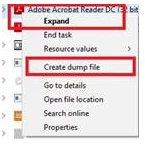
      

Step 1: Download the Procmon tool from https://docs.microsoft.com/en-us/sysinternals/downloads/procmon

Step 2: launch procmon.exe.

Step 3: Set the below filter in procmon (optional ), do the required steps/ workflow and save the logs in the end.

The process dumps along with procmon logs will help us investigate the issue in detail. Once the logs are available, please upload the log files to either ( Dropbox, OneDrive, Google Drive or any other cloud option you have) and share the public link with us via private message:

How to send a private message: https://forums.adobe.com/thread/1184148?start=0&tstart=0

Tariq Dar

53 replies

Participating Frequently
July 17, 2019

I have the same issue on a Mac with 10.13.6

No solution helps.

Acrobat is since Version 10 a horrible App. I can´t understand that adobe is program some like that. slow, unstable, wrong color representation...

Participant
June 12, 2019

I have the same issue here in the company. Several machines freeze when opening the adobe and worst than that, users click on the pdf document and adobe doesn´t open. It opens only after restarting the machine.

We are using Windows 10 with Adobe Acrobat 2019.012.20034

Any ideas?

Inspiring
June 12, 2019

andrecrodrigues.......

I may have something that can help.... these instructions were given to me by Adobe and since I deleted the file mentioned below I have not had any problems.   I am not sure how this might affect your situation  - not sure if the file affects teams that share files, but it worked for me...   See my extra notes to you in italics.

  • Take a backup of the AdobeCollabSync.exe binary file in “C:\Program Files (x86)\Adobe\Acrobat DC\Acrobat\AdobeCollabSync.exe” and then delete it from that folder. Then launch Acrobat and if it still crashes, share the dump for that as well. I deleted the .exe file and reopened Acrobat DC  - the program did not crash at all.
  • Also notice that if AdobeCollabSync process is appearing in the Task Manager still ? I checked and it was not running.
  • After above steps you can revert the AdobeCollabSync.exe file.  I did this and it crashed again so I went back and deleted the file and have not restored it since... and no issues with Acrobat DC  - Adobe was still going to try to troubleshoot to see if they could find a way to fix it so the file could remain but I have not heard back from them in about a week.  I am good with the way it works now and have noticed no disruptions so I just left things the way they are.

This may help, it is worth a shot... I am on Windows 10 with the same Acrobat DC version.

Participant
June 13, 2019

Hi Jen Wing,

I opened a case with Adobe to investigate this issue, we are facing this problem for a long time. Let´s see what they say and I will share my findings.

Participant
May 6, 2019

I have had this same issue for the last few weeks. Windows 10 Pro, v1809, Acrobat Reader DC, 2019.010.20099.

However, it's not exactly as others describe. In my case the 10sec freeze occurs about 3-5 secs after opening Acrobat Reader DC, and even if no document is loaded. So it's not about any PDF document contents, it's about the startup processes of Reader DC itself.

Disabling "Enable protected mode at startup" appears to fix it.

olivierh88006558
Participant
May 17, 2019

my issues are solved since last update version 2019.012.20034.

Not a single freeze since.

Participant
May 17, 2019

My issues are surprisingly solved as well with the newest update (v. 2019.012.20034). Thanks Adobe

Hopefully it stays like that.

olivierh88006558
Participant
May 2, 2019

None of the proposed solutions work for me except leaving Adobe open.

Sorry but this is a pain in the ass having it hanging there for nothing.

ADOBE ANYONE WORKING ON THIS ISSUE?

Your chat support just refused to take the ticket saying this was a matter to see with my entreprise IT company.

Just a disgrace.

Tbowie
Participant
May 2, 2019

I can tell you that, I have had to replace/reimage computers that have been installed to the latest and greatest Adobe Pro patch.

I am currently downgrading all of my users that are experiencing these issues with Adobe crashing multiple times and affecting Outlook etc etc.  To the Version from 2015 - patch 58 as my Adobe rep asked me to do to test it for them. 

I also was made aware, they know about the issue and are doing nothing to fix it.  They are asking their customers to do the work to fix the issue and communicate back how we got it working. 

Not a good way to operate IMO.  Customers are paying for the use of the software and getting shafted on the support.  Obviously, just look at the responses and lack of anything more than uninstall, run the cleaner and download/install again.  For most of us, we would have already done this before opening a ticket, but thanks for telling us what we already know and still not providing a solution for out 100 users.

wmp_tb
Participant
May 3, 2019

Anyone know where to get installer for older versions of Acrobat DC? Something before February 2019 because seems like that is when this issue started. (Need Subscription based)

Thanks

Inspiring
May 1, 2019

I have the same problem. Acrobat Pro freezes for several seconds when opening the program, or double clicking on a PDF file when the Acrobat isn't running.  Initially, it will run fine for the first few seconds while the profile icon is gray. But then once it turns blue, it will freeze for 5-10 seconds.

Disabling signature verification did not change anything.

I could not sign out of my Adobe account, otherwise I would have to re-register every Adobe program again.

Disabling "Sync preferences across devices and document services" did not change anything either.

Participating Frequently
May 1, 2019

Well get this.  I posted on another thread but I HAD a case open with Adobe about the Acrobat DC Pro causing the crashing.  They emailed Monday that they would get back to me soon.  This morning I get an email that they closed the case.  How do they close a case if it is not resolved.  No wonder why they haven't come up with a fix, support keeps closing the cases so the developers probably don't even know about it.  Just can't believe Adobe cares so little about customers.

TRYING AGAIN ADOBE.  ARE YOU OUT THERE?  DO YOU CARE AT ALL OR DO YOU JUST WANT OUR MONEY ANNUALLY????

Known Participant
May 1, 2019

I would suggest that anyone who's had enough with Acrobat pro DC have a gander at Bluebeam Revu. 

Participant
May 1, 2019

For the issue of PDF’s taking 2-5 mins to open up on the initial opening.

The following addressed my issue so far.

  • Open Adobe
  • Hit Control+K
  • Go to Category Security (Enhanced)
  • Deselect Run in AppContainer
  • Click Yes to the Warning Pop up window
  • Close Adobe
  • Reopen Adobe

Also implemented this fix on 3 other computers and it addressed the issue.

cglassen
Participant
April 30, 2019

This issue is enraging. Still no resolution. Earth to Adobe, can you hear us?

None of the workarounds made any difference.

Affecting two computers, both of which never had reader installed.

adaml30882080
Participant
April 24, 2019

I have turned off enhanced security and signature verification. And am still seeing the issue.

What i do notice is that the freeze happens at the exact same time that the "Provide Feedback" bubble in the top right corner of the application appears. Every time.

I am assuming that adobe is pulling system information and either passing it to the cloud. I also always see the Adobe Acrobat DC (32 bit) process have a spike in network traffic as soon as it begins responding again. Seems like it is mining your system information at a cost to overall application performance.

adaml30882080
Participant
April 24, 2019

Wait, Did a clean and reinstall and now it only freezes for a fraction of a second during login.

mohntechnology
Participant
April 23, 2019

I have the same issue. I have the newest update (19.010.20100), and have tried both disabling security and signatures. No luck. Damn annoying!

mohntechnology
Participant
April 23, 2019

By the way. It seems like the freezing is related to logging into the cloud etc. At the right upper corner of the window, this symbol is grey at first, and you can scroll in the document:

When it turns blue, the app freeze for 10 sec, and then works normally. I also notice that the messenge icon also takes a couple of seconds to load.

Please fix this ASAP!

Participant
April 16, 2019

I may have a temporary fix - this is working for me:

1) right click the desktop icon for Adobe Acrobat DC, choose "troubleshoot compatibility"

2) choose "troubleshoot program"

3) choose the 3rd option "the program opens but doesn't display correctly", click next

4) choose the 1st & 2nd option: "error message saying the program needs to run in 256....." & "error message....65536", click next

5) click "test program"

6) it will open, options menus look a little funny, but it doesn't crash.

     a) while here, go to EDIT-> preferences -> security (enhanced), un-check "Enable Enhanced Security" so it is off

7) go back to the troubleshooter, click next

8) choose: "yes, save these settings for this program"

and then it should work without crashing.... hopefully.....works for me, for now... good luck everyone

lunamarc
Participating Frequently
April 16, 2019

#5 does not come up as 'test program' but as restart. Not sure if it's a different version?

I did find a second icon and deleted that. (I file infrequently used shortcuts in a folder and now recall reinstalling as an attempt to fix so I ended up with two. Perhaps this was my personal issue? We'll see shortly.)

lunamarc
Participating Frequently
April 17, 2019

OK, my Adobe is the Pro version. That may explain why it is different. I'll have to give this a try.