

Adobe Acrobat XI will "Convert to PDF" a Word DOCX but not a DOC file from Explorer context menu
I am setting up my new computer, running Windows 10 (Version 20H2, OS Build 19042.867). Due to certain requirements, I have to use Microsoft Office Home and Student 2010 and Adobe Acrobat XI (11.0.23).
I have reinstalled Adobe Acrobat XI and applied the 11.0.23 patch and I get the same results described below. I have searched this forum, but haven't found any solutions that work. I have tried to Manually install the PDF Printer and removing some setting in the registry. Neither worked. I'm hoping someone has another solution for me to try so I can get this working.
On my old system, running the same configuration of Windows, Word and Adobe Acrobat XI, I am able to convert both DOC and DOCX files to PDF by right clicking on them in File Explorer and choosing Convert to PDF, by going to Word and choosing Create PDF from the Adobe menu in Word, or opening Adobe Acrobat and choosing Create PDF from File. Using the File Explorer option is the easiest when I am trying to convert multipe documents.
On my NEW computer, I can only convert Word documents to PDF by choosing Create PDF from the Adobe menu in Word OR by right clicking in File Explorer, but the right click option ONLY converts DOCX files. For DOC files, I do not get a Convert to PDF option.
When I try to Create PDF from File in Acrobat XI itself, DOC or DOCX files do not show up in the Open dialog box when looking at All Supported Formats. If I choose *.doc OR *.docx and then try to open a DOC or DOCX file, I get the message Acrobat could not open 'My Document.docx' because it is either not a supported file type or because the file has been damaged... This method works fine on my old computer.
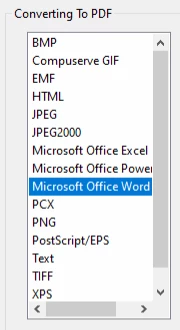
Below is what the Acrobat Edit -> Preferences -> Convert To PDF section looks like on my OLD computer. On the new computer, Word is missing from this list.
Thanks!
 AdChoices