
Davidd
Participant
May 24, 2022
Question

Adobe Reader on Mac Monterey: Zoom missing on toolbar

  • May 24, 2022
  • 1 reply
  • 1079 views

Like a lot of others, I can no longer change the Zoom via my tool bar, as the + _ and % buttons are all gone. I am not a big fan of + or -, as they are crude. I have always relied heavily and setting the percent.


I have read more than a dozen  posts here, but the recommended solutions don't show here. When I go to View>Show/Hide>Toolbar Items>Show Select & Zoom Tools, the options for the old icons are not there. Here are my only options:
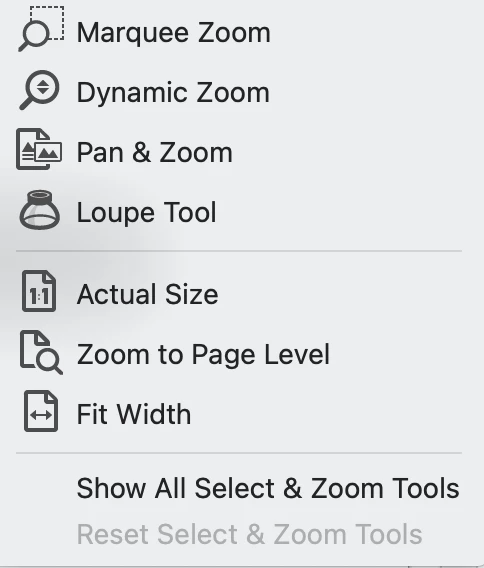
 

I have delete and uploaded Adobe Reader. I have tried going to default settings (which are already there, as I just uploaded) and rebotting. 


I know that I can access Zoom + and - view the View tab or using the Comnmand function, but I'd really like the percent tab back. Is there a way to get in on Mac?


Thanks for any help on this!


David

This topic has been closed for replies.

1 reply

Amal.
Community Manager
Community Manager
May 24, 2022

Hi there


Hope you are doing well and sorry to hear that.


Would you mind sharing the version of the Acrobat DC you are uisng? To check the version go to Help > About Acrobat and make sure you have the recent version 22.1.20112 installed. Go to Help > Check for updates and reboot the computer once.


You may also try to reset the Acrobat preferences as described here https://community.adobe.com/t5/acrobat-discussions/how-to-reset-acrobat-preference-settings-to-default/td-p/4792082


Also try to create a new test user profile with full admin rights or enable the root account in MAC and try using the application there and check.


Regards

Amal

Davidd
DaviddAuthor
Participant
May 25, 2022

Thanks for the reply. I had just removed and reloaded Reader, so it is the current version without any changes. In fact. most of the files described in the reset article don't exist. 


I did set up a new User with Admin, and Reader does have the entire set of zoom tools. So, there is something wrong with how Reader is interacting with my primary account. Thoughts on how to address this? It would be a nightmare if I had to tranfer everything saved in my account to another account. 😞


Thanks, again.

Legend
May 25, 2022

Please give the actual version number, not "latest". People don't always find they have the latest available version: we ask because details matter.


What files are missing, from those instructions? Many people make the mistake of looking in /Library/Preferences rather than ~/Library/Preferences, which the document says, because they do not know how to look in the invisible ~/Library folder.