


Participating Frequently
September 6, 2024
해결됨

Dependent Dropdown JavaScript Syntax Error

  • September 6, 2024
  • 1 답변
  • 1076 조회

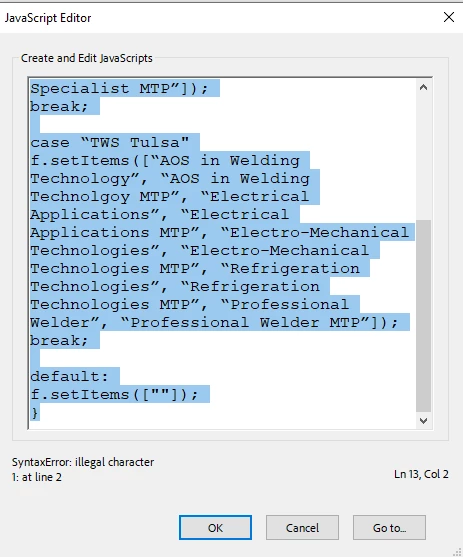
I pulled up instructions to write JavaScript to make a dependent dropdown but I keep getting a syntax error and I can't figure it out. Can someone help? I've never done this before so forgive me for missing the obvious. Thank you!

var f = this.getField(“Program”);
switch(event.value){
case “RSI - The Refrigeration School"
f.setItems([“AOS in Mechanical Maintenance Engineering”, “AOS in Mechanical Maintenance Engineering MTP”, “Electrical Applications”, “Electrical Applications MTP”, “Electro-Mechanical Technologies”, “Electro-Mechanical Technologies MTP”, “Refrigeration Technologies”, “Refrigeration Technologies MTP”, “Welding Specialist”, “Welding Specialist MTP”]);
break;

case “TWS Tulsa"
f.setItems([“AOS in Welding Technology”, “AOS in Welding Technolgoy MTP”, “Electrical Applications”, “Electrical Applications MTP”, “Electro-Mechanical Technologies”, “Electro-Mechanical Technologies MTP”, “Refrigeration Technologies”, “Refrigeration Technologies MTP”, “Professional Welder”, “Professional Welder MTP”]);
break;

default:
f.setItems([""]);
}
 

이 주제는 답변이 닫혔습니다.
최고의 답변: Nesa Nurani

@Thom Parker I'm wondering if you know if it's possible to populate a numeric formatted text field from a dropdown selection? For example if I selected 'milk' in a 'groceries' dropdown list it would populate '$2.00' in a 'Cost' number formatted text field. I tried the script below and the 'Tuition' field doesn't populate. I also tried changing to a 'Tuition2' dropdown and entering the dollar amounts as a list in options but it keeps giving me formatting errors for the number no matter what change the options to. Thank you!


var f = this.getField("Tuition");
switch(event.value){

case "Professional Welder":
f.setItems(["$18,700"]);
break;

case "Professional Welder MTP":
f.setItems(["$16,830"]);
break;

case "Welding Specialist with Pipefitting":
f.setItems(["$22,650"]);
break;

case "Welding Specialist with Pipefitting MTP":
f.setItems(["$20,385"]);
break;

case "AOS in Welding Technology":
f.setItems(["$17,500"]);
break;

case "AOS in Welding Technology MTP":
f.setItems(["$15,750"]);
break;

case "Electrical Applications":
f.setItems(["$16,900"]);
break;

case "Electrical Applications MTP":
f.setItems(["$15,210"]);
break;

case "Electro-Mechanical Technologies":
f.setItems(["$19,700"]);
break;

case "Electro-Mechanical Technologies MTP":
f.setItems(["$17,730"]);
break;

case "Refrigeration Technologies":
f.setItems(["$16,900"]);
break;

case "Refrigeration Technologies MTP":
f.setItems(["$15,210"]);
break;

case "Electrical Lineworker":
f.setItems(["$13,750"]);
break;

case "Electrical Technologies":
f.setItems(["$16,900"]);
break;

case "Electrical Technologies MTP":
f.setItems(["$15,210"]);
break;

default:
f.setItems([""]);
}


If you are populating a text field you can't use setItems(), that is for dropdown fields, instead use like this:
f.value = "$18,700";

1 답변

Thom Parker
Community Expert
Community Expert
September 6, 2024

There are two types of errors in the code.

1) Bad quotes.  In JavaScript the plain ASCII quote must be used  " instead of 

2)"Case" statements end with a ":"   Check the Core JS reference for syntax specifics.  

Here's what it should be (except I didn't fix all your quotes, you'll need to do that):


var f = this.getField("Program");
switch(event.value){
  case "RSI - The Refrigeration School":
    f.setItems(<replace quotes>);
    break;

  case "TWS Tulsa":
    f.setItems(<replace quotes>);
    break;

  default:
    f.setItems([""]);
}


Thom Parker - Software Developer at PDFScriptingUse the Acrobat JavaScript Reference early and often
Participating Frequently
September 6, 2024

@Thom Parker I would have never gotten the ASCII quotes. I really appreciate your help and explanation. Thank you!