
Exit
  • Global community
    • Language:
      • Deutsch
      • English
      • Español
      • Français
      • Português
  • 日本語コミュニティ
  • 한국 커뮤니티
3

Disable "Attach a Link" When Sending by Email?

New Here ,
Feb 19, 2020 Feb 19, 2020

I would like to permanently disable the option to "Attach a Link" when a user clicks the email button in Acrobat. It started being enabled by default, confusing my users and disrupting their workflow.


It was much better the way it used to be:

You'd click the mail envelope and Outlook would open a new message right up and have the PDF attached. Now you have to confirm your method (for us it's "Default email application (Microsoft Outlook)", and click Next. These are unnecessary steps and there should at least be an option to bypass them in Preferances. If that option is there I haven't found it.


TOPICS
General troubleshooting , How to
31.8K
Translate
Report
Community guidelines
Be kind and respectful, give credit to the original source of content, and search for duplicates before posting. Learn more
community guidelines
Community Expert ,
Feb 19, 2020 Feb 19, 2020

It's not there. You can use a script to add a button to quickly email the file without passing through all these hoops Adobe decided to add. For example, this free tool I've developed will do that: http://try67.blogspot.com/2018/10/acrobat-reader-2019-quick-file-send.html

Translate
Report
Community guidelines
Be kind and respectful, give credit to the original source of content, and search for duplicates before posting. Learn more
community guidelines
New Here ,
Apr 19, 2023 Apr 19, 2023

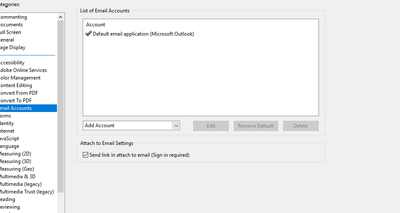
In Adobe Acrobat go to Preferences -> E-Mail Accounts -> uncheck "Send link in attach to email (Sign in required)" -> restart the application. Once you've opened it up again, the "Attach a link" will be turned off as default!

Translate
Report
Community guidelines
Be kind and respectful, give credit to the original source of content, and search for duplicates before posting. Learn more
community guidelines
New Here ,
Apr 19, 2023 Apr 19, 2023

For some reason this change won't stick for me. It works throughout a session of using Adobe, defaulting the link choice to off, but as soon as I close down and open up a new pdf the checkbox in preferences is checked again!

Translate
Report
Community guidelines
Be kind and respectful, give credit to the original source of content, and search for duplicates before posting. Learn more
community guidelines
Community Beginner ,
Apr 20, 2023 Apr 20, 2023

ME TOOOOOOOOOOOOOOOOOOOOOOOOOOOOOOOOOOOOO !!!  it's ridiculous...


Translate
Report
Community guidelines
Be kind and respectful, give credit to the original source of content, and search for duplicates before posting. Learn more
community guidelines
Community Beginner ,
Dec 23, 2023 Dec 23, 2023

open outlook, file, options, add-ins, Highlite Adobe clould ..., at the bottome clickGo, then deslect the Adobe cloud box, ok

Translate
Report
Community guidelines
Be kind and respectful, give credit to the original source of content, and search for duplicates before posting. Learn more
community guidelines
New Here ,
Dec 28, 2023 Dec 28, 2023

This worked perfectly!  Thank you so much!


Translate
Report
Community guidelines
Be kind and respectful, give credit to the original source of content, and search for duplicates before posting. Learn more
community guidelines
New Here ,
Jul 01, 2024 Jul 01, 2024

it works!!! thank you very much!!

Translate
Report
Community guidelines
Be kind and respectful, give credit to the original source of content, and search for duplicates before posting. Learn more
community guidelines
New Here ,
Jul 30, 2024 Jul 30, 2024
LATEST

Thank you so much!  This was driving me crazy.  I don't know how you knew to do that, but I am glad you did!

Translate
Report
Community guidelines
Be kind and respectful, give credit to the original source of content, and search for duplicates before posting. Learn more
community guidelines
Community Beginner ,
Apr 19, 2023 Apr 19, 2023

yup. thx.

Translate
Report
Community guidelines
Be kind and respectful, give credit to the original source of content, and search for duplicates before posting. Learn more
community guidelines
New Here ,
Apr 20, 2023 Apr 20, 2023

Thanks


Translate
Report
Community guidelines
Be kind and respectful, give credit to the original source of content, and search for duplicates before posting. Learn more
community guidelines
Community Beginner ,
Apr 20, 2023 Apr 20, 2023

EXCEPT --- everyother email pdf that you need to send, you have to go back and do this again and again and again and again and again... 


Translate
Report
Community guidelines
Be kind and respectful, give credit to the original source of content, and search for duplicates before posting. Learn more
community guidelines
New Here ,
May 02, 2023 May 02, 2023

When I go to preferences there is not an option for E-mail Accounts... does anyone know where to find this?

Translate
Report
Community guidelines
Be kind and respectful, give credit to the original source of content, and search for duplicates before posting. Learn more
community guidelines
New Here ,
May 08, 2023 May 08, 2023

Great, worked, thanks! rk

Translate
Report
Community guidelines
Be kind and respectful, give credit to the original source of content, and search for duplicates before posting. Learn more
community guidelines
New Here ,
Jun 06, 2023 Jun 06, 2023

THANK YOU - this was driving me crazy and I couldn't disable it. This worked for me!

Translate
Report
Community guidelines
Be kind and respectful, give credit to the original source of content, and search for duplicates before posting. Learn more
community guidelines
Community Beginner ,
Jun 20, 2023 Jun 20, 2023

Thank you!!!

Translate
Report
Community guidelines
Be kind and respectful, give credit to the original source of content, and search for duplicates before posting. Learn more
community guidelines
Community Beginner ,
Dec 23, 2023 Dec 23, 2023

mine is unchecked and its still there

Translate
Report
Community guidelines
Be kind and respectful, give credit to the original source of content, and search for duplicates before posting. Learn more
community guidelines
Adobe Employee ,
Apr 21, 2023 Apr 21, 2023

Hi Lindsay29491439mtzs and karenm91179990,


Thank you for reaching out.


As mentioned above, the changes revert on application relaunch.

Do you mean the settings in Preference "Send link in attach to email (Sign in required)" gets enabled automatically after relaunch ing the application?

Would you mind sharing the screen recording with us?

Share the Acrobat and OS version numbers as well.


Thanks,

Meenakshi

Translate
Report
Community guidelines
Be kind and respectful, give credit to the original source of content, and search for duplicates before posting. Learn more
community guidelines
Community Beginner ,
Apr 21, 2023 Apr 21, 2023

OS Windows 10

Acobat DC is what I use. I don't know what version it is

The box in email settings on the preferences page is what magically checks on it's own, after I have unchecked it every other time I send a PDF.


Translate
Report
Community guidelines
Be kind and respectful, give credit to the original source of content, and search for duplicates before posting. Learn more
community guidelines
Community Beginner ,
Apr 21, 2023 Apr 21, 2023

screen shot.. I turned this OFF an hour ago.... it's like polgergist !!  IT's BAAACCCCCKKKK
karenm91179990_0-1682104496527.png


Translate
Report
Community guidelines
Be kind and respectful, give credit to the original source of content, and search for duplicates before posting. Learn more
community guidelines
New Here ,
Jun 12, 2023 Jun 12, 2023

Me too. I can't get rid of it either 

Translate
Report
Community guidelines
Be kind and respectful, give credit to the original source of content, and search for duplicates before posting. Learn more
community guidelines
New Here ,
Apr 21, 2023 Apr 21, 2023

Here is a screen recording of the issue:
https://www.loom.com/share/6b053fba6979479e863e517021c0ca15


I'm using Adobe Acrobat Pro Version 2023.001.20143 on Windows 10

Translate
Report
Community guidelines
Be kind and respectful, give credit to the original source of content, and search for duplicates before posting. Learn more
community guidelines
Explorer ,
May 04, 2023 May 04, 2023

@Meenakshi Negi you've gone silent about this issue for a couple of weeks. Is this an acknowledged bug? Is there a plan to recitfy? Or is this part of the plan to try forcing everyone onto Adobe's cloud services?

Translate
Report
Community guidelines
Be kind and respectful, give credit to the original source of content, and search for duplicates before posting. Learn more
community guidelines
New Here ,
May 01, 2023 May 01, 2023

I can't get Acrobat to send attachments either... but this is on a Mac.  If I go to preferences/email, and turn off the link option, I get the dialogue to send a link or a copy... and that works... but then it never does it again.  I have to reboot the app each time I wish to send a pdf. which I use for signatures - so this is a real pita.  


Help!

Translate
Report
Community guidelines
Be kind and respectful, give credit to the original source of content, and search for duplicates before posting. Learn more
community guidelines
Community Expert ,
May 01, 2023 May 01, 2023

Old school: prepare your e-mail in the e-mail application. Drag-n-drop the Acrobat file, send.

ABAMBO | Hard- and Software Engineer | Photographer
Translate
Report
Community guidelines
Be kind and respectful, give credit to the original source of content, and search for duplicates before posting. Learn more
community guidelines

