
Participant
April 18, 2024
Answered

Fillable form won't let me type unless I right-click then tab through

  • April 18, 2024
  • 12 replies
  • 10973 views

Hello,

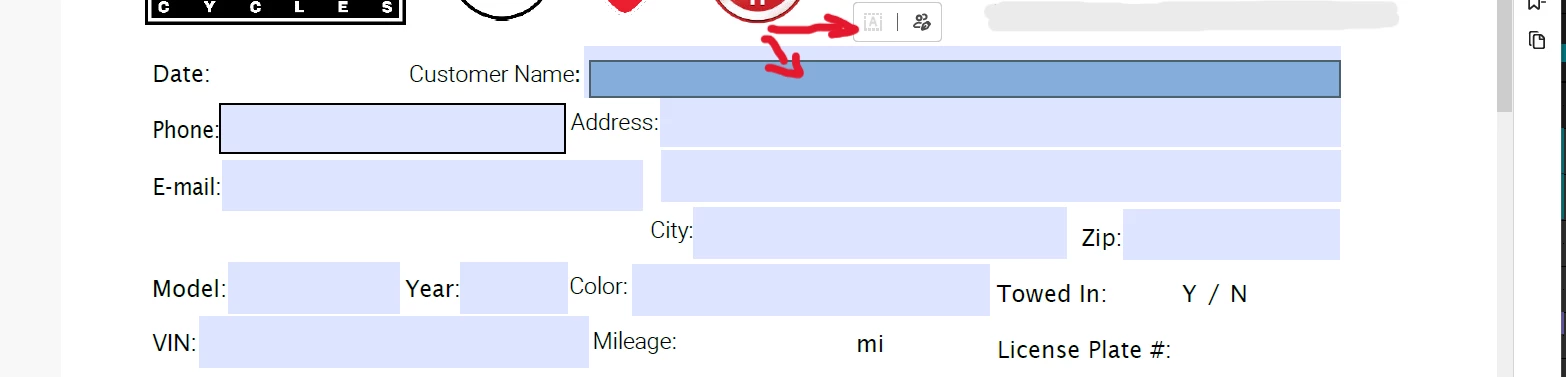
I have a fillable form that has recently stopped letting me click on the field and let me type into it. 

I have a picture attached for reference. 

It will let me click into the field and then another blue box will pop up along with a rectangle that, when you mouse over it, it has the "fill in form fields" symbol to the left and "request e-signatures" to the right. 

It already shows the "fill in form fields" symbol as being greyed out, as if I can already type into the field however, not even a cursor shows up when trying to click repeatedly in the field. 

I have found that, if I right-click in the field, it will then show the cursor with just the original field, no secondary field inside of it, and will let me type into it. 

I have checked security settings and also e-signature settings and everything looks good. 

To be clear, I am NOT looking to have e-signatures anywhere on the form and it is NOT setup for them either. 

Any help would be greatly appreciated! 
This topic has been closed for replies.
Correct answer Meenakshi_Negi

Hi All,


Thank you for your patience so far.


The issue has been resolved. Please reboot the machine and then relaunch Acrobat.

Then, wait for some time and try to fill out the forms again. 


Let us know how it goes.


Thanks,

Meenakshi


Marking a reply or response “Correct” will help future users with the same issue quickly identify the correct answer.

12 replies

Participant
April 20, 2024

I have the same problem and would like it fixed asap. I pay 11 euros for it every month and use Acrobat every day for my work. It is always the same with these updates, one makes problems. The issue needs to be resolved next week.

Amal.
Legend
April 18, 2024

Hi @SageGrimm02 


Hope you are doing well and thanks for reaching out.


This issue has already been reported to to our engineering team for review.


We will share the update as soon as we get any information.


Thanks for your understanding


~Amal

Participant
April 20, 2024

I am also experiencing the same EXACT same issue per the screen captures.

My forms are NOT set up to require E-Signatures.


Additional notes of behavior are:


In order to allow my users to click in the fields with the mouse, they must first open the e-signature panel (tool that shows in SageGrimm02 post above, then a message pops up which states "The author of this form has specified the fields which you can fill. Click on any field to start filling form."


A second menu QUICKLY pops up overlaying this one. That must be cancelled. (screenshot 1)


Once "OK" is clicked on the original pop up message, you can proceed to complete the form by click and selecting fields --- UNLESS you happen to close the E-sign menu. At that poimnt hte whole process begins again.


Please fix this soon. I have more than 25 forms created that my membership uses. No one will figure this out.

Participant
April 20, 2024

Hi, i have this issue that urgently reqiure for soultion