
Steve MacLaurin
Participant
April 9, 2015
Answered

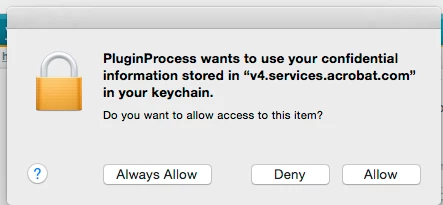
Hi, Anyone know what this means please: Plugin process wants to use confidential information stored in "v4.services.acrobat.com" in keychain?

  • April 9, 2015
  • 14 replies
  • 59481 views

Hi,

Got the above message today when exiting Safari browser. May have been coincidental.

Does anyone know what this plugin process is please? I updated to Acrobat DC two days ago and wasn't using acrobat when I got this message.
This topic has been closed for replies.
Correct answer Junius

Steve,

I just spoke w/Adobe. This dialog box and its reference to information is only for and is restricted to our personal Acrobat accounts and is not for access to or by any outside party or parties. Adobe said that, in fact, we have to "Allow" this or we will not be able to view documents that are not stored on our machines or stored in the cloud.

Hope this helps,

~ JB III

14 replies

Legend
November 30, 2017

That’s the Classic version. Maybe no update for it yet.

Legend
November 30, 2017

What exact version do you have today?

kristof46
Participating Frequently
November 30, 2017

2017.011.30068. If you want to say that this is last version (I didn't install anything) thing is worst then before. Only today I had 3 times plugin popup.

AshuMittal9644438
Adobe Employee
Adobe Employee
November 30, 2017

Hi kristof46

The patch update for Classic version is scheduled for release in the next couple of days. I will confirm as soon as it is available.

Thanks,

-ashu

krzysztofi11496945
Participant
November 8, 2017

We just can't delete it from keychain?

For now I go to keychain app and select this "v4.services.acrobat.com" (click enter) and go to allow control or something like that (I have it in other language) and check first line "allow to all application". Maybe it helps.

krzysztofi11496945
Participant
November 8, 2017

I've heard from Adobe support on FB that next update tentatively schedule for this month will bring a fix of this issue.

Participant
November 16, 2017

I've been seeing the

v4.services.acrobat.com popup dialogue about 50 times a day since updating to High Sierra.

Legend
October 24, 2017

Allen, are you sure that's the same issue?

Allen Henn
Participant
October 24, 2017

Yes, 100% like stevec54252041mentioned as well.

Legend
October 24, 2017

You are right, matches message 44. Complicated discussion.

UWSMPH-Tech
Participant
October 21, 2017

Digging into this as well, started immediately after 10.13 OS upgrade upon launch of Acrobat DC. As we have several Apple OS systems at work subject to upgrade and have now tried several suggestions at this forum, and the problem persists, finally put a call into Adobe. The Adobe Rep did state this is a documented problem no fix until the next update cycle in November. At this will hang onto our case number and see what the next update cycle from Acrobat patches.

Participating Frequently
October 16, 2017

I've just started getting this popup recently - if I enter my password and choose Alway Allow, it still pops up again the next time I open safari. Same results for Deny. Yuck.

ujvb
Participant
October 16, 2017

Same here - updated to High Sierra and this started popping up in Safari.

Participant
October 17, 2017

Same here - updated to High Sierra and this started popping up in Safari.

Participant
April 18, 2016

Is it possible this is related to "Captured Audience Platform" that Adobe chooses to implement for software use?.  When purchasing desktop version...one might still be partially captured via old plan?  

Insult to injury begins as we spend all of OUR time and OUR money trying to solve problems that are related to Adobes infrastructure.  I am bothered by the lack of value Adobe places on my time.  It's easy to prey on those who have no IT background.  Somewhat like predatory lending.  The most vulnerable consumers are those who have no understand of the particular business line.  I CHOSE to participate.  Yet I didn't know the full cost of participating with Adobe...until now.  

Participant
March 20, 2016

I have opened my keychain, and deleted the two apps that access this password. Seems to have solved it for now.

Participant
December 20, 2015

Delete "v4.service.acrobat" in keychain. Then it will not show up.

Participating Frequently
February 24, 2016

Tried deleting it in the keychain. It just comes back and then it is back to Deny spamming.

Known Participant
June 12, 2015

Update:

Adobe originally promised me a phone call after the first chat session. Yeah I didn't think that would actually happen and it didn't. In fact they waited an extra week and tried to tell me it wasn't their issue, it was Keychain and Apple's problem. I told them not to close the tick that the issue was in fact an Acrobat issue. A little over week later they just up and closed the case. I chatted again and told them to reopen it. I have spoken to Apple and they have verified that Keychain is up to date, installed properly, and functioning as it is programmed to function. This is what I added to the support ticket upon it being reopened:

First of all this case was closed rather than await my reply. The case is not withdrawn, it is not resolved and it is NOT an issue with Keychain.

I have contacted Apple and they have verified that Keychain is up to date, not corrupted and functioning exactly as programed. (Apple Case ID: *********).

Acrobat DC is calling to v4.services.acrobat.com, an Adobe Acrobat file to which it does NOT need access to function. Proof of which is that if you deny access 17-18 times the file will open and the plugin for the browser works perfectly.

The only reason that I am able to surmise that the PluginProcess (also an Adobe program) wants to access this is to take note of the files that are being opened. The identical file if saved to the local hard drive will not garner such an error. This is ONLY when accessed via the PluginProcess that is used exclusively with the browsers.

The PluginProcess Error occurs in all browsers, Safari, Firefox and Chrome. This is NOT an issue with Keychain, it is reproducible on multiple devices, and multiple people that are totally unrelated (see the thread Adobe Support quoted on June 1, 2015 below).

Closing this case rather than troubleshooting it is not a solution. Please address the issue and provide a solution that does not require access to my confidential information. It is confidential for a reason.

I look forward to your resolution.

Lets see what they say to this.

PS - part of their original solution was to refer me to this forum thread... AFTER I made my original comments. Doh!