Participating Frequently
November 2, 2018
해결됨

How can I change the position of the rulers (zero point) to the beginning of the trim box instead of the mediabox in Acrobat DC?

  • November 2, 2018
  • 1 답변
  • 4138 조회

How can I change the position of the rulers (zero point) to the beginning of the trim box instead of the mediabox in Acrobat DC?

이 주제는 답변이 닫혔습니다.
최고의 답변: Stephen Marsh

Yes, but that is the size of the mediumbox; not of the trim box.

I also implemented the script; it helps a little bit but only to the page that is visible, not the whole document and I can't leave it open for other pages to show the box sizes. I have to klick on ok before I can move to another page etc.


I was not sure if you really meant trimbox or mediabox, as you mentioned moving the zero point in say InDesign, and in InDesign the the visible document page could be the mediabox if no bleed or slug is added, or it could be the trimbox if there was bleed or slug.

Yes, the script has limitations, it was originally intended for Acrobat Reader users that don’t have all of the prepress tools found in Acrobat Pro.

I do have a solution for you that I hope you like:
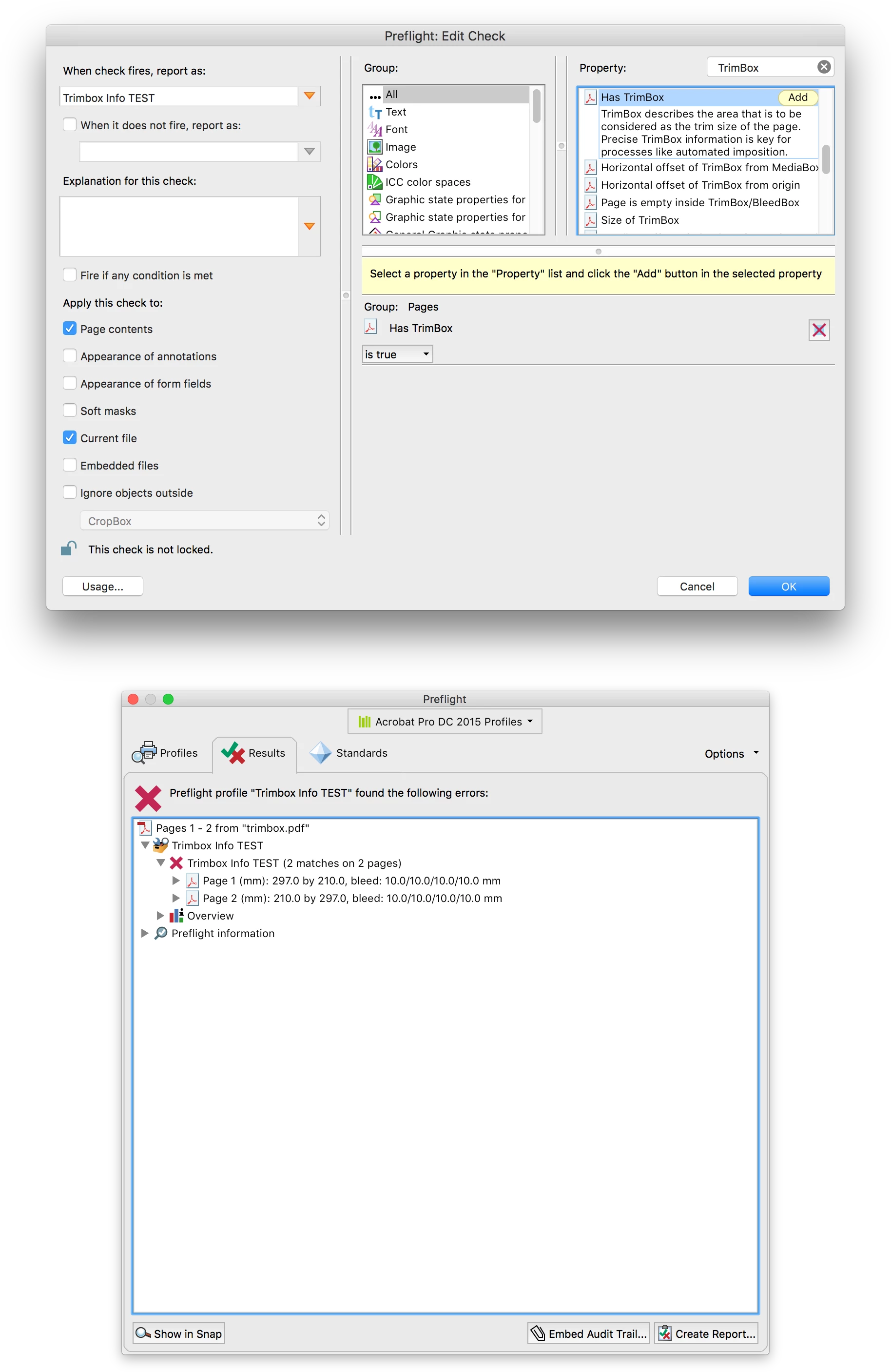
Using the print production tools > preflight > single check > options > create check it is possible to report on all of the trimbox info from multiple pages in a single floating panel.


1 답변

Dave__M
Community Expert
Community Expert
November 2, 2018

One does have a bit of control over the rulers in Preferences>Units & Guides (but not much!).

I don't know if this will help your scenario, but I hope so!  I know this will shift the Layout Grid, and that may or may help you.

My best,

Dave

jelled6788610작성자
Participating Frequently
November 6, 2018

Thanks fr your suggestion, but... There should be a button to set the offset to the beginning of the trim box... That would be much better. All other programs work this way like in InDesign or you can simply adjust the position of the rulers zero point... but not in Acrobat. This should be fixed by Adobe.

Now you have to "know" or find out the position of the trim box at each different pdf-file and alter the measurements in the preferences.

We inspect several different kind of pdf-files on a daily basis.

Abambo
Community Expert
Community Expert
November 6, 2018

Please feel free to make a request to add that feature: Feature Request/Bug Report Form .

ABAMBO | Hard- and Software Engineer | Photographer
