


Participant
November 30, 2022
해결됨

How do I move the quick actions toolbar in Acrobat Pro 2022.003.20281 on a Mac?

  • November 30, 2022
  • 64 답변들
  • 193970 조회

I'm using Acrobat Pro 2022.003.20281 on a Mac OS 12.5. In past versions I could dock the Quick Actions Toolbar to the top of the window, but in this version of Acrobat, it hovers in the upper left, sometimes covering art that I need to see when zooming in. Is there a way to dock it so it isn't hovering, or at least temporarily hide it? The attached image shows how it is "floating" above the window. I need it to not float so it doesn't cover my PDF workspace. Thanks!
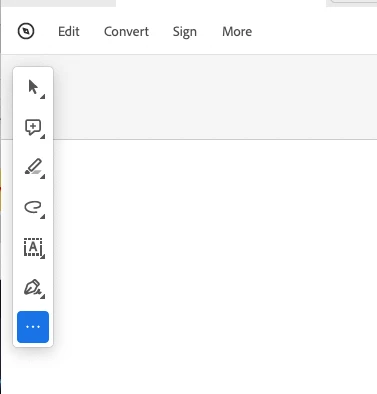
 

최고의 답변: Bevi Chagnon - PubCom.com

You can revert to the classic GUI interface by following the instructions here (for both Mac and Windows):

https://community.adobe.com/t5/acrobat-discussions/acrobat-2023-how-to-revert-to-classic-gui-user-interface/m-p/14052807


And let Adobe know your opinion at UserVoice: https://acrobat.uservoice.com/forums/590923-acrobat-for-windows-and-mac/suggestions/47082691-ditch-the-2023-user-interface-in-acrobat


64 답변

Participant
February 25, 2023

I hate that it can't be docked too. I use the zoom feature alot. Looking to maybe use something else if this can't be fixed.

Participant
February 24, 2023

Replying to document yet another user's frustration with this inflexibility.

Known Participant
February 8, 2023

Hey Adobe, are you going to fix this annoying feature? This "floating" toolbar has to be one of the useless features ever. Please let us rearrange the workspace to get this intrusive thing off of our document.

Participant
July 21, 2023

Still no other solution than to Disable New Acrobat as of today. 

Meenakshi Negi
Community Manager
Community Manager
December 1, 2022

Hi Joshua Love,


Thank you for reaching out.


This is the new User Interface behavior. Currently, we do not have any option to move the toolbar. 

We will check with the team if we can remove it or hide it when zooming in on the PDF and will update you.


We appreciate your patience.


Thanks,

Meenakshi


Participant
April 14, 2023

This is totally stupid, you're ruined a perfectly good program.  

Participant
October 5, 2023

Agreed!! They always ruin what works! Why do these companies think that they need to mess with processes that work? It's soooo frustrating!!!


job security