
Inspiring
March 3, 2023
Question

How to print coloured pages as black and white?

  • March 3, 2023
  • 2 replies
  • 11116 views

I have a PDF document with pages that are all some kind of purple. 
Am seeking a way to print it to a new PDF as black and white.
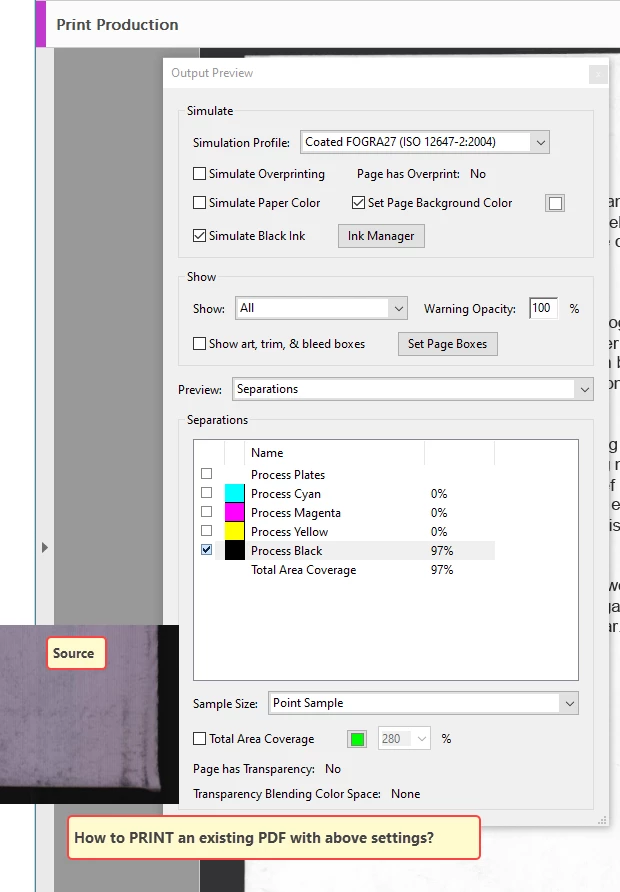
In "Print Production" > "Output Preview" I may check 'Simulate black ink' and check 'Process Black'

So far that looks fine then.

However, whilst having the Output Preview on screen, what is the   next   step?
If I close that panel (Output Preview) the settings won't stick, i.e. it changes back to purple.


Have no idea how to proceed.

Appreciate help on this.


Thanks!
 

This topic has been closed for replies.

2 replies

Amal.
Community Manager
Community Manager
March 3, 2023

Hi @adwul62 


++ Adding to the discussion


Please go to edit (Win), Adobe Acrobat (Mac) > preferences > accessibility > and change the page background to white as shown in the screenshot below:


Let us know how it goes.


Regards

Amal


Hey! Spread the word and help others by marking the correct answer so future users can benefit from your experience.

adwul62Author
Inspiring
March 3, 2023

@amal - regretfully that did not work.

@Luke Jennings3 


Just for good order's sake, this is the idea. On the left you see pages being purple
Then "Tools" > "Print Production" > "Output Preview", uncheck colours only leaving "Process Black" checked.
Result is on the right.
Now it looks fine, but as said, the next step is, how to save the document like that, or print as a new document,
or how to achieve the same in Print > Advanced?

Thanks.
p.s. note that I am not familiar with things like 'preflight profile' - I add above and below screenshot, so as to avoid misunderstandings on what I am trying to achieve.


adwul62Author
Inspiring
March 3, 2023

Your screen shot helps alot. I misunderstood your question. I still think using a preflight profile is your best option. (Tools> Print Production> Preflight> Fixups). This allows you to select a color (the purple) and map it to white, no printing necessary. It looks complicated, but is actually pretty easy. Can you upload a sample page pdf?


Thanks again. I went in there (Fixups), there are trillion options... Most options are greyed out, except custom fixups...

Have attached 2 pages from the file.
Maybe you can find a way? 
But ... if it is too complicated and/or it takes too much time, forget it.
Let's say it is 'it would be great'-thing. Otherwise - so be it.
I was merely hoping to be able to print a new PDF or save to a new PDF like the Output Preview, but that seems imposssible.
Thanks in advance for all the work!!

(Again, drop it, if it is to complicated)

ls_rbls
Community Expert
Community Expert
March 3, 2023

Hi @adwul62 ,


Please find other recommended tips in a recent discussion linked below:


adwul62Author
Inspiring
March 3, 2023

Thanks for the feedback.
I forgot to mention: I am using Acrobat Pro 2020. The file is 250 pages.
Is there no way then to print the document to a new PDF using the above settings?
That would mean that I get the right 'Output Preview' but would not be able to actually create a new PDF like output preview..?
I went back and forth in the Print > Advanced dialog. I might use grey scale but don't get the white background as like above.
Hence asking here.


Luke Jennings3
Community Expert
Community Expert
March 3, 2023

You can run a Preflight profile to map a specific color to black. Here is a link to a related discussion with instructions:

https://community.adobe.com/t5/acrobat-discussions/how-to-convert-all-text-in-a-book-from-cmyk-to-black-only/m-p/13286263#M383961

Note, I believe some printers will use cmy toner, even if the pdf is 100% black.