
Known Participant
May 4, 2020
Answered

Indicate pain areas on body chart

  • May 4, 2020
  • 8 replies
  • 20691 views

Hi, I have a medical pdf form. There are text fields, check boxes and digital signatures on the form. I have an issue with body chart, where patients required to indicate their pain areas. Please see image below and let me know what possible ways are availabe there in acrobat to complete this form?
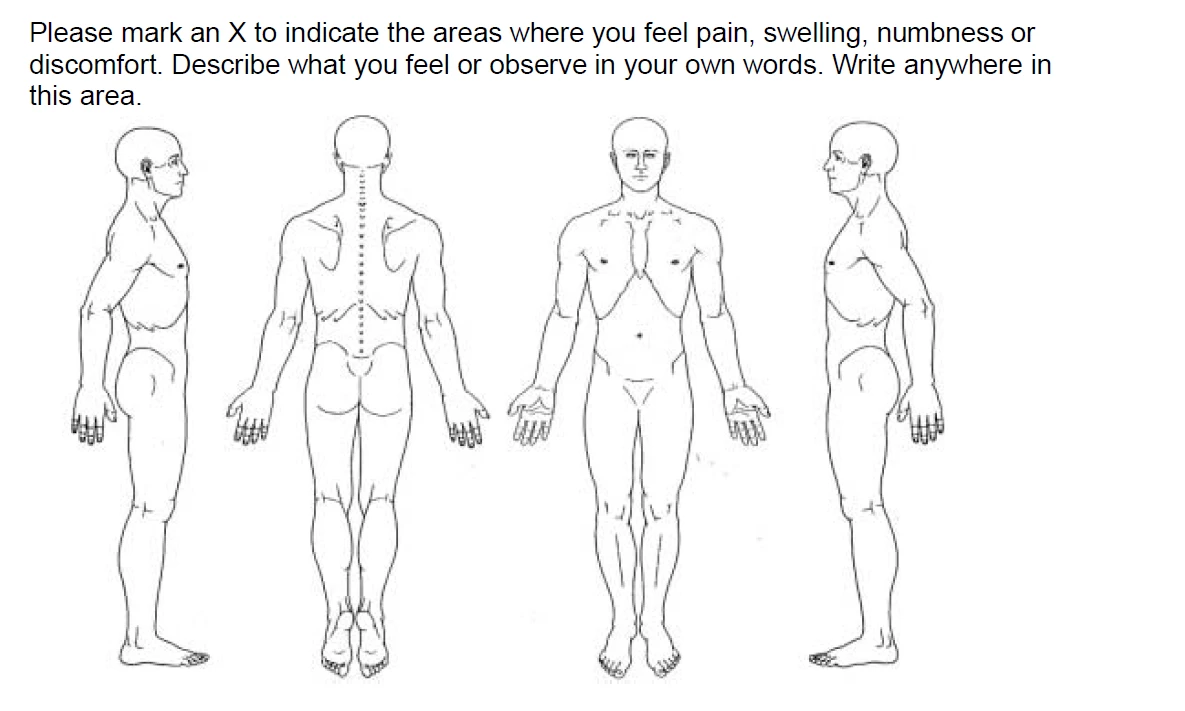
 

What are the easiet way to indicate pain areas in this body chart. 

Correct answer try67

There isn't a very easy way of doing it, but I've created something for you... You can get it here.

8 replies

New Participant
April 19, 2025

I have found that using a color coded diagram works best. Just make a legend beside the diagram that specifies what each color relates to the pain scale of 1-10. I use 4-5 colors for mine and it makes it idiot proof for all involved.

Wiggy1

JR Boulay
Community Expert
April 19, 2025

Can you share a sample file?


Acrobate du PDF, InDesigner et Photoshopographe
JR Boulay
Community Expert
February 2, 2021

Be sure to print using the "Document and stamp" or the "Document and markups" option:


Acrobate du PDF, InDesigner et Photoshopographe
Known Participant
February 2, 2021

Actually, I have added this to a form that also has fillable fields/

try67
Community Expert
February 2, 2021

That doesn't matter. Use the option JR has shown and it will print both.

Known Participant
February 2, 2021

Unfortunately, When the x's are marked on the bodies they do not print out on the forms. Is this possible to make it so the x's print out when we print the forms

Known Participant
May 5, 2020

How can we move to pencils section using javascript?

Thom Parker
Community Expert
May 6, 2020

This code activates the pencil tool:


app.execMenuItem("Annots:Tool:InkMenuItem");


This code deactivates the pecil tool:

app.execMenuItem("Hand")

Thom Parker - Software Developer at PDFScriptingUse the Acrobat JavaScript Reference early and often
JR Boulay
Community Expert
May 5, 2020

"There isn't a very easy way of doing it, but I've created something for you... You can get it here."

I also post before I have read everything 😉
It's just great!

Acrobate du PDF, InDesigner et Photoshopographe
JR Boulay
Community Expert
May 5, 2020

Can't the patients uses the Comment tools?

Pencil, square, circle…

Using JavaScript you can create a button that users clics to get the Pencil tool.

Acrobate du PDF, InDesigner et Photoshopographe
ls_rbls
Community Expert
May 5, 2020

Hey arshadsolehry,


This can be easily achieved with some basic javascripting and checkboxes.


Using checkboxes in this example is great because you can switch the check mark to an "X", place them around  all around the  diagrams, and even assist the users with tooltips that will pop when the users hover the mouse pointer over a checkbox.


You can also provide the users with more answering options using dropdown menus. 


This makes the experience of using your PDF more interactive and intuitive .


I am currently assisting another user with something similar.


You're more than welcome to join or visit this ongoing discussion to grab sadditional ideas and  how it is done:


Let me know if that link gives you the appropriate answers that you're looking for or if you need more help.


try67
try67Correct answer
Community Expert
May 5, 2020

There isn't a very easy way of doing it, but I've created something for you... You can get it here.

ls_rbls
Community Expert
May 5, 2020

Sorry try67, 


I just noticed that you posted after I submitted my reply.

try67
Community Expert
May 5, 2020

The more the merrier! And each one might have a different solution to this challenge.

I used a single button field over the entire area to add a Stamp at the point where it is clicked, and a separate button to clear all the added marks (since you can't manipulate them directly because they overlap with the main button).