
Participant
November 30, 2022
Answered

Line for area measuring tool is huge

  • November 30, 2022
  • 1 reply
  • 2512 views

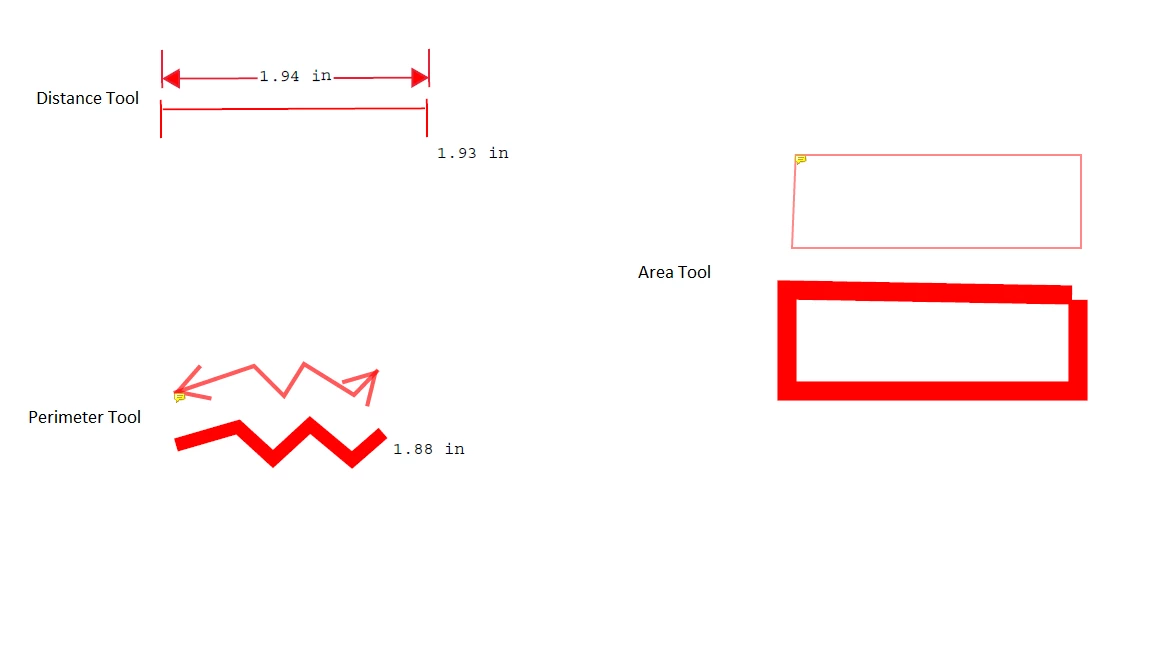
I use the measuring tool all day and while still measuring (That part is key) my line for Perimeter and Area became huge. Once I have finished it goes back to normal but trying to measure plans whith it so big is frustrating because it blocks half the plans while Im doing it and I have to readjust the points after Im finished. Any one know how to fix this?


Photo shows lines on top are finished measurments and lines on bottom are in progress ones.
 

This topic has been closed for replies.
Correct answer Amal.

Hi @CPC27374961ecue 

Hope you are doing well and sorry to hear that

I tried to reproduce the issue on my end and its working fine.

What is the version of the Acrobat DC you are using? To check the version go to Help > About Acrobat and make sure you have the recent version 22.3.20281 (Mac) or 22.3.20282 (Win) installed. Go to Help > Check for updates and reboot the computer once.

Also try to repair the installation from the help menu (Win Only) and see if that works.

Please try to reset the Acrobat preferences as described here https://community.adobe.com/t5/acrobat-discussions/how-to-reset-acrobat-preference-settings-to-default/td-p/4792082

You may also try to create a new test user profile with full admin rights in Win or enable the root account in MAC and try using the application there and check.

Regards
Amal

1 reply

Amal.
Community Manager
Amal.Community ManagerCorrect answer
Community Manager
December 1, 2022

Hi @CPC27374961ecue 

Hope you are doing well and sorry to hear that

I tried to reproduce the issue on my end and its working fine.

What is the version of the Acrobat DC you are using? To check the version go to Help > About Acrobat and make sure you have the recent version 22.3.20281 (Mac) or 22.3.20282 (Win) installed. Go to Help > Check for updates and reboot the computer once.

Also try to repair the installation from the help menu (Win Only) and see if that works.

Please try to reset the Acrobat preferences as described here https://community.adobe.com/t5/acrobat-discussions/how-to-reset-acrobat-preference-settings-to-default/td-p/4792082

You may also try to create a new test user profile with full admin rights in Win or enable the root account in MAC and try using the application there and check.

Regards
Amal

Participant
December 2, 2022

Removing the prefrences file worked. Thank you so much!